

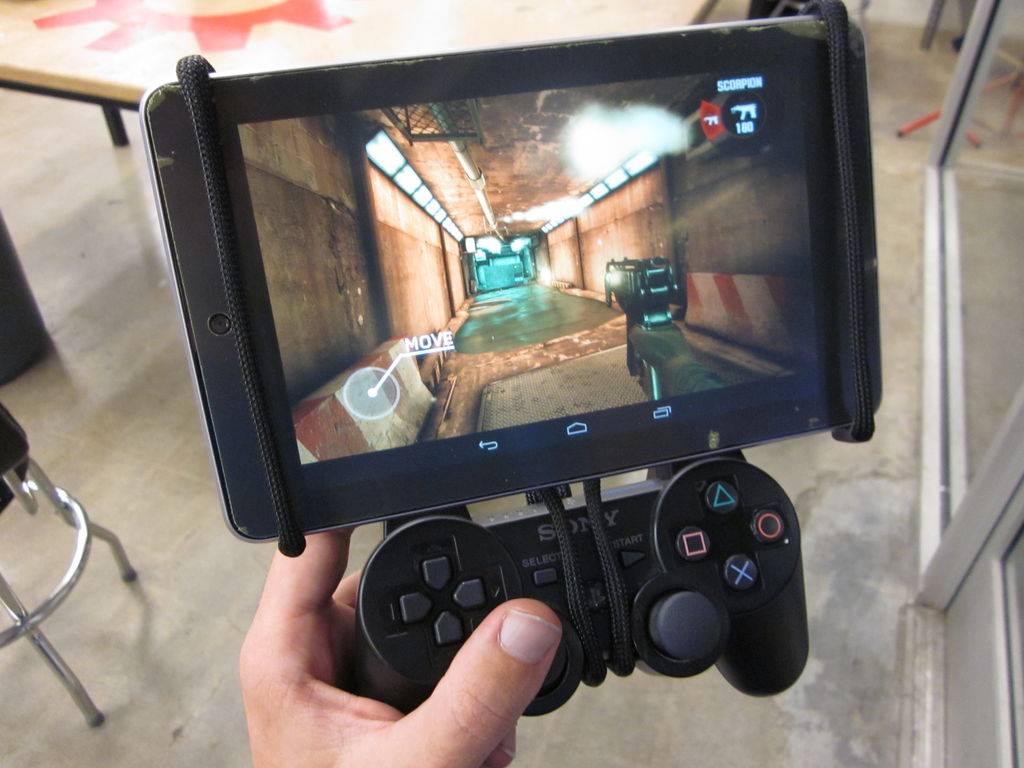
Who loves their Nexus 7 with that powerful NVIDIA quad-core processor and all those HD games but sometimes wish they had an easy way to use a game controller? There’s a few different gamepads available and Archos has their own idea in mind, but the folks from Instructables have made this awesome homemade gamepad controller and stand using a PS3/Xbox controller — and it is awesome.
What you see above is the awesome and budget friendly Google Nexus 7 tablet that many of you should already own (if not, enter our giveaway) then they use some crafty handwork and mount it right to a PS3 controller for the ultimate Android gaming experience. Awesome right?
In case you aren’t familiar with Instructables.com they show you step-by-step instructions on how to make things with their tagline “share what you make.” So after we saw this awesome Nexus 7 mod we had to share it with our readers — since we know many of you have the awesome little tablet. To make the awesome device you see above this is all you’ll need:
– Nexus 7 Tablet – $200
– PS3 / Xbox controller – $50For the Mount
– 1/8″ dia x 48″ Mild Steel Rod -$3 (OR 1/8″ dia x 48″ Copper Rod)
– 48″ of 1/8″ MDPC Expandable Tubing – Comes in packs of 20′ rolls for $7
– This is the stuff that people use to manage cables inside of computers. But you want to have a flexible tube that won’t scratch your device.– 1/8″ Heat Shrink Tubing – $2
For some grippy stuff and to clean up the ends.
So for those who already have a Nexus 7 as well as a Xbox or PS3 controller this mod will only cost you a few dollars from your nearest hardware store. Get a few vice grips, some tough muscles and you’ll be ready to enjoy Dead Trigger, Shadowgun, or even the brand new Beach Buggy Blitz with an awesome controller instead. A full set of instructions can be followed by clicking here.
[device id=2841]
[via OMGDroid]








I’m sure I won’t be the only one to say this but man is this ugly looking. I guess it doesn’t matter too much for the DIY types that like functionality over form but I know I won’t be doing this
Man I have to Agree. Plz tell me why even bother mounting the ps3 controller?. I basically have the exact same setup but with my Xoom. Connecting via Bluetooth allows the player to move around just like we do on a console without effecting that placement if. my Xoom or viewing angle. Just like in a game when you’re about to.get killed you tend jurk your hands one way or another atleast connecting via Bluetooth you don’t end up tossing your Xoom or Nexus accross the room.
Casperi
I did this last year, but with a bluetooth keyboard. I now have a flippable DS-like version. I’ll be getting a Dualshock 3 soon.
http://www.youtube.com/watch?v=4U9TpgI1EG8
Paint it black, use an xbox controller and maybe we got a deal?
When you can be creative it’s better than be a hater, be a hater when all hope are lost.