

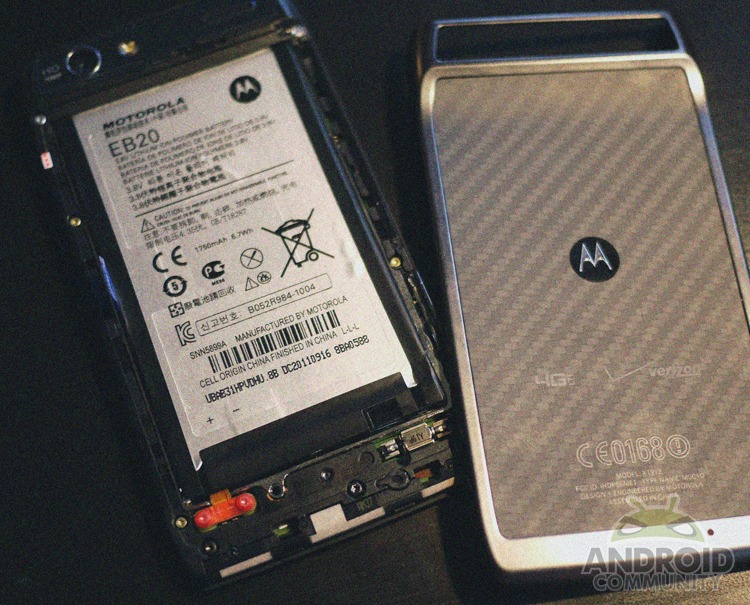
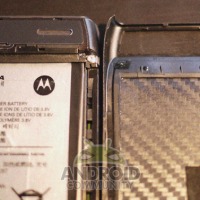
When the new Motorola DROID RAZR was first announced we all quickly learned that the battery was not removable. The back of the device was attached for good, making users unable to remove or swap the battery should they choose. This isn’t a huge issue but many weren’t happy to hear the news. Not to mention the modding and dev community relies on battery pulls somewhat often — I’ve had a few of those moments myself. Lucky for us a loyal reader has just received his shiny new DROID RAZR and tore it down himself to find that the back actually does come off, it just takes a little effort.
We have plenty of photos in the gallery below but in case you missed it the RAZR also received the iFixIt teardown treatment this morning. Sort of revealing what we now have pictures of ourselves. Only they imply you need a machete (or a Dozuki) to open the smartphone while our tipster only used his fingernail and a little bit of arm strength.
Have a look at some notes on how our tipster was able to pop the back off of his/her RAZR with just a bit of effort:
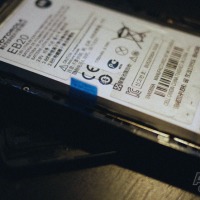
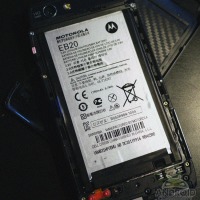
“Hi, I saw that there was an area along the top of the phone where my fingernail could fit, so I wondered if I could actually take the back off, and yes it did come off after just a bit of careful pulling around each of the edges. There are snaps along the whole perimeter as well as glue across most of the battery inside connecting it to the back panel, so you’ve got to be careful since I’m not 100% sure if any part of the back would break if you bend it too much. The back is bendable though, and the Kevlar seems to keep it shape no matter how much you bend it.
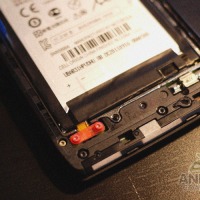
The battery underneath is taped in with electrical tape and has a plastic piece over the connector to the phone, so I don’t dare go further than this, but just so you guys know, the battery could be taken out if you really wanted to…” – Figglsticks45
In other words, it appears Motorola really doesn’t want us inside this RAZR thin phone. Our source here notes that they’ve glued the back on quite well and it took more than a few tries to get the Kevlar coated device apart. Once inside, you’ll notice the battery cover actually has rivets or snaps and will nicely click back into place just as any other battery cover. Only they’d rather users not try, apparently, as they’ve been clear in more ways than one that getting into this device will result in a warranty break by you. We didn’t see any VOID if removed stickers on the inside, but the manual had a few. We aren’t going to encourage our readers to try this but sometimes you must do what needs to be done, right?
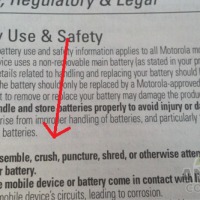
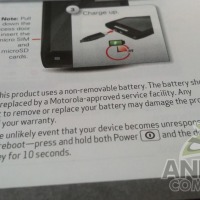








Slide 8 is telling you not to disassemble the battery itself, not the phone. reading: it’s fundamental.
worth reading slide 9 as well champ.
“Should” and “may” are not legally absolute terms. If you can do it without messing your phone, and your phone later craps out but not due to anything you did with the battery, then you are ok.
Actually, “should” is, in fact, a legal term of art and usually means that something is mandatory. A normal english speaker should read it in contacts as “must”.
http://legal-dictionary.thefreedictionary.com/should
But whats the point if you cant buy another battery??????
I’m sure you can somewhere eventually.. but yea idk
I guess the question is: ‘is this a viable option unless you can buy a better quality battery that will fit into the same space?’
It doesnt say anything about removing the battery it only says do not modify the battery. removing and replacing is not modding the battery but more of modding the phone if you could even call it that. (just as gill said)
I am sure there will be a company out there that you will be able to send your Razr to for a battery replacement, hell even Moto may offer such a service down the road for a pretty penny.
Other world computing an awesome site for mac owners, offers battery replacements for all the iPod lines and the original iphone and iphone 3G models. so your “non replaceable battery”
can indeed be replaced. Patience every one. “You cant always get what you want, but if you try some time you might find you get what you need”
if moto doesn’t want anyone breaking into the back then i assume they don’t sell spare batteries?
and if they don’t sell spare batteries then they don’t sell stand alone chargers?
and if there’s no stand alone charger then what’s the point of having a spare battery if you have to pop the spare battery into the phone to charge it.
this is pure poop
so is there a possibility of an extended battery now?
I just did this recently….thought I was the first. Shoulda known better…lol.
Its not hard to remove it. Once you get a fingernail in somewhere just work the rest off. I alwasy start with the side with the power and volume buttons. Seems easier to start there on my phone. Or the top. But I always leave the side with the sim card last.
And once the Droid 4 comes out…..IF it has the same size battery….there you go. Seidio will be all over that. But…I’m going the external battery option. iTrent makes a smallish one with 9,000 and 11,00 mAh’s. That cannot be beat when its the same price as my 2800 mAh one for the Droid 1.
I just did this recently….thought I was the first. Shoulda known better…lol.
Its not hard to remove it. Once you get a fingernail in somewhere just work the rest off. I alwasy start with the side with the power and volume buttons. Seems easier to start there on my phone. Or the top. But I always leave the side with the sim card last.
And once the Droid 4 comes out…..IF it has the same size battery….there you go. Seidio will be all over that. But…I’m going the external battery option. iTrent makes a smallish one with 9,000 and 11,00 mAh’s. That cannot be beat when its the same price as my 2800 mAh one for the Droid 1.
I have to pop the battery out of my Droid X every other day just to keep it running smoothly. The older a smart phone gets, the more often you have to pull the battery to do a hard reset. If i get the Razr, how am i supposed to do that without voiding the warranty?
Verizon rep told me powering down the phone, removing the sim card and reinserting the sim card, is akin to removing the battery. If that does not fix the problem, the next step was to do a soft reset which was to hit the power and volume button simultaneously. I did not have to go this far but the Verizon rep did assure me that all my data and apps would still be there. The hard reset would take the phone back to it’s original state.
Such a helpful comment. I don’t know why, but the screen went black but the buttons were still lit on my Droid Razr. So I did the soft reset and its back and healthy 🙂
I’ve had the motorola razor for a month now I never had any problems. Never had to hard boot or reset the phone once. Battery life is the best battery life on the market right now. I am happy happy happy
you won’t, you pull the razor battery, the ribbon will tear and your phone is useless, can’t even put a new battery in it. I ruined a razor maxi and a normal razor to learn that lesson. but honestly you won’t have those problems with the razor but DONT think you can upgrade, replace, or remove the battery cause you cannot and just taking off the back casing thats glued voids warranty cause its then no longer water proof/resistant. if you want a really great batter buy the maxi, that will give you 1 day non stop activity or 2 days normal
If u do take the back off this phone do not just pull the battery out, the orange strip that u see at the bottom the battery is tearable and if u do tear it like I did then Ur phone will no longer turn on because Ur battery will no longer be connected
idid the same thing.
me too *uck
Me to, but I am making a custom tool to really
over the screws and having a printed circuit board Assembly shop repair the cable
i popped out the battery and now it wont turn back on. I dont know what to do.! Should i just turn it back in?
@Brandon, were you able to repair the broken connection?
Here is the deal, BOTTOM LINE, these phones RAZR 4g and MAXX by Motorola are SEALED, with non removable batteries for 1 main reason. It is Glued and Sealed for WATER RESISTANCE. So if you think you’ll need an extra batt in a days time, or use it 24 hours a day like I do, for business, movie watching on netflix, the works! I would advise just getting the MAXX, it’ll be worth it in long run if you can afford it. Next no matter what you remove you void the warranty because of the water resistant feature. Plus it makes it solid combined with that kevlar back its very strong, secure, and GLUED like hell for water resistance. thats also why sim card etc is in side not in back. SO DONT TAKE OFF BACK!!!
any questions or want a brand new special edition white one , email me at austin.cates@gmail.com or just call me (Austin) @jroc74:disqus 423-710-6658. or email me and ill call you.
its a 32 gb white razor, never opened. comes with cases and chargers car, and house. And all sorts of other stuff is available.
have a great one guys! hope that info helps. cause you’ll pay $100 to fix it and thats only if you have insurance.
mine went dead and now it wont turn on.. how do you reset the phone if you cant take battery out ? the white charge light turns on.. but thats all it’s doing :{
press and hold the power button and volume down key at the same time. It will restart about 10 seconds
worked for me too
thanks my droid razr m just froze and i didn’t know how to restart it
WORKED N THANX KIM POH
Thanks dude!! u actually saved my life.. my phone froze too u saved it!! thanks a ton!!
Thank you, thank you, thank you! Worked for me also. Was starting to get a “little stressed”!!!
Thank you very much! 🙂
My droid razr is froze.. how do i get it to turn off then back on?
hold the volume- and power button at the same time until the phone resets
Thanks a lot 🙂 🙂 🙂 <3
So expensive mistake on my part.Took the battery out, only to discover the little connector from the batter to the phone severed the orange cord in 2~! I took it to Verizon, and explained that my phone had froze, and I took the battery out, of course they explained that voided the warrenty, and for $500 I could send it up for repair, or for $199 I could buy a new phone and add a line for $9.99 since I didn’t have any upgrades left. So I coughed up the $199 for the new phone and it looks like my 1st grader will be using our old phone for $9.99 a month~!! NOTE TO SELF, DO NOT EVER TAKE THE BATTERY OUT! Not unless you have some techy tools to do it, and aren’t afraid of maybe slicing the wires. I have learned my lesson…if it freezes, make Verizon fix it…
I had to go overseas on a family emergency and Verizon assured me that my razr would be working fine here … I tried to charge it thru the USB port on my laptop … a white steady light came on at the top (where the notifications come in) and it won’t turn back on! I did the ‘soft reset’ (on & volume) and was thrilled that it came on … but before it was fully up, it turned back off and hasn’t been back on since 🙁 … I have to wait until I get back to get it fixed! Not happy right now!!
does you phone still work when it did that because mine just did it
thank you liaw kim poh your comments work for me you just save me a lot …..
just took apart my razr since it got dropped in water. I would assume the warranty sticker is the triple red X top left side.
I dropped my phone in the toilet a couple days ago, i immediately put it in rice without taking it apart of course. i attempted to power up the phone today with no avail. But i noticed the green light battery charger indicator did come on when i tried to charge it. Do you suggest i let it dry some more in the rice or should i give up?
Try putting it in all purpose flour I did the same thing
Ohh nooo my battery got spoil and how may i replace it
is mine any good after taking out battery
Where can you purchase a case for your Motorola Droid? The glass on mine is fractured.
swingdancerman@yahoo.com