

• Home
  • Reviews
  • Featured
  • Archives
  • Videos
  • Devices
  • Send Tips
  • Contact
  • AndroidCommunity on Twitter AndroidCommunity on Facebook AndroidCommunity on Google+ AndroidCommunity RSS Feed

Android Community

    • MUST READ

      STORIES

    • HTC Butterfly S official: UltraPixel Camera, BoomSound, 5-inch display

      June 19, 2013

    • Android 5.0 ‘Key Lime Pie’ Concept Design has us dreaming for the future

      June 18, 2013

    • Huawei Ascend P6 official as world’s thinnest smartphone

      June 18, 2013

  • Trending Topics
  • Jelly Bean
  • NVIDIA
  • Galaxy S 4
  • HTC One
  • Nexus 7
  • Tegra
  • Sell Your Used Phone

Ice Cream Sandwich tablet UI ported to Samsung Galaxy Note

5
  • By Michael Crider
  • on 8 Apr, 2012

Ice Cream Sandwich tablet UI ported to Samsung Galaxy Note

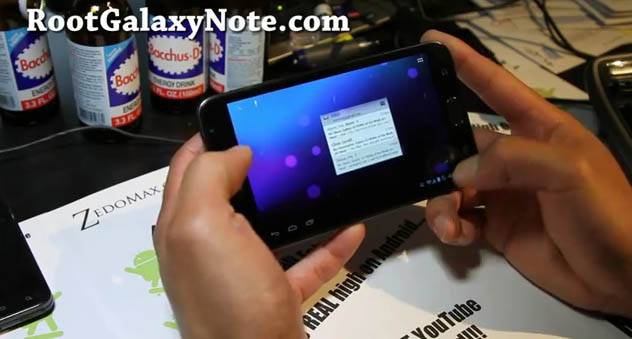
We’ve seen the ubiquitous Galaxy Nexus get a mod that enables the user interface from the tablet flavor of Ice Cream Sandwich, but now it’s come to something a little more useful. A user from RootGalaxyNote.com posted a video of Samsung’s super-sized smartphone running in tablet mode. Obviously the 5.3-inch Samsung Galaxy Note has a lot more reason to run a tablet modification than its smaller brothers. You can download the “imilka” custom tablet ROM here.

The modification allows the Note to run as a full tablet – there’s literally no difference between the software on the phone an a build of the Android Open Source Project code on an Ice Cream Sandwich tablet, with the obvious exception of the virtual pixel density. he interface is a little cramped on the Galaxy Note, but not so much that the average user won’t be able to get around. Of course you can always pull out the S-Pen for some pen-based computing. The modified user interface allows for panels and multi-column views in the apps that support them, including most of Google’s essential apps.

Unfortunately the tablet mode is contained within its own ROM at the moment – there’s no way to apply this to a stock Ice Cream Sandwich build. It’s also limited to the i7000, the international GSM version of the Galaxy Note. But given that this little trick has already been performed on the Galaxy Nexus, it should come in a more generic form (and for more devices) sooner rather than later.

Story Timeline

  • Samsung previews S-Pen "Premium Suite" apps and Android 4.0 on Galaxy Note
  • Peter the elephant loves the Samsung Galaxy Note - naturally
  • AT&T's Galaxy S II gets CM9 nightlies, Galaxy Note and Skyrocket are next
  • Samsung Galaxy Note sells 5 million worldwide
  • AT&T Galaxy Note gets its own leaked Ice Cream Sandwich ROM
  • AT&T Galaxy Note Android 4.0 ICS hands-on
[device id=1438]
Share
  • Android 5.0 'Key Lime Pie' Concept Design has us dreaming for the future
  • Qualcomm Snapdragon 800 series quad-core benchmarks: This thing is fast
  • Minuum Keyboard ready for beta testing - aims to change how we type

Tags: Custom ROMIce Cream SandwichSamsungSamsung Galaxy Note

  • Gareth

    I have the ICS stunner ROM and this allows me to switch between tablet and phone modes.

  • Anthony

    you just change the dpi nbd… anything 160 or lower triggers tablet ui mode. i can make my tablet have phone ui if i want…

  • http://profile.yahoo.com/3QSFISERREJMY6BUVQMY5GTMSY Wallace

    my friend’s aünt makes $83/hr on the laptõp. She has been firèd from work for six months but last month her pay was $15031 just workïng on the laptop for a few hours. Read more on this web site LâzýÇãsh5.Çom

  • Sejal Malik

    Toshiba’s three new Excite Android 4.0 tablets offering upto 13 hours battery life  life http://www.techdiscussion.in/index.php?topic=682.0

  • http://www.facebook.com/profile.php?id=100000421670129 Nico Anton

    Tablet mode doesn’t have to look this ugly with all the icons in the center of the screen and no it’s not only for this ROM but for all AOSP/AOKP ICS Roms on both Galaxy Notes.

  • Search

  • REVIEWS

    • Sony Xperia ZL ReviewSony Xperia ZL Review
    • GALAXY S 4 Tech21 Impact Mesh case reviewGALAXY S 4 Tech21 Impact Mesh case review
    • AT&T LG Optimus G Pro ReviewAT&T LG Optimus G Pro Review
    • Iron Man 3 game Review: what you need to knowIron Man 3 game Review: what you need to know
    • Samsung GALAXY S 4 ReviewSamsung GALAXY S 4 Review
  • HANDS-ON & QUICK LOOKS

    • Qualcomm Snapdragon 800 series developer platform first lookQualcomm Snapdragon 800 series developer platform first look
    • Huawei Ascend P6 “Beauty Shot” hands-on demo shows smooth-skin oddityHuawei Ascend P6 “Beauty Shot” hands-on demo shows smooth-skin oddity
    • Huawei Ascend P6 hands-onHuawei Ascend P6 hands-on


  • T-Mobile G1 Accessories
  • RECENT COMMENTS

  • About
  • Contact
  • Terms of Use
  • Privacy Policy
  • Advertise

Copyright 2013 Android Community







