

• Home
  • Reviews
  • Featured
  • Archives
  • Videos
  • Devices
  • Tegra
  • Send Tips
  • Contact
  • AndroidCommunity on Twitter AndroidCommunity on Facebook AndroidCommunity on Google+ AndroidCommunity RSS Feed

Android Community

    • MUST READ

      STORIES

    • Google+ Hangouts app update adds tablet support

      May 17, 2013

    • Skobbler for Android update adds turn-by-turn navigation

      May 17, 2013

    • Sony Xperia Tablet Z added to Android Open Source Project

      May 17, 2013

  • Trending Topics
  • Jelly Bean
  • NVIDIA
  • Galaxy S 4
  • HTC One
  • Nexus 7
  • Sell Your Used Phone

Google adds natural geography to Google Maps

0
  • By Dave LeClair
  • on 26 Oct, 2012

Google adds natural geography to Google Maps

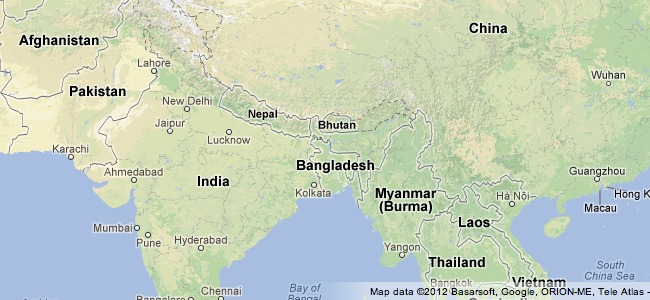
Google has certainly been busy updating Maps in the month of October, and now, they’ve rolled out a new feature that shows terrain, color gradations to depict vegetation, and labels for natural land formations. This helps Google Maps provide even more detailed information to users of its service. Google Maps users can now find great forests, mountain ranges and other natural formations more easily.


The new Google Maps clearly give us a more realistic feel for the natural features on Earth. Whereas the old images appeared flat, unless you enabled satellite, this update clearly shows the diverse features on the surface of the planet. Google Maps already had incredible detail, but this update takes it to another level, and clearly puts it ahead of other map services.

This update for Google Maps comes at the perfect time. Apple just launched its own Apple Maps, and it came under a large amount of scrutiny. Google’s continuing efforts to improve its service with this update, improved Street View, and even going to the Grand Canyon, clearly put it miles ahead of the competition. Google actually offered information similar to this for a long time, but it was not on by default. Now, it’s a fixture of the Maps service, and it is a great improvement.
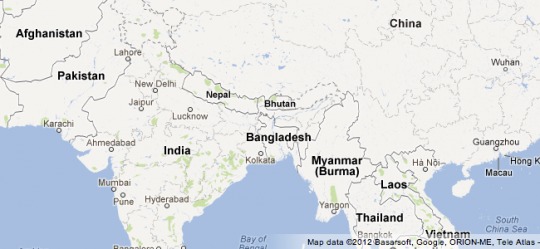

The photo above shows how Maps looked before the update.

The update is rolling out as we speak, and you should start seeing it soon, if you don’t already. It will be apparent very quickly when the update goes live, as it makes drastic changes to the appearance of Maps. October has certainly been a great month for Google Maps; let’s hope they keep this momentum going forward through the rest of the year.

Story Timeline

  • Google Rolls Street View Out To Mobile Browsers
  • Google Street View update adds 250,000 miles of roads and special collection areas
  • Google data centers get a Street View virtual tour
  • Google Maps Street View cameras are headed through the Grand Canyon
[via Google Maps Blog]
Share
  • New Nexus 7 outed in Google Hangouts video
  • Verizon HTC One talk returns as the HTC PN073XX surfaces
  • Easter Eggs and Ponies found in the new Google Hangouts

Tags: GoogleGoogle MapsUpdate

  • Search

  • REVIEWS

    • AT&T LG Optimus G Pro ReviewAT&T LG Optimus G Pro Review
    • Iron Man 3 game Review: what you need to knowIron Man 3 game Review: what you need to know
    • Samsung GALAXY S 4 ReviewSamsung GALAXY S 4 Review
    • Samsung Galaxy Note 8.0 ReviewSamsung Galaxy Note 8.0 Review
    • Pebble review: Two weeks with a smartwatchPebble review: Two weeks with a smartwatch
  • HANDS-ON & QUICK LOOKS

    • Google+ Hangouts app goes live, we go hands-onGoogle+ Hangouts app goes live, we go hands-on
    • Flipboard magazines arrive with v2.0 update, we go hands-onFlipboard magazines arrive with v2.0 update, we go hands-on
    • Lenovo IdeaCentre Horizon hands-on with BlueStacks for Android gamingLenovo IdeaCentre Horizon hands-on with BlueStacks for Android gaming


  • T-Mobile G1 Accessories
  • RECENT COMMENTS

  • About
  • Contact
  • Terms of Use
  • Privacy Policy
  • Advertise

Copyright 2013 Android Community







