

• Home
  • Reviews
  • Featured
  • Archives
  • Videos
  • Devices
  • Tegra
  • Send Tips
  • Contact
  • AndroidCommunity on Twitter AndroidCommunity on Facebook AndroidCommunity on Google+ AndroidCommunity RSS Feed

Android Community

    • MUST READ

      STORIES

    • Android 4.3 leaks on video with new camera UI

      May 24, 2013

    • HTC One ‘Senseless Edition’ could arrive this summer

      May 23, 2013

    • Verizon HTC One reality returns as DROID DNA offer pops up

      May 20, 2013

  • Trending Topics
  • Jelly Bean
  • NVIDIA
  • Galaxy S 4
  • HTC One
  • Nexus 7
  • Sell Your Used Phone

Chrome for Android updated with new settings and performance fixes

6
  • By Cory Gunther
  • on 6 Jun, 2012

Chrome for Android updated with new settings and performance fixes

Google’s extremely popular browser Chrome for Android has just been updated today on the Google Play Store. Recently we reported the browser was getting ready to leave the “beta” tag behind but after today’s update they are still considering it a beta product and haven’t changed much.

The update to Chrome seems rather minor and doesn’t bring us anything we’ve been hoping for, like Adobe Flash and smoother zooming. Although according to the Google Chrome Blog it has received a rather large improvement to overall performance and speed. Google also specifically states the stability of Chrome for Android has been stepped up too. I’ve not really had any problems with stability myself so I can’t complain there.
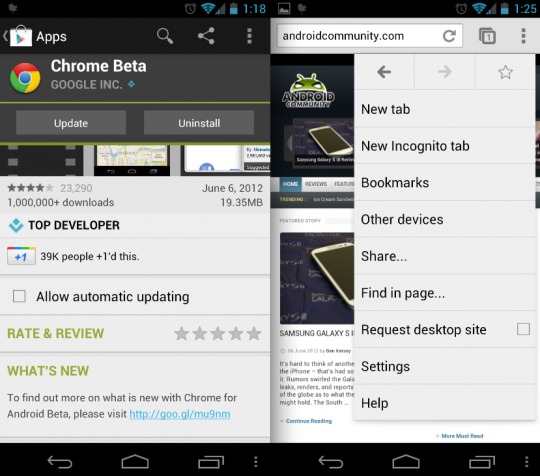
Google’s also very lightly reorganized the settings menu in Chrome too. While I’m not noticing anything dramatic at first glance I’m sure a few things changed to make things more simple during usage. The issue of not being able to auto-hide the status bar is still listed as a “known issue” so hopefully that will be addressed in a future update. Things are moving along quite well and the Browser has been my daily used browser for some time now. Hopefully it gets released out of beta and arrives for the masses soon.

Chrome for Android Play Store link

Story Timeline

  • Adobe: Flash support not included in Chrome for Android
  • Chrome for Android Easter eggs: stupid tab tricks
  • Chrome for Android will improve by "leaps and bounds" soon
  • Google’s Eric Schmidt claims Chrome is “by far the safest”, even on mobile
  • Google Chrome Beta for Android receives an update
  • Chrome for Android update adds desktop mode and bookmarks
  • Chrome for Android coming out of beta soon
  • No Chrome OS tablets coming any time soon
Share
  • Verizon HTC One "will be announced later"
  • New Nexus 7 reportedly shipping now, launching next month
  • HTC One with a larger 5-inch display coming soon

Tags: browserChromeChrome for AndroidGoogleMobile BrowsersmartphoneUpdate

  • http://www.facebook.com/people/Mike-Dye/575025297 Mike Dye

    Must have flash or its useless.

    • Robhimself79

      Agreed. Were still way too reliant on flash to just be done with it. Its the only thing keeping me from using it as a primary browser.

  • Magnus100

    Very happy with the browser, except for lack of flash

  • Mantas Adomavičius

    Why it cant be installed to 2.3? why?!

  • Alex Luckett

    And still, no ability to view the browser history. What the hell, Google?

  • AM3RIG

    I am very glad C4A runs on my GT-P3113!

  • Search

  • REVIEWS

    • AT&T LG Optimus G Pro ReviewAT&T LG Optimus G Pro Review
    • Iron Man 3 game Review: what you need to knowIron Man 3 game Review: what you need to know
    • Samsung GALAXY S 4 ReviewSamsung GALAXY S 4 Review
    • Samsung Galaxy Note 8.0 ReviewSamsung Galaxy Note 8.0 Review
    • Pebble review: Two weeks with a smartwatchPebble review: Two weeks with a smartwatch
  • HANDS-ON & QUICK LOOKS

    • Coolpad Quattro II 4G and 8920 hands-onCoolpad Quattro II 4G and 8920 hands-on
    • Kyocera Hydro XTRM and EDGE hands-onKyocera Hydro XTRM and EDGE hands-on
    • Opera for Android exits beta, we go hands onOpera for Android exits beta, we go hands on


  • T-Mobile G1 Accessories
  • RECENT COMMENTS

  • About
  • Contact
  • Terms of Use
  • Privacy Policy
  • Advertise

Copyright 2013 Android Community






