• Home
  • Reviews
  • Featured
  • Archives
  • Videos
  • Devices
  • Send Tips
  • Contact
  • AndroidCommunity on Twitter AndroidCommunity on Facebook AndroidCommunity on Google+ AndroidCommunity RSS Feed

Android Community

    • MUST READ

      STORIES

    • HTC Butterfly S official: UltraPixel Camera, BoomSound, 5-inch display

      June 19, 2013

    • Android 5.0 ‘Key Lime Pie’ Concept Design has us dreaming for the future

      June 18, 2013

    • Huawei Ascend P6 official as world’s thinnest smartphone

      June 18, 2013

  • Trending Topics
  • Jelly Bean
  • NVIDIA
  • Galaxy S 4
  • HTC One
  • Nexus 7
  • Tegra
  • Sell Your Used Phone

Android Community and SlashGear on Google Currents — A new way to view your favorite site

0
  • By Cory Gunther
  • on 8 Dec, 2011

Android Community and SlashGear on Google Currents — A new way to view your favorite site

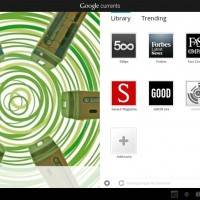
Google has just announced their new Google Currents project. In case you aren’t familiar with Currents that link should have all the details. This is basically a magazine-esque format RSS reader application only with a better UI and an overall awesome experience. It’s a new way to browse and read your favorite sites and RSS feeds and hey, Android Community and SlashGear are both already in Currents — Check us out!

So far I must admit, Google Currents is pretty darn awesome. I’ve been viewing so much content and our awesome reviews like the one on the Transformer Prime that I’ve hardly been working. If you’ve been looking for a better and easier way to view your favorite sites (Android Community and SlashGear) then this is your solution. This isn’t your average reader or app like Flipboard, this is a full on all in one solution and Google’s done a fantastic job. It is simply, easy to understand, has a beautiful UI, and is highly customizable for both readers and publishers alike. Not only that but it works for Android phones, tablets and even iOS.
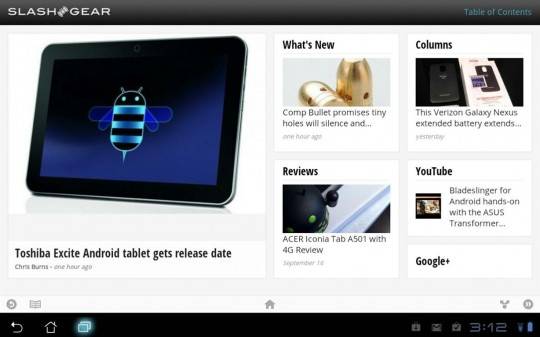
One awesome feature is publishers can create custom pages, change the layout, and even pull from multiple sources all at once. Take our sister site SlashGear for example. We have everything from our webpage to Twitter, Google+, and even our YouTube channel for all of our hands-on videos and reviews neatly in one place. Check out the screenshot below of SlashGear YouTube in Google Currents.
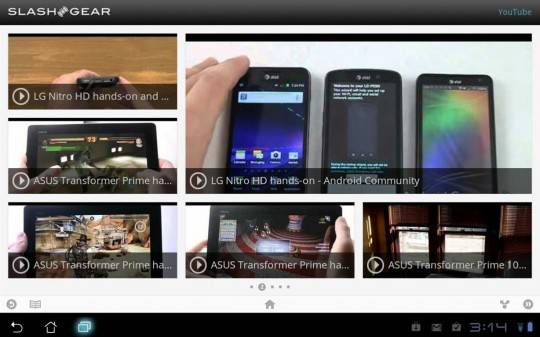
The user interface is fluid and brilliant and makes the entire browsing experience quite pleasurable. Being able to swipe left and right through all the content is very fast and easy. Click on an image in any of our many reviews and you can swipe through the entire photo gallery with pinch to zoom and more. Then hit the YouTube source to view the hands-on and walkthrough coverage for said product. Enjoy my hands-on video below for a better idea of Google Currents, then head to the market and give it a try today. Don’t forget to add Android Community and SlashGear to your front page!


Google Currents Market Link

P20111208145716
P20111208171140
P20111208154101

P20111208151200
P20111208151213
P20111208151240

P20111208151256
P20111208151438

Share
  • Android 5.0 'Key Lime Pie' Concept Design has us dreaming for the future
  • Qualcomm Snapdragon 800 series quad-core benchmarks: This thing is fast
  • Minuum Keyboard ready for beta testing - aims to change how we type

Tags: Android CommunityGooglegoogle currentsmarketnewsslashgearsmartphoneTablet

  • Search

  • REVIEWS

    • Sony Xperia ZL ReviewSony Xperia ZL Review
    • GALAXY S 4 Tech21 Impact Mesh case reviewGALAXY S 4 Tech21 Impact Mesh case review
    • AT&T LG Optimus G Pro ReviewAT&T LG Optimus G Pro Review
    • Iron Man 3 game Review: what you need to knowIron Man 3 game Review: what you need to know
    • Samsung GALAXY S 4 ReviewSamsung GALAXY S 4 Review
  • HANDS-ON & QUICK LOOKS

    • Qualcomm Snapdragon 800 series developer platform first lookQualcomm Snapdragon 800 series developer platform first look
    • Huawei Ascend P6 “Beauty Shot” hands-on demo shows smooth-skin oddityHuawei Ascend P6 “Beauty Shot” hands-on demo shows smooth-skin oddity
    • Huawei Ascend P6 hands-onHuawei Ascend P6 hands-on


  • T-Mobile G1 Accessories
  • RECENT COMMENTS

  • About
  • Contact
  • Terms of Use
  • Privacy Policy
  • Advertise

Copyright 2013 Android Community