• Home
  • Reviews
  • Featured
  • Archives
  • Videos
  • Devices
  • Tegra
  • Send Tips
  • Contact
  • AndroidCommunity on Twitter AndroidCommunity on Facebook AndroidCommunity on Google+ AndroidCommunity RSS Feed

Android Community

    • MUST READ

      STORIES

    • Samsung Galaxy S III 4.2.2 update leaks with GALAXY S 4 features

      May 20, 2013

    • Jolla Sailfish smartphone arriving with Android app support

      May 20, 2013

    • Hisense Sero 7 Pro with Tegra 3, Android 4.2 takes on Google’s Nexus 7

      May 19, 2013

  • Trending Topics
  • Jelly Bean
  • NVIDIA
  • Galaxy S 4
  • HTC One
  • Nexus 7
  • Sell Your Used Phone

Use Your Wii Remote For Games On Android

9
  • By David Junior
  • on 9 May, 2010

Use Your Wii Remote For Games On Android

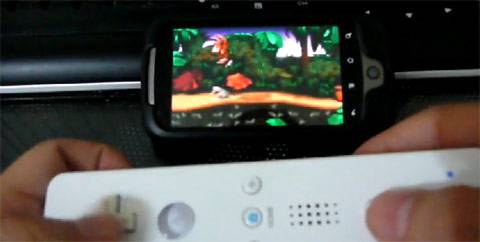
This is an awesome hack, it’s actually not much hacking involved but we’ll still call it that because it sounds cooler. You can now use your Wii remote to play games on your Android device. There is no need to use onscreen buttons now.

In the past few weeks we’ve seen controllers added to Android devices as an overlay on the keys and even an Atari controller hacked to work with a G1. This involves less effort than those, all you need is an emulator, an Android handset, a Wii remote and an app called Wiimote and you’re in business. Checkout the video below then gets started on your device.

[youtube]http://www.youtube.com/watch?v=GnVZgLPcq8U&feature=player_embedded[/youtube]

Wiimote Market Description:

This demo allows you to interact with a Wii Controller using a Bluetooth enabled device.

New features:
- Connect to multiple controllers simultaneously
- Toggle LEDs and rumble
- New UI
- Extension controllers

[via engadget]

Share
  • Hisense Sero 7 Pro with Tegra 3, Android 4.2 takes on Google's Nexus 7
  • Google H840 media streamer hits the FCC to replace the Nexus Q
  • New Nexus 7 outed in Google Hangouts video

Tags: BluetoothcheckoutdemoemulatorengadgetG1gameshackmarket descriptionnew featuresnexusVideowww youtubeyoutube

  • Cookchanz

    When I try to connect the wiimote it states no route to host. How do I solve this and connect?

    • Averjk

      Do you have a Samsung device?

      • Zack

        same prob
        i have a pantech burst

      • Suppercut

        Pantech Burst is not supported. Don’t feel bad; I got stuck with one as well.

        I canNOT play MMX with touch. >_<

    • Luke

      I have da same prob, did u figure it out

    • Luke

      I have da same prob, did u figure it out

    • Suppercut

      It means your phone is not supported.

  • James98 Ja

    wat the app called that the games are in

  • Jrocakamrgraffiti

    Is an incredible 2 compatible?

  • Search

  • REVIEWS

    • AT&T LG Optimus G Pro ReviewAT&T LG Optimus G Pro Review
    • Iron Man 3 game Review: what you need to knowIron Man 3 game Review: what you need to know
    • Samsung GALAXY S 4 ReviewSamsung GALAXY S 4 Review
    • Samsung Galaxy Note 8.0 ReviewSamsung Galaxy Note 8.0 Review
    • Pebble review: Two weeks with a smartwatchPebble review: Two weeks with a smartwatch
  • HANDS-ON & QUICK LOOKS

    • Google+ Hangouts app goes live, we go hands-onGoogle+ Hangouts app goes live, we go hands-on
    • Flipboard magazines arrive with v2.0 update, we go hands-onFlipboard magazines arrive with v2.0 update, we go hands-on
    • Lenovo IdeaCentre Horizon hands-on with BlueStacks for Android gamingLenovo IdeaCentre Horizon hands-on with BlueStacks for Android gaming


  • T-Mobile G1 Accessories
  • RECENT COMMENTS

  • About
  • Contact
  • Terms of Use
  • Privacy Policy
  • Advertise

Copyright 2013 Android Community