

• Home
  • Reviews
  • Featured
  • Archives
  • Videos
  • Devices
  • Tegra
  • Send Tips
  • Contact
  • AndroidCommunity on Twitter AndroidCommunity on Facebook AndroidCommunity on Google+ AndroidCommunity RSS Feed

Android Community

    • MUST READ

      STORIES

    • Otterbox Defender and Commuter GALAXY S 4 case hands-on

      May 20, 2013

    • Verizon HTC One reality returns as DROID DNA offer pops up

      May 20, 2013

    • Student wins science fair with 30-second phone battery charger

      May 20, 2013

  • Trending Topics
  • Jelly Bean
  • NVIDIA
  • Galaxy S 4
  • HTC One
  • Nexus 7
  • Sell Your Used Phone

Turn your regular T-Mobile G1 into a developers edition

3
  • By Staff Editor
  • on 8 Dec, 2008

Turn your regular T-Mobile G1 into a developers edition

Those of us who already have a T-Mobile G1 or do not have the money for the developers edition and would like to have one, will love what we found. The bootloader for the developers edition G1 is finally out and is making its rounds.

From what we hear, T-Mobile went ahead and gave a developers version of the G1 to a customer as a warranty replacement. With a little help from his friends, he managed to extract the unlocked bootloader from the phone and put it on the Internet. The best part is the process of converting your G1 is very simple.

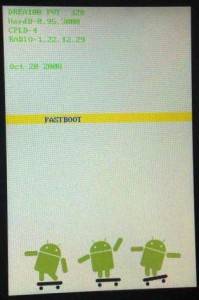
To start, just gain root access to your T-Mobile G1. Once you have done that all you have to do is download and apply the unlocked bootloader to your handset. Just turn on your phone while holding down the power and camera button and you will see the skateboarding Android instead of the usually boot screen.  Congratulations you now have a developers T-mobile G1.

Be warned though that this may also brick your phone and we here at Android Community hold no responsibility for any damage this process may do to your T-Mobile G1. If this process is done wrong at all, YOUR PHONE WILL BE DEAD. With that said we would like to know how this process worked for you.

[Via GotOnTheInter]

Share
  • Student wins science fair with 30-second phone battery charger
  • Hisense Sero 7 Pro with Tegra 3, Android 4.2 takes on Google's Nexus 7
  • Verizon HTC One reality returns as DROID DNA offer pops up

Tags: android osGooglehack

  • Search

  • REVIEWS

    • AT&T LG Optimus G Pro ReviewAT&T LG Optimus G Pro Review
    • Iron Man 3 game Review: what you need to knowIron Man 3 game Review: what you need to know
    • Samsung GALAXY S 4 ReviewSamsung GALAXY S 4 Review
    • Samsung Galaxy Note 8.0 ReviewSamsung Galaxy Note 8.0 Review
    • Pebble review: Two weeks with a smartwatchPebble review: Two weeks with a smartwatch
  • HANDS-ON & QUICK LOOKS

    • Google+ Hangouts app goes live, we go hands-onGoogle+ Hangouts app goes live, we go hands-on
    • Flipboard magazines arrive with v2.0 update, we go hands-onFlipboard magazines arrive with v2.0 update, we go hands-on
    • Lenovo IdeaCentre Horizon hands-on with BlueStacks for Android gamingLenovo IdeaCentre Horizon hands-on with BlueStacks for Android gaming


  • T-Mobile G1 Accessories
  • RECENT COMMENTS

  • About
  • Contact
  • Terms of Use
  • Privacy Policy
  • Advertise

Copyright 2013 Android Community






