

• Home
  • Reviews
  • Featured
  • Archives
  • Videos
  • Devices
  • Tegra
  • Send Tips
  • Contact
  • AndroidCommunity on Twitter AndroidCommunity on Facebook AndroidCommunity on Google+ AndroidCommunity RSS Feed

Android Community

    • MUST READ

      STORIES

    • Android 4.3 leaks on video with new camera UI

      May 24, 2013

    • HTC One ‘Senseless Edition’ could arrive this summer

      May 23, 2013

    • Verizon HTC One reality returns as DROID DNA offer pops up

      May 20, 2013

  • Trending Topics
  • Jelly Bean
  • NVIDIA
  • Galaxy S 4
  • HTC One
  • Nexus 7
  • Sell Your Used Phone

Tampermonkey App Brings Augmented Browsing to Android

0
  • By John Scheible
  • on 2 Jun, 2011

Tampermonkey App Brings Augmented Browsing to Android

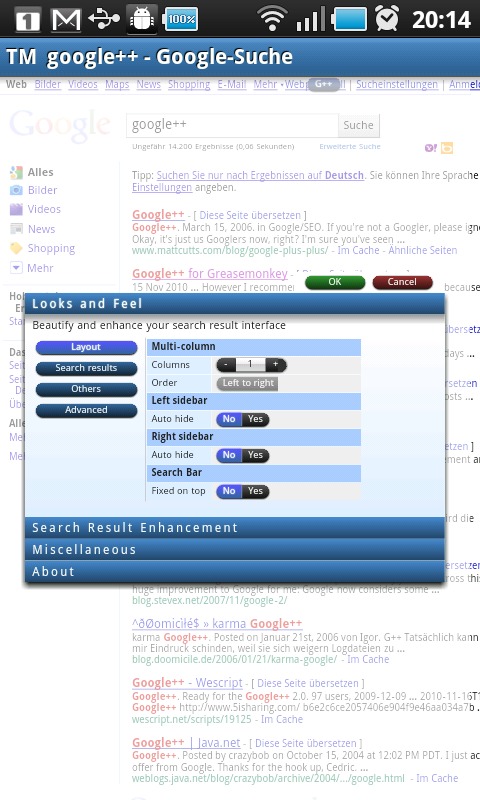
Now if you are a fan of the Greasemonkey Firefox extension or Tampermonkey’s Chrome version, you’re probably thinking “awesome!”, while the rest of us are thinking “what’s augmented browsing?” Apps like Tampermonkey allow you to utilize scripts to make changes to websites as you browse. This is very open ended, but to give you a better idea, of what this means, some of the popular uses for such apps are removing ads, auto-filling forms, or transposing info from another site, onto the one you’re viewing.

Obviously this is a very powerful tool, but it needs scripts to do anything. Luckily, this app is compatible with Greasemonkey scripts as well as Chrome Tampermonkey scripts, meaning it should be able to use any pre-existing script you can dig up on the internet. The downside here is that they may not run perfectly.

The developer of the app states that it is still in beta, and that since phones are not as powerful as the computers that use the Chrome app it’s adapted from, it may be a bit sluggish for now. Given its limitations, Tampermonkey doesn’t appear to be quite ready for the big time yet. If you’re familiar with Greasemonkey or Tampermonkey and want to test out scripts to lend a hand to its development head over to the XDA thread and jump on in. For the rest of us, given the beta status and the current lack on instructions, waiting may be the wiser choice. The app shows great promise though and could shape up to be an awesome tool as it progresses to it’s final stage.

[via XDA]

Share
  • Verizon HTC One "will be announced later"
  • New Nexus 7 reportedly shipping now, launching next month
  • HTC One with a larger 5-inch display coming soon

Tags: Googlexda developers

  • Search

  • REVIEWS

    • AT&T LG Optimus G Pro ReviewAT&T LG Optimus G Pro Review
    • Iron Man 3 game Review: what you need to knowIron Man 3 game Review: what you need to know
    • Samsung GALAXY S 4 ReviewSamsung GALAXY S 4 Review
    • Samsung Galaxy Note 8.0 ReviewSamsung Galaxy Note 8.0 Review
    • Pebble review: Two weeks with a smartwatchPebble review: Two weeks with a smartwatch
  • HANDS-ON & QUICK LOOKS

    • Coolpad Quattro II 4G and 8920 hands-onCoolpad Quattro II 4G and 8920 hands-on
    • Kyocera Hydro XTRM and EDGE hands-onKyocera Hydro XTRM and EDGE hands-on
    • Opera for Android exits beta, we go hands onOpera for Android exits beta, we go hands on


  • T-Mobile G1 Accessories
  • RECENT COMMENTS

  • About
  • Contact
  • Terms of Use
  • Privacy Policy
  • Advertise

Copyright 2013 Android Community






