

• Home
  • Reviews
  • Featured
  • Archives
  • Videos
  • Devices
  • Tegra
  • Send Tips
  • Contact
  • AndroidCommunity on Twitter AndroidCommunity on Facebook AndroidCommunity on Google+ AndroidCommunity RSS Feed

Android Community

    • MUST READ

      STORIES

    • Otterbox Defender and Commuter GALAXY S 4 case hands-on

      May 20, 2013

    • Verizon HTC One reality returns as DROID DNA offer pops up

      May 20, 2013

    • Student wins science fair with 30-second phone battery charger

      May 20, 2013

  • Trending Topics
  • Jelly Bean
  • NVIDIA
  • Galaxy S 4
  • HTC One
  • Nexus 7
  • Sell Your Used Phone

Samsung Infuse 4G rooted via SuperOneClick

0
  • By Cory Gunther
  • on 12 May, 2011

Samsung Infuse 4G rooted via SuperOneClick

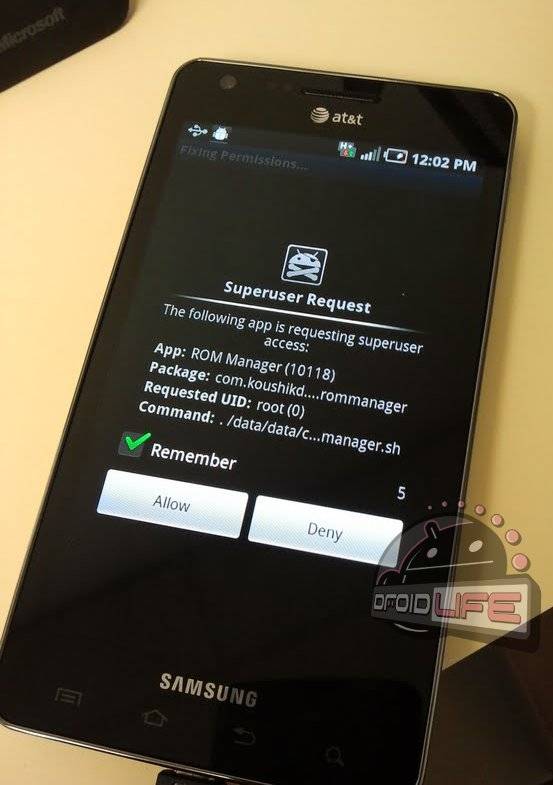
Well folks it is just that easy. As always the wonderful developers from XDA have done it again and now the brand new Samsung Infuse 4G from AT&T has been rooted with a single click. It doesn’t get much easier than that. Using the ever popular SuperOneClick method you simply run the program on your computer, and you are rooted. More details below.

Just a few short days ago the Infuse 4G was announced and shortly after we had a hands-on and unboxing. It sure is a pretty device with that huge 4.5″ screen and extremely thin body, just barely thicker than the SGS II. For those that don’t know it is a single-core Galaxy S phone with a huge 4.5″ screen and is capable of handing AT&T’s 4G speeds (they are activated too).

The SuperOneClick method has been around for a long while, it works on basically every android phone that isn’t NAND locked or have some other type of lock down issues like most Motorola phones have of late. So this should be a relatively easy thing for anyone looking to root, most likely you have done if before but if not feel free to let me help you. Lucky for you guys things have got pretty easy in the rooting game, before it was a much more involved experience. To root your Infuse 4G follow some short instructions below or ask any questions if you are worried over at the XDA Forum.

Instructions:

Download SuperOneClick v1.9.1

You NEED to put your phone on USB Debugging mode
You NEED to make sure the Android drivers for your phone are installed (usually install once you plug in over usb)
Make sure you DO NOT mount your SD card.
If you still can’t get something to run, try doing it in recovery mode.

From here you run the SuperOneClick application on your computer and follow the on-screen instructions, it is very easy and there isn’t much room for mistakes so it should be a fast process. Finish that and your done. Easy peasy. For those worried here is a slightly older, but very helpful video guide that explains it.

[via Droid Life]

Share
  • Student wins science fair with 30-second phone battery charger
  • Hisense Sero 7 Pro with Tegra 3, Android 4.2 takes on Google's Nexus 7
  • Verizon HTC One reality returns as DROID DNA offer pops up

Tags: ATTeasyrootrootRootedSamsung Infuse 4Gxda forums

  • Search

  • REVIEWS

    • AT&T LG Optimus G Pro ReviewAT&T LG Optimus G Pro Review
    • Iron Man 3 game Review: what you need to knowIron Man 3 game Review: what you need to know
    • Samsung GALAXY S 4 ReviewSamsung GALAXY S 4 Review
    • Samsung Galaxy Note 8.0 ReviewSamsung Galaxy Note 8.0 Review
    • Pebble review: Two weeks with a smartwatchPebble review: Two weeks with a smartwatch
  • HANDS-ON & QUICK LOOKS

    • Google+ Hangouts app goes live, we go hands-onGoogle+ Hangouts app goes live, we go hands-on
    • Flipboard magazines arrive with v2.0 update, we go hands-onFlipboard magazines arrive with v2.0 update, we go hands-on
    • Lenovo IdeaCentre Horizon hands-on with BlueStacks for Android gamingLenovo IdeaCentre Horizon hands-on with BlueStacks for Android gaming


  • T-Mobile G1 Accessories
  • RECENT COMMENTS

  • About
  • Contact
  • Terms of Use
  • Privacy Policy
  • Advertise

Copyright 2013 Android Community






