• Home
  • Reviews
  • Featured
  • Archives
  • Videos
  • Devices
  • Send Tips
  • Contact
  • AndroidCommunity on Twitter AndroidCommunity on Facebook AndroidCommunity on Google+ AndroidCommunity RSS Feed

Android Community

    • MUST READ

      STORIES

    • HTC Butterfly S official: UltraPixel Camera, BoomSound, 5-inch display

      June 19, 2013

    • Android 5.0 ‘Key Lime Pie’ Concept Design has us dreaming for the future

      June 18, 2013

    • Huawei Ascend P6 official as world’s thinnest smartphone

      June 18, 2013

  • Trending Topics
  • Jelly Bean
  • NVIDIA
  • Galaxy S 4
  • HTC One
  • Nexus 7
  • Tegra
  • Sell Your Used Phone

Jelly Bean brings “Liveness” to Face Unlock – Requires a blink

5
  • By Cory Gunther
  • on 29 Jun, 2012

Jelly Bean brings “Liveness” to Face Unlock – Requires a blink

Google’s Face Unlock feature was met with tons of praise last year when announced along side the Galaxy Nexus and Android 4.0 Ice Cream Sandwich, but at the same time it was met with a lot of criticism for being easily bypassed or hacked. Simply use a photo of of the face and it would work, making it not too secure. With Jelly Bean they’ve taken it a few steps further.

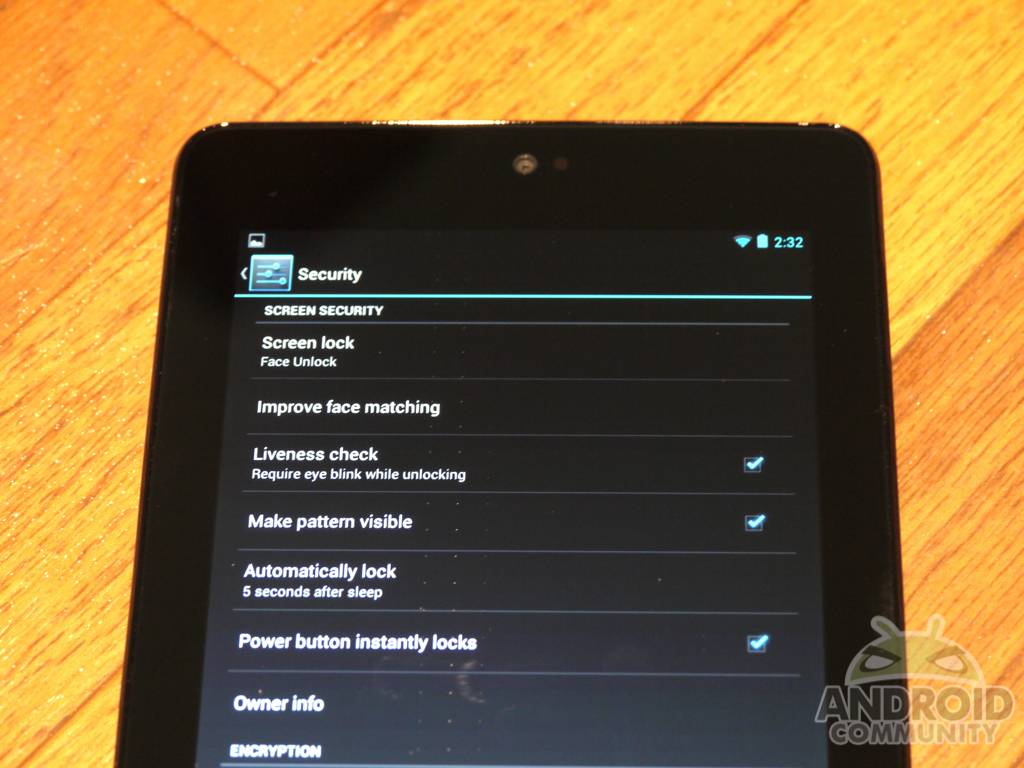
Not only has Face Unlock improved by Google adding additional “advanced” options where the user can take up to four additional pictures with glasses, different lighting, beards and more, but they’ve also made it more secure with a “liveness” option.
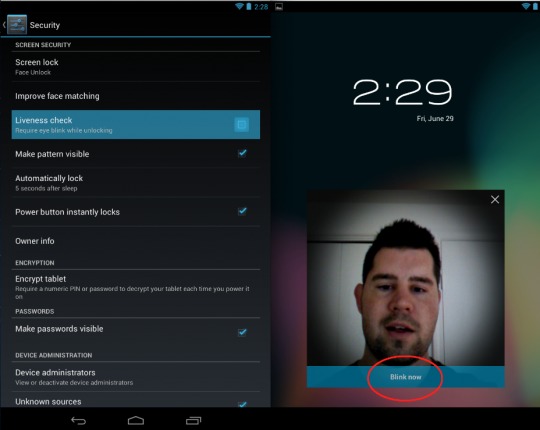
Essentially this works just like we mentioned in the title. Android 4.1 Jelly Bean has a new options once Face Unlock is selected under settings just click the “liveness check” option. This will make the facial detection engine also require the user to blink his eyes before getting access. It’s a small touch, but works great actually. Unlocking seems faster too. Once you blink the unlock sound effect emits and the screen turns on all so fast you feel like your blink just did something amazing. It’s rather fun to be completely honest.

It isn’t just about being fun though. Google has done this to remove all the criticism face unlock has received. Now it’s more secure, fools photos, and can even work after you get a hair cut or shave a gnarly beard. It still not truly be advanced security for unlocking, but we’ll take it.

For those that have Android 4.0 or 4.1 Jelly Bean — do you actually use Face Unlock?
P1090666
Screen Shot 2012-06-29 at 2.43.22 PM

Story Timeline

  • More ICS video: face unlock, camera features and battery results
  • Ice Cream Sandwich Face Unlock has issues with dark skin tones
  • Android 4.1 Jelly Bean officially announced at Google IO
  • Android 4.1 Jelly Bean features offline dictation and features galore
  • Google Nexus 7 hands-on
  • Galaxy Nexus Android Jelly Bean 4.1 leaks
Share
  • Android 5.0 'Key Lime Pie' Concept Design has us dreaming for the future
  • Qualcomm Snapdragon 800 series quad-core benchmarks: This thing is fast
  • Minuum Keyboard ready for beta testing - aims to change how we type

Tags: face unlockGoogleGoogle IOIce Cream SandwichJelly BeanNexus 7

  • Dustin Wen

    Nope, I like having the camera shortcut and notifications available. Maybe I’ll use face unlock with my Nexus 7.

  • eagunner

    Hm I wonder how long it will take for people to solve the riddle of displaying a photograph of the phone’s owner that appears to blink… does this sound hard? I hope I’m wrong, but this sounds like a half assed, reactionary attempt to patch a security hole by people who don’t understand security.

    • mwbehr

      They’re not trying to protect the FBI database here, they’re trying to give you an alternative to zero security (swipe to unlock) that’s almost as quick and easy.

  • BT Onedem

    GREAT progress!! It used to take only a photo to fool it, now one needs to use an animated gif.

    • http://www.androidcommunity.com Cory Gunther

      lol

  • Search

  • REVIEWS

    • Sony Xperia ZL ReviewSony Xperia ZL Review
    • GALAXY S 4 Tech21 Impact Mesh case reviewGALAXY S 4 Tech21 Impact Mesh case review
    • AT&T LG Optimus G Pro ReviewAT&T LG Optimus G Pro Review
    • Iron Man 3 game Review: what you need to knowIron Man 3 game Review: what you need to know
    • Samsung GALAXY S 4 ReviewSamsung GALAXY S 4 Review
  • HANDS-ON & QUICK LOOKS

    • Qualcomm Snapdragon 800 series developer platform first lookQualcomm Snapdragon 800 series developer platform first look
    • Huawei Ascend P6 “Beauty Shot” hands-on demo shows smooth-skin oddityHuawei Ascend P6 “Beauty Shot” hands-on demo shows smooth-skin oddity
    • Huawei Ascend P6 hands-onHuawei Ascend P6 hands-on


  • T-Mobile G1 Accessories
  • RECENT COMMENTS

  • About
  • Contact
  • Terms of Use
  • Privacy Policy
  • Advertise

Copyright 2013 Android Community