

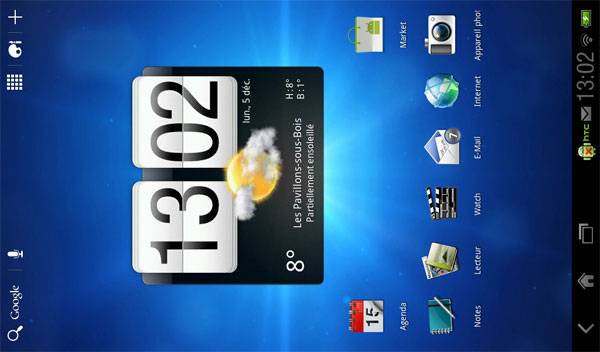
If you own an HTC Flyer tablet there is some good news coming out of France today. Apparently, the French are getting the update for the smartphone starting today. The new update brings the Flyer up to Android 3.2 Honeycomb. Flyer owners have been waiting for this update.
The update brings the software to 3.55.405.1. The update itself is 210MB and is coming OTA. Since the update is larger, do yourself a favor and grab it when available using WiFi. Apparently, this version of the update is for the 32GB version with WiFi and 3G connectivity.
There is no word on version of the update for other tablet models like the 16GB WiFi only version. If you are able to get the update in countries outside of France let us know. Also, let us know if they have the update for the WiFi version of the tablet.
[via HTC-Hub]








I got it here in Holland about an hour ago! Only my touch buttons under de screen are off…….:(
That’s how it’s supposed to be. It doesn’t look like there is any way hack them back in. Does the stylus work any better in Honeycomb?
I think that’s better. I never liked the placement of the touch buttons anyway. The left corner will be much better… if we ever get Honeycomb in the US on the 16G!
I think that’s better. I never liked the placement of the touch buttons anyway. The left corner will be much better… if we ever get Honeycomb in the US on the 16G!
I think that’s better. I never liked the placement of the touch buttons anyway. The left corner will be much better… if we ever get Honeycomb in the US on the 16G!
“…Apparently, the French are getting the update for the smartphone starting today. …”
Smartphone? You mean tablet, right?
Hi! I’ve heard that the Honeycomb upgrade will result in the dreaded Android status/notification bar being present all the time and that the bezel buttons will be disabled. I love the Flyer, but the main reason I bought it was for the full screen display. If there is no way to hide the bar without “rooting” the tablet , I guess I will have to give in and go Apple! Please, if anyone has any information on hiding the bar, I would like to know. Also heard that ICS might solve the issue. Thanks in advance!
You know you don’t HAVE to update the tablet if you really don’t want to, right? Why would you go to apple who only makes 10″ tablets? If you wanted to, you could buy the upcomming Galaxy Tab 7.7. Once you take the button bar into account, the amount of screen real estate compared to the Flyer pre-honeycomb is about the same. Most Android tablets are 10.1 inches instead of 9.7 like the iPad to accommodate the button bar. I’m just wondering, why don’t you like on screen buttons?
i update it today on my tab htc 32gb wifi in tailand thei sent the mesage to my tab so i udate it ,,but it looks me more complecated to use i mis my menu dowwstars,,