

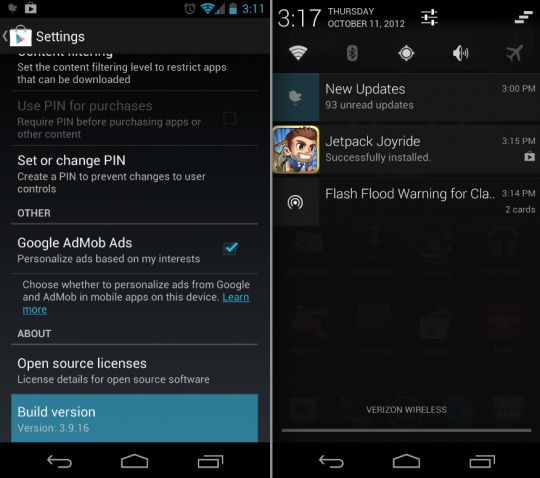
Today Google has just issued an update to the Google Play Store. For those that have already received it, you’ll quickly notice they’ve added a few awesome and much awaited for features. We haven’t seen an update since August, but today they’ve started rolling out Google Play Store version 3.9.16 to the masses. Read on below for more details and download links.
First off everything works better with Android 4.1 Jelly Bean. While we know not everyone is enjoying Jelly Bean yet, the expanded notifications have been completely overhauled. You now have full expandable notifications from the Google Play Store for updates, and upon updating an app you get the actual app or games icon, not just a generic logo. Little things like this makes for a more polished experience.
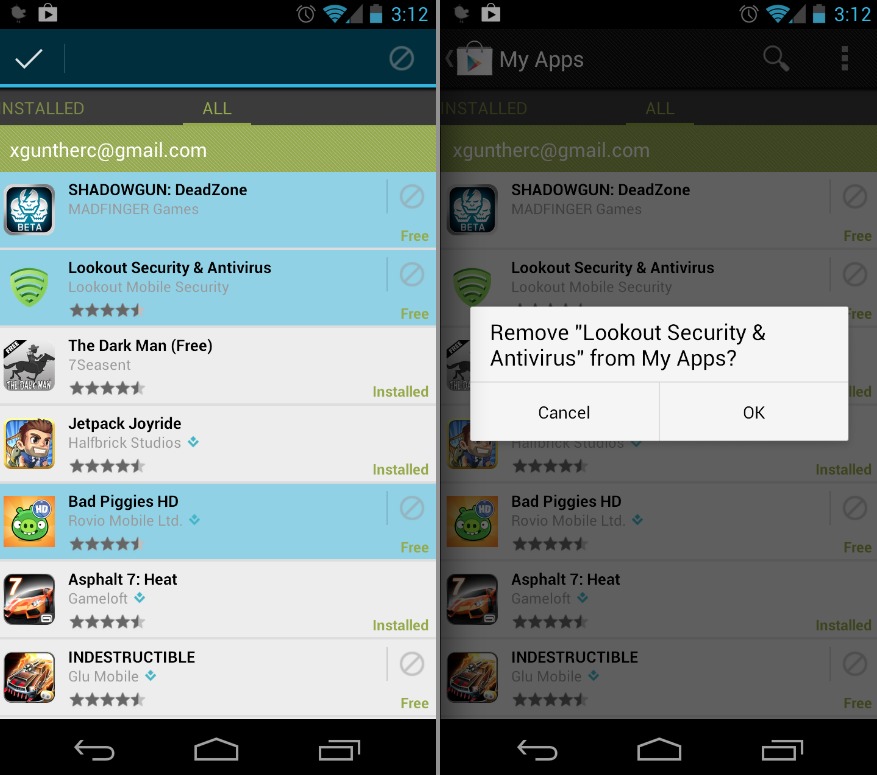
Then the other major new thing here is the ability to remove apps from your list. If you’re like me, you download tons of apps and games and that “all apps” list in the Play Store is extremely long. Now you can easily go through and delete apps you know you have no interest in. If you’ve ever got a new phone and had to search through that entire “all” list forever you’ll know the feeling. This is an extremely welcomed change. Now I just wish there was a way to filter it to show only purchased apps — as it did before.
It looks like Google’s actually trimmed the size down on the Google Play Store, and the actual APK size is smaller than before. So far it seems nice and quick, the remove feature is extremely easy and you can even long press for multi-select and wipe out an entire list with ease. Simply install this right over the previous Google Play Store and you’re good to go.
Google Play Store: download
[via Android Police]








Seems like Google have really started to listen. First the contact photos and now this!
Yea I’m happy they’ve added the removal option. We just need “purchased apps” back.
^ This. And the next thing I’d like to see is some kind of “earmark” feature for apps that I want to keep in mind but not necessarily install right away. Shouldn’t be too hard to add.
Yes.. A save for later would be neat too
off: wich app do you use to get the widgets (wifi, bt, etc.) on the notification bar?
tks
off: wich app do you use to get the widgets (wifi, bt, etc.) on the notification bar?
tks
@b909920f359a1db5486ffca6acad0d92:disqus That is a ROM. CM10.. but you can get Battery Widget Reborn for a similar function.
Paid apps menu is really required! How can such a big global company like google not put such a simple thing on the play store. Also, although I havent seen the update… Does the list start at the begining when you look at an app and go back to the search screen? That really irritates me so much, scrolling all the way down to the place you got to while searching apps! If they have, excuse me for my rant! 😉
I love how it now goes back to where you were in the “All” list when choosing to install an app from the list. The ability to remove apps from the “All” list is also great, but after removing one it still jumps to the beginning of the list. It took me 15 minutes to remove unwanted apps: remove, scroll down, remove, scroll down, remove, scroll down… Maybe a “Multi-select” feature should be added.
Long press on one app, and you can then multi-select others…
lol.. I mention multi-select right in post.. haha
Sorry Cory, I don’t know how I missed it! *face turns beet red with shame* Thanks.
Absolutely amazing to remove all those useless apps from my ALL list. I let my girl use my phone and she downloads countless apps and removes them (only they stay in my all list). Still took me a good 10-15 minutes of scrolling and highlighting with the multi selection to remove them all.
Is this in anyway affiliated with google?
This is welcome news as I’m switching between two phones as we speak, and thought I had to do it one app at a time. One thing though. I sure wish there was a say to do it from the app store portal on the web. Amazon gives you that ability. Why didn’t Google think of that? As a side note, I wish you could filter your apps list online based on which device you have.