

• Home
  • Reviews
  • Featured
  • Archives
  • Videos
  • Devices
  • Tegra
  • Send Tips
  • Contact
  • AndroidCommunity on Twitter AndroidCommunity on Facebook AndroidCommunity on Google+ AndroidCommunity RSS Feed

Android Community

    • MUST READ

      STORIES

    • Chrome Beta updated with Translation bar and fullscreen tablet support

      May 23, 2013

    • HTC One ‘Senseless Edition’ could arrive this summer

      May 23, 2013

    • HTC One sales are strong as it passes 5 million mark

      May 23, 2013

  • Trending Topics
  • Jelly Bean
  • NVIDIA
  • Galaxy S 4
  • HTC One
  • Nexus 7
  • Sell Your Used Phone

Google Maps updated with elevation data and scale bar

2
  • By Michael Crider
  • on 25 Apr, 2012

Google Maps updated with elevation data and scale bar

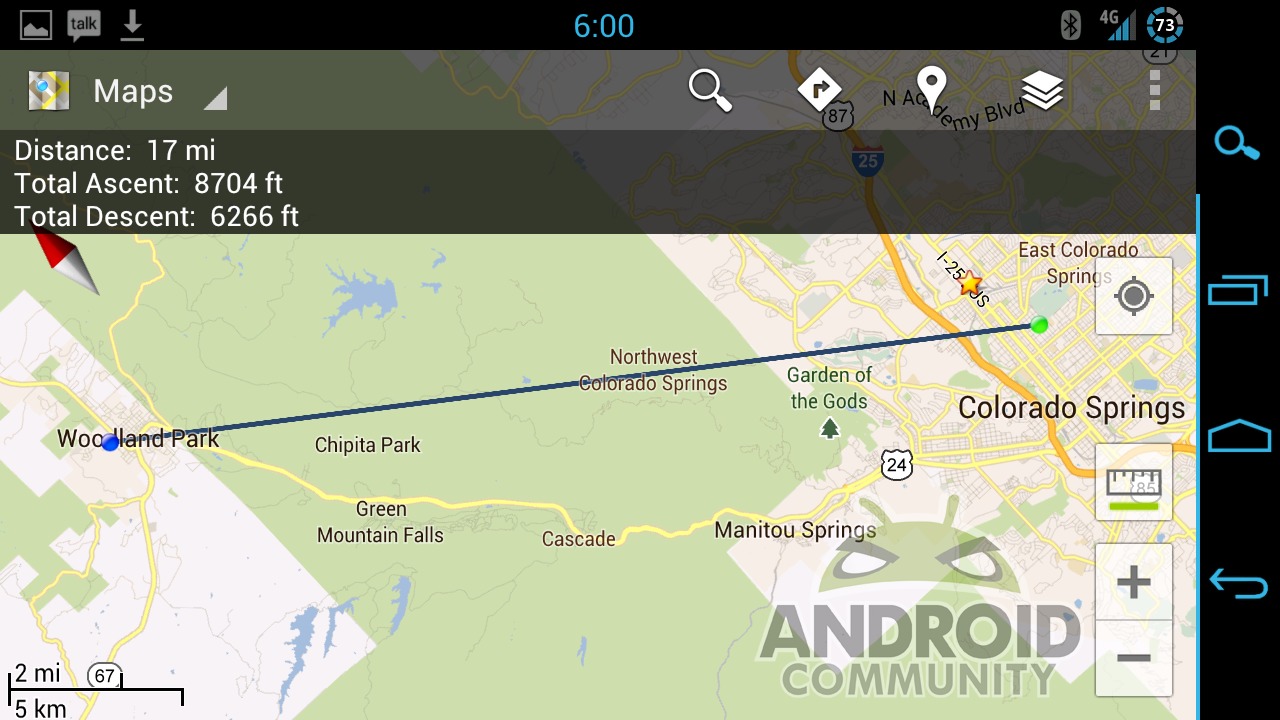
If you’re a Google Maps user and a hiker, mountain climber or just a data junkie, you’ll want to update the app in the Google Play Store now. Two features previously restricted to Labs have graduated to the full app, and another has been added. The most interesting stuff is still happening in the Labs section, with the newly revised Measure feature allowing you to see elevation data. The new functions work with all current Android devices.

The scale bar has been available in Labs for a while, and mimics the same function on Google Maps’ desktop site. You can’t adjust the scale bar in the lower left corner, but it shifts dynamically based on what level of zoom you’re looking at. Speaking of zoom, the plus and minus buttons are now permanent features, zooming in and out by a factor of two (give or take) with each tap. Both can be enables or disabled in the “Display” section of the menu.

The new Labs feature allows you to tap between two points on the map and get an instant distance between them. You can also see the elevation of both points, and the difference between them: for example, going between Colorado Springs and Woodland Park is 16 miles as the crow flies, but it’s about half a mile of vertical change. You can also select multiple points for a more accurate route.


Story Timeline

  • Navigate through CES with Google Maps
  • Google Maps Android app gets power & location improvements; Maps Game incoming
  • Google updates Goggles and Maps with night mode and more
  • Google Maps updated with better battery life and latitude location history
  • Google Maps Navigation menu updated with new UI
  • Google Maps update adds preferred transit mode and new navigation menu
  • Google's Floor Plan Marker improves indoor Google Maps
Share
  • Samsung Galaxy Note 3 with Android 4.3 spotted in benchmark results
  • Verizon HTC One "will be announced later"
  • Verizon HTC One tipped for CTIA event unveiling

Tags: GoogleGoogle MapsGoogle Play Storesoftware update

  • androidfan12222

    awesome ..  I just found a website where they give an amazing SAMSUNG Galaxy Tab For free to test and keep.you may not believe it, but it turns out this offer is for real 
    ,I just got one this weekend all I had to do is to fill an app of my shipping Information. really worth a try !
    check it out here => GiveAway


  • anonymouse

    yay this is my boyfriend’s 20% project :) more awesome features for elevation coming soon!

  • Search

  • REVIEWS

    • AT&T LG Optimus G Pro ReviewAT&T LG Optimus G Pro Review
    • Iron Man 3 game Review: what you need to knowIron Man 3 game Review: what you need to know
    • Samsung GALAXY S 4 ReviewSamsung GALAXY S 4 Review
    • Samsung Galaxy Note 8.0 ReviewSamsung Galaxy Note 8.0 Review
    • Pebble review: Two weeks with a smartwatchPebble review: Two weeks with a smartwatch
  • HANDS-ON & QUICK LOOKS

    • Coolpad Quattro II 4G and 8920 hands-onCoolpad Quattro II 4G and 8920 hands-on
    • Kyocera Hydro XTRM and EDGE hands-onKyocera Hydro XTRM and EDGE hands-on
    • Opera for Android exits beta, we go hands onOpera for Android exits beta, we go hands on


  • T-Mobile G1 Accessories
  • RECENT COMMENTS

  • About
  • Contact
  • Terms of Use
  • Privacy Policy
  • Advertise

Copyright 2013 Android Community





