

• Home
  • Reviews
  • Featured
  • Archives
  • Videos
  • Devices
  • Tegra
  • Send Tips
  • Contact
  • AndroidCommunity on Twitter AndroidCommunity on Facebook AndroidCommunity on Google+ AndroidCommunity RSS Feed

Android Community

    • MUST READ

      STORIES

    • Google H840 media streamer hits the FCC to replace the Nexus Q

      May 18, 2013

    • Google+ Hangouts app update adds tablet support

      May 17, 2013

    • Skobbler for Android update adds turn-by-turn navigation

      May 17, 2013

  • Trending Topics
  • Jelly Bean
  • NVIDIA
  • Galaxy S 4
  • HTC One
  • Nexus 7
  • Sell Your Used Phone

Gmail for Android update adds reply and archive from notifications

0
  • By Robert Nelson
  • on 18 Mar, 2013

Gmail for Android update adds reply and archive from notifications

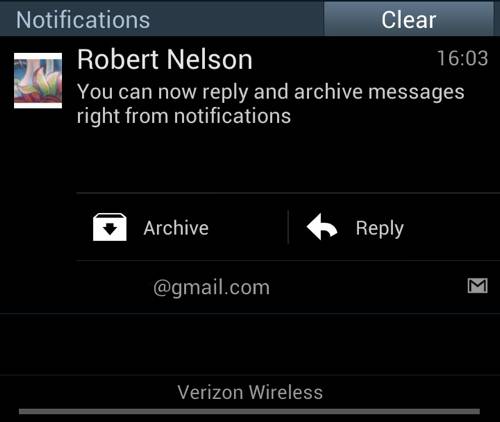
Google has rolled out the latest update for Gmail on Android. This latest update is available by way of the Google Play Store and it brings some new functionality for those running Jelly Bean. This update also brings some performance improvements for those running older flavors of Android.

gmail-update

Beginning first with the goodies for Jelly Bean users. These deal with the notification shade and are rather simple. They are also rather convenient. Basically, those running Android 4.1 will now be able to reply, archive or delete a message directly from the notification shade. In other words, moving forward less opening of the Gmail app will be required.

The changes for those running Android 4.0 Ice Cream Sandwich include faster search. Google notes that the faster searching should also be seen when you are running offline. Ice Cream Sandwich users have also gotten some unspecified performance improvements and bug fixes.

Finally, those running Android 2.2 or later also have some unspecified performance improvements. Those with Android 2.2 or later also have a new labels API available for third party app developers. All said and done, while it seems that Jelly Bean users got the best deal here, it is nice to see Google paying attention to the older versions as well. With that, those with an Android device in hand should launch the Play Store on their device and proceed to update.

[via Official Gmail Blog]

Story Timeline

  • Gmail chief developer heads to Google's Project Glass team
  • Google acquires Sparrow for Gmail mobile reboot
  • Google brings video chat Hangouts to Gmail
  • Google updates Gmail with better 7-inch tablet support
  • Gmail update incoming with pinch-to-zoom and swipe to delete features
  • Gmail update brings pinch-to-zoom to Android 4.0 and above
  • PSA: You must enable pinch-to-zoom in the new Gmail
  • Google updates Gmail mobile interface for Android
  • Google shows off Gmail, Path, Evernote and more for Google Glass
Share
  • New Nexus 7 outed in Google Hangouts video
  • Google H840 media streamer hits the FCC to replace the Nexus Q
  • Samsung says it will look into compacting Galaxy S 4 software bloat

Tags: AndroidAndroid App Updateapp updateemailGmailGoogle

  • Search

  • REVIEWS

    • AT&T LG Optimus G Pro ReviewAT&T LG Optimus G Pro Review
    • Iron Man 3 game Review: what you need to knowIron Man 3 game Review: what you need to know
    • Samsung GALAXY S 4 ReviewSamsung GALAXY S 4 Review
    • Samsung Galaxy Note 8.0 ReviewSamsung Galaxy Note 8.0 Review
    • Pebble review: Two weeks with a smartwatchPebble review: Two weeks with a smartwatch
  • HANDS-ON & QUICK LOOKS

    • Google+ Hangouts app goes live, we go hands-onGoogle+ Hangouts app goes live, we go hands-on
    • Flipboard magazines arrive with v2.0 update, we go hands-onFlipboard magazines arrive with v2.0 update, we go hands-on
    • Lenovo IdeaCentre Horizon hands-on with BlueStacks for Android gamingLenovo IdeaCentre Horizon hands-on with BlueStacks for Android gaming


  • T-Mobile G1 Accessories
  • RECENT COMMENTS

  • About
  • Contact
  • Terms of Use
  • Privacy Policy
  • Advertise

Copyright 2013 Android Community






