

Today we have a fancy new application to show you DSLR fans. While this currently is still in beta and only works with Canon EOS DSLR cameras as well as a select few Android devices this list and compatibility will surely grow. The popular developer Chainfire tweeted today about his awesome new app and we think it looks awesome and has some serious potential.
This applications will give you full control of your Canon EOS DSLR from your phone or tablet through USB. This only requires USB and you don’t need a computer or laptop, no rooting is required or anything either. Get out that EOS camera, your Galaxy S II and a USB cable and you are ready to go. (Host USB Cable only)
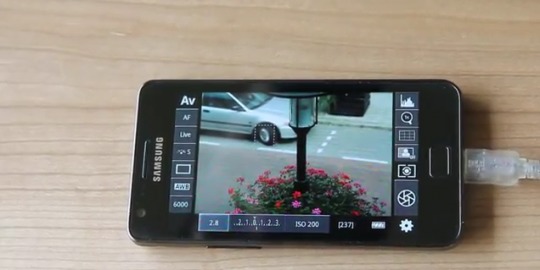
This is an early version released by popular demand and is still a work in progress and in its beta stages. From the video we will show you below it looks pretty awesome already so I can’t wait to try it out. He has added tons of features and more are coming soon. Make sure you read the full description in the market regarding the requirements as you need a special USB cable, your average USB laying around wont work. It also needs to be a USB Host Cable and the only devices currently listed as working are the Samsung Galaxy S II and the Motorola Xoom (with 3.1) but more should work or be coming soon.
Features include but are not limited to:
– Live View
– Auto Focus (tap Live View)
– Manual focus adjustments in Auto Focus mode
– Histogram
– Zoom control
– Grid display
– Bulb capture
– Continuous capture
– Extensive modification of settings
— Shutter speed
— Aperture
— Exposure Compensation and Bracket
— Flash Compensation
— ISO speed
— Auto-Focus Mode
— Focus and Zoom area (tap-and-hold Live View)
— Picture Style
— Drive Mode
— White Balance
— Color Temperature
— Auto-Lighting Optimizer
— Metering Mode
Note that available options depend on the mode you have your camera set to (M, Av, Tv, etc)
For even more details or to ask questions head over to the Chainfire DSLR controller XDA thread. You can also get the app available now in the Android Market.
[Thanks for the tip Rawat!]








How about a Samsung Galaxy Tab 10.1 with one of these 😉 _ http://www.bestbuy.com/site/Samsung+-+USB+Connector/2837365.p?id=1218363393359&skuId=2837365&st=EPL-1PL0BEGXAR&cp=1&lp=1
People, look at Project Naiar http://www.camera-control.com/ , support much more devices (all android phones and tablets with usb) em much more camera models and brands. They need mode support to development, so if you can, support them.
People, look at Project Naiar http://www.camera-control.com/ , support much more devices (all android phones and tablets with usb) em much more camera models and brands. They need mode support to development, so if you can, support them.
People, look at Project Naiar http://www.camera-control.com/ , support much more devices (all android phones and tablets with usb) em much more camera models and brands. They need mode support to development, so if you can, support them.
I can confirm this app works with my Samsung Galaxy Tab 10.1 w/ the latest TouchWiz UI Update, the Samsung USB Connection kit, and my Canon EOS Rebel T2i DSLR…
Some one can tell me..which cable that i can use for my eos 60d..i try so many cable..but it doesnt work…please help me..
ipad 2 plz ㅠㅠ;;
ipad 2 plz ㅠㅠ;;
ipad 2 plz ㅠㅠ;;
Could someone explain what a “USB Host” cable is and how it differs from a standard cable.
Does this work on the G1?
i am using huawei mediapad and eos60d, my Microusb-OTG works fine for mediapad and usb drive, but can’t work for mediapad and eos60d =( help
revised. i don’t remember how or have something to do with remote release app, it works perfectly on Huawei Mediapad!!!
NICE..!!!
Hi , I only get image on photo , not in Video recording , Canon 600D , Nexus 5 and Nexus 7