

• Home
  • Reviews
  • Featured
  • Archives
  • Videos
  • Devices
  • Tegra
  • Send Tips
  • Contact
  • AndroidCommunity on Twitter AndroidCommunity on Facebook AndroidCommunity on Google+ AndroidCommunity RSS Feed

Android Community

    • MUST READ

      STORIES

    • Google H840 media streamer hits the FCC to replace the Nexus Q

      May 18, 2013

    • Google+ Hangouts app update adds tablet support

      May 17, 2013

    • Skobbler for Android update adds turn-by-turn navigation

      May 17, 2013

  • Trending Topics
  • Jelly Bean
  • NVIDIA
  • Galaxy S 4
  • HTC One
  • Nexus 7
  • Sell Your Used Phone

Dolphin Browser HD updates with bookmark sync

0
  • By Michael Crider
  • on 19 Oct, 2011

Dolphin Browser HD updates with bookmark sync

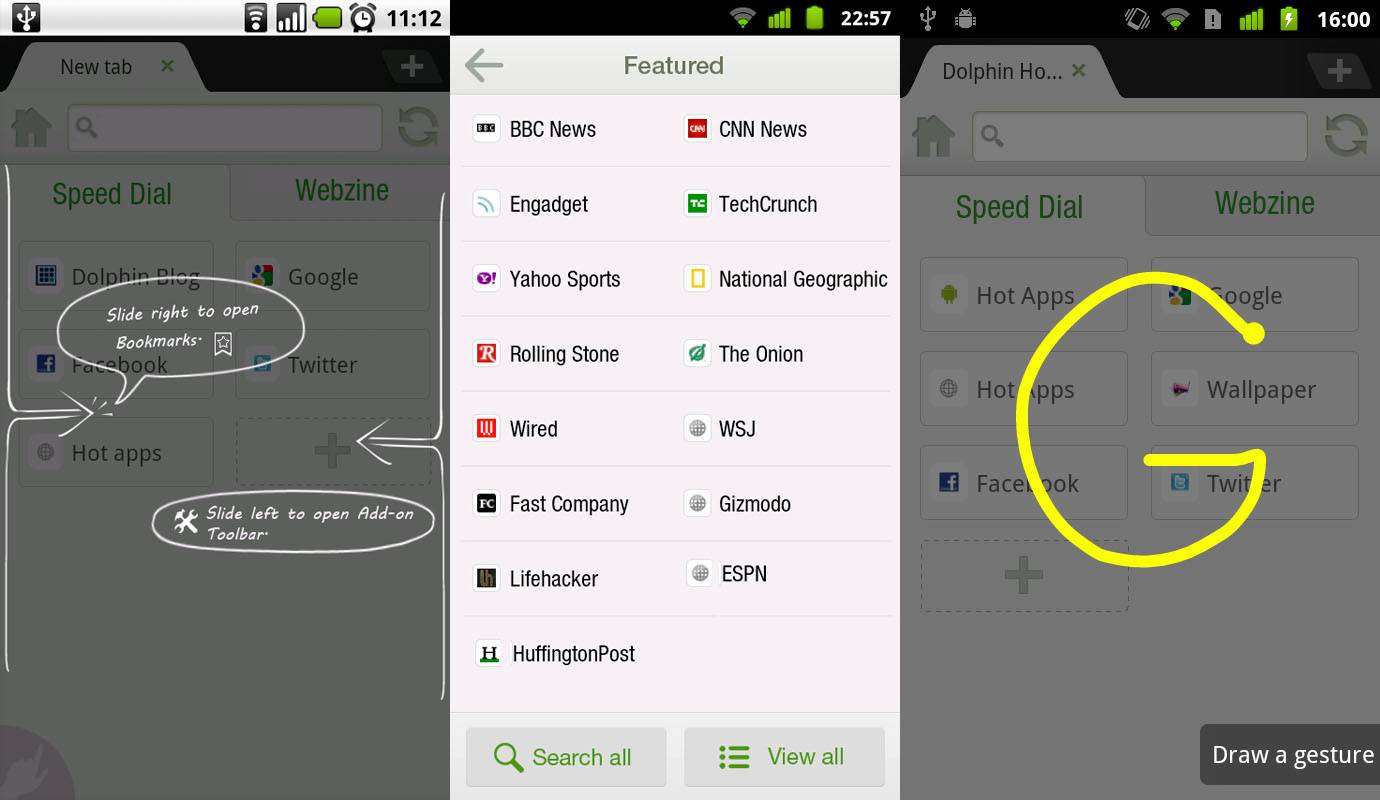
I’ve always found that one of the most frustrating things about constantly flashing new ROMs is that I have to set up non-Google apps like third party browsers all over again. Today that process gets a little easier in one of Android’s most popular browsers, Dolphin. Dolphin HD7 includes a bookmark sync feature, backing up your bookmarks to Dolphin’s servers, not unlike Chrome or Firefox Sync.

The addition will be a welcome one for anyone who’s ever forgotten to back up their bookmarks to an SD card (cough, cough). The syncing feature, which is labelled “Dolphin Connect,” will also back up most of the browser settings, like gestures and history, though apparently any extensions will still need to be re-downloaded. Unfortunately Dolphin doesn’t hook into your Google account, so users will have to sign up for yet another account before using the service. The new version also offers “webzine” sites, which are RSS-powered specially formatted pages.

If you’ve yet to try Dolphin Browser HD on your smartphone or tablet, you owe it to yourself to give it a try. The tabbed interface, gesture control and sliding access to bookmarks and extensions makes for a much more versatile app than the standard browser, and it tends to be a lot more stable than desktop converts like Opera or Firefox Mobile. A wide variety of themes and extensions are available on the Android Market, and like the browser itself, they’re free. The latest version hasn’t hit the Market yet, but you can download it from GetJar for some side-loading goodness. Version 7 will hit the Market on Sunday.

[via Lifehacker]

Share
  • New Nexus 7 outed in Google Hangouts video
  • Verizon HTC One talk returns as the HTC PN073XX surfaces
  • Easter Eggs and Ponies found in the new Google Hangouts

Tags: browserDolphin HDfree apps

  • Search

  • REVIEWS

    • AT&T LG Optimus G Pro ReviewAT&T LG Optimus G Pro Review
    • Iron Man 3 game Review: what you need to knowIron Man 3 game Review: what you need to know
    • Samsung GALAXY S 4 ReviewSamsung GALAXY S 4 Review
    • Samsung Galaxy Note 8.0 ReviewSamsung Galaxy Note 8.0 Review
    • Pebble review: Two weeks with a smartwatchPebble review: Two weeks with a smartwatch
  • HANDS-ON & QUICK LOOKS

    • Google+ Hangouts app goes live, we go hands-onGoogle+ Hangouts app goes live, we go hands-on
    • Flipboard magazines arrive with v2.0 update, we go hands-onFlipboard magazines arrive with v2.0 update, we go hands-on
    • Lenovo IdeaCentre Horizon hands-on with BlueStacks for Android gamingLenovo IdeaCentre Horizon hands-on with BlueStacks for Android gaming


  • T-Mobile G1 Accessories
  • RECENT COMMENTS

  • About
  • Contact
  • Terms of Use
  • Privacy Policy
  • Advertise

Copyright 2013 Android Community






