

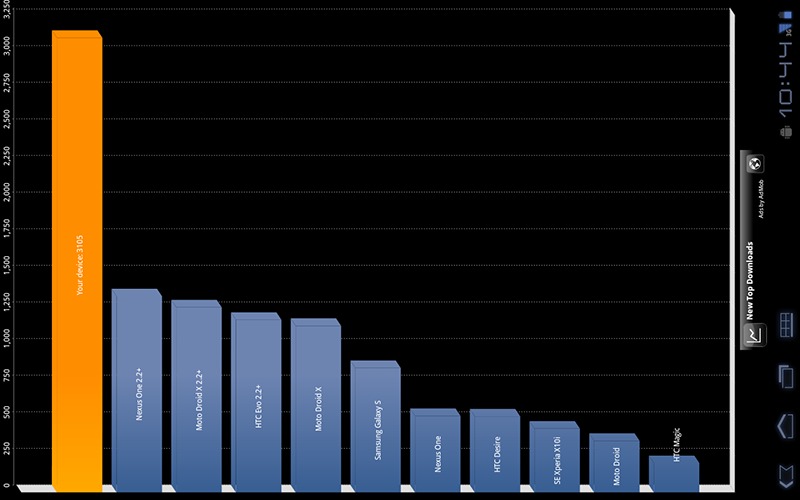
A true constant in the gadget universe is that if a new Android device comes out, you can bet someone over at XDA forums is going to throw caution to the wind and push the edge of the envelop to see what it can do. And the Motorola Xoom is no exception. XDA forum member Coolbho3000 has reported he he overclocked the Xoom up to a max of 1.5 GHz. According to the post at XDA Forums, CoolBho3000 was able to safely get past the Xoom’s max setting of 1Ghz using SetCPU, a utility he wrote to help users boost the power output of their devices.
I have successfully brought the Tegra 2 in the Xoom to 1.5GHz. A few kernel modifications make the dual core chip in the Xoom even more powerful than the recently announced Tegra 2 3D! 1.5GHz through two Cortex A9 cores is truly a force to be reckoned with.
In addition to boosting the speed of the processor, CoolBHO3000 has posted a video to show the improved benchmarks afterwards:
In order to overclock their Xooms, users are advised to do the following procedure:
1. Make sure you’ve unlocked your Xoom’s bootloader for flashing first, then root it.
2. Grab this zip and extract it. It includes a boot.img with the overclocked kernel and a corresponding wifi module: http://www.setcpu.com/files/xoom_ocboot.zip. Thanks to Koush for the rooted ramdisk in this boot.img!
3. Reboot into the bootloader by running:
adb reboot bootloader
4. Flash the boot image to your boot partition, then boot back into Android by running:
fastboot flash boot xoom_ocboot.img
fastboot reboot
5. Push the bcm4329.ko to your /system/lib/modules folder and reboot to re-enable wifi:
adb remount
adb push bcm4329.ko /system/lib/modules/bcm4329.ko
adb reboot
But remember this. Doing so will void your warranty and although CPUSet can safely overclock your system, doing so can always make frying your tablet and possibility. So just keep in mind you may end up with an $800 paper weight if you don’t do it just right and nobody to blame but yourself.
[via XDA Developers]







