• Home
  • Reviews
  • Featured
  • Archives
  • Videos
  • Devices
  • Send Tips
  • Contact
  • AndroidCommunity on Twitter AndroidCommunity on Facebook AndroidCommunity on Google+ AndroidCommunity RSS Feed

Android Community

    • MUST READ

      STORIES

    • HTC Butterfly S official: UltraPixel Camera, BoomSound, 5-inch display

      June 19, 2013

    • Android 5.0 ‘Key Lime Pie’ Concept Design has us dreaming for the future

      June 18, 2013

    • Huawei Ascend P6 official as world’s thinnest smartphone

      June 18, 2013

  • Trending Topics
  • Jelly Bean
  • NVIDIA
  • Galaxy S 4
  • HTC One
  • Nexus 7
  • Tegra
  • Sell Your Used Phone

Tweak your Grand Theft Auto 3 graphics the easy way, with a custom app

1
  • By Michael Crider
  • on 2 Jan, 2012


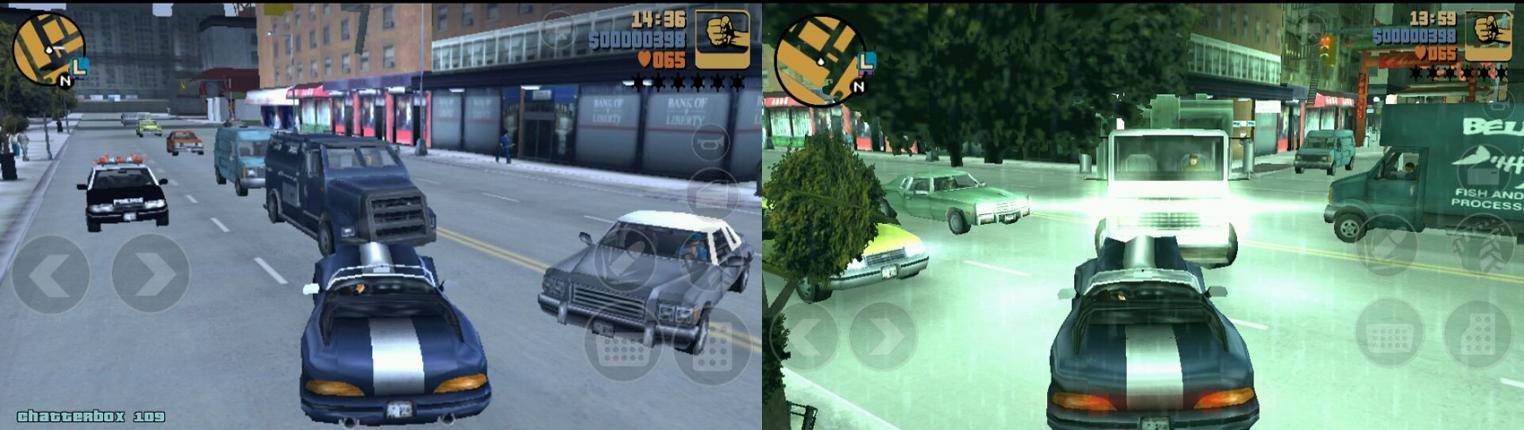
I’m sure that lots of you have been roaming around Liberty City for the past few weeks after the Android release of sandbox classic Grand Theft Auto 3. (Well, I’m sure that those of our readers who are 18 and above have, anyway. Wink wink.) You’ve probably heard that the settings file for GTA3′s graphics is easily found and manipulated by any text editor, but if you want something quicker and more accessible, XDA member “hacksteak25″ has a basic tweak app ready for your use immediately.

The app doesn’t do anything mind-blowing – it just sets a few of the graphic settings higher or lower as you like. The utility comes in handy for phones and tablets that are a little older: using the GTA3 Graphical Settings app, you can quickly change and launch the game, to see how much eye candy you can get away with before it starts to hamper performance. Settings files are automatically backed up, and should something nasty happen, the original (dull) settings are restored once you uninstall the app.

Story Timeline

  • Grand Theft Auto III coming to Android this fall
  • Grand Theft Auto III Anniversary Edition crashes into Android December 15th
  • Grand Theft Auto III arrives in Android Market
  • Boost Grand Theft Auto 3's graphics with a few simple tweaks
  • Grand Theft Auto 3 update adds Bionic and Galaxy Nexus support, on sale for $2.99

Rockstar was a little conservative with the graphics settings that it applied to all GTA 3 downloads – if you’ve got a dual-core processor and more than 768MB of RAM, odds are pretty good that the default settings aren’t using your phone’s full potential. And a lot of the additions really do make for a better gaming experience. GTA 3 isn’t exactly a supermodel my modern gaming standards, but the addition of basic lighting and higher resolution makes it look a lot better. If you’re in the mood to try out a bit of tweaking, install the sideloaded companion app today.

[via Droid Gamers]

Share
  • Android 5.0 'Key Lime Pie' Concept Design has us dreaming for the future
  • Qualcomm Snapdragon 800 series quad-core benchmarks: This thing is fast
  • Minuum Keyboard ready for beta testing - aims to change how we type

Tags: Android appandroid gamesgrand theft automods

  • http://www.facebook.com/people/Gayatri-Mulla/100003345723669 Gayatri Mulla

    Wonderful piece of information, I had come to know about your blog  from my friend Nandu , Hyderabad, I have read at least 7 posts of yours by now, and let me tell you, your website gives the best and the most interesting information. This is just the kind of information that I had been looking for, I’m already your RSS reader now and I would regularly watch out for the new posts, once again hats off to you! Thanks a ton once again, Regards,
    <a href“http://nikfull.com/mobile-movies-3gp-mobile-movies-mp4-mobile-movies/”

  • Search

  • REVIEWS

    • Sony Xperia ZL ReviewSony Xperia ZL Review
    • GALAXY S 4 Tech21 Impact Mesh case reviewGALAXY S 4 Tech21 Impact Mesh case review
    • AT&T LG Optimus G Pro ReviewAT&T LG Optimus G Pro Review
    • Iron Man 3 game Review: what you need to knowIron Man 3 game Review: what you need to know
    • Samsung GALAXY S 4 ReviewSamsung GALAXY S 4 Review
  • HANDS-ON & QUICK LOOKS

    • Qualcomm Snapdragon 800 series developer platform first lookQualcomm Snapdragon 800 series developer platform first look
    • Huawei Ascend P6 “Beauty Shot” hands-on demo shows smooth-skin oddityHuawei Ascend P6 “Beauty Shot” hands-on demo shows smooth-skin oddity
    • Huawei Ascend P6 hands-onHuawei Ascend P6 hands-on


  • T-Mobile G1 Accessories
  • RECENT COMMENTS

  • About
  • Contact
  • Terms of Use
  • Privacy Policy
  • Advertise

Copyright 2013 Android Community