

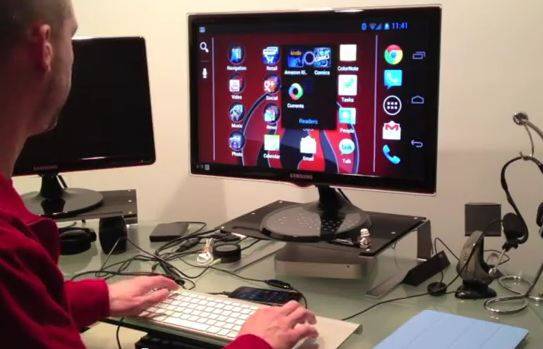
Most high-end Android smartphones include some kind of video-out feature, and Ice Cream Sandwich has built-in support for Bluetooth and USB peripherals like mice and keyboards. This naturally means that you could plug in an HDMI cable, connect your keyboard and mouse, and have something similar to a desktop PC. But is it practical? YouTube user Christian Cantrell aimed to find out. He connected his stock, unrooted Galaxy Nexus to a computer monitor with an MHL adapter, connected an Apple keyboard and trackpad, and tried to replicate desktop functions without any hacking or non-standard equipment.
The experience is surprisingly fluid, and helped in no small way by the trackpad replicating a finger touch. a cursor follows your finger around, and the various taps, holds and gestures in Android make a natural transition. Standard navigation buttons get desktop analogs, like the “back” button being replaced with the Escape key. The Alt-Tab function even brings up Android’s native app switcher – nice. Even with everything connected. Cantrell’s phone keeps running as fast as normal.
Obviously the Android interface isn’t meant for a 20-inch screen, but thanks to the Galaxy Nexus’s native 720p display (which is mirrored on both the phone and the monitor) it works surprisingly well. Replacing a desktop browser or document editor technically works, but the mobile interface holds you back when blown up. That said, the increasingly cloud-based nature of Google’s Android apps makes for pretty good integration. Cantrell’s demonstration is a lot more impressive than Motorola’s various Lapdocks – perhaps carrying a couple of cables and a keyboard and finding an unused monitor may be a better solution all around.
[device id=1740]
[via ItProPortal]








Now Google just needs to add the ability to natively switch to a tablet interface when connected to an external monitor.
This is something like a year ago features.
Atrix 4G was the first to bring on this.
I do the same by changing my computer resolution do 800×600, awesomely big icons.
Would like to see how the Galaxy note fairs in this regard and might have to try it on my Galaxy tab 10.1″. Funny I ran across this thread. Was thinking about replacing my elderly parents computer as it is heading down the road to the grave and being an android fan with the tab, think it would be very much easier for them to understand considering what they really do. Its a more logically designed interface as far as I’m concerned.
Anyone try this w/ Moto X?