

• Home
  • Reviews
  • Featured
  • Archives
  • Videos
  • Devices
  • Tegra
  • Send Tips
  • Contact
  • AndroidCommunity on Twitter AndroidCommunity on Facebook AndroidCommunity on Google+ AndroidCommunity RSS Feed

Android Community

    • MUST READ

      STORIES

    • Sony Xperia Tablet Z shipping date slips

      May 24, 2013

    • Google said to be bidding against Facebook for Waze acquisition

      May 24, 2013

    • Chrome Beta updated with Translation bar and fullscreen tablet support

      May 23, 2013

  • Trending Topics
  • Jelly Bean
  • NVIDIA
  • Galaxy S 4
  • HTC One
  • Nexus 7
  • Sell Your Used Phone

SwitchMe brings multiple user profiles to (rooted) Android phones and tablets

0
  • By Michael Crider
  • on 26 Jan, 2012

SwitchMe brings multiple user profiles to (rooted) Android phones and tablets

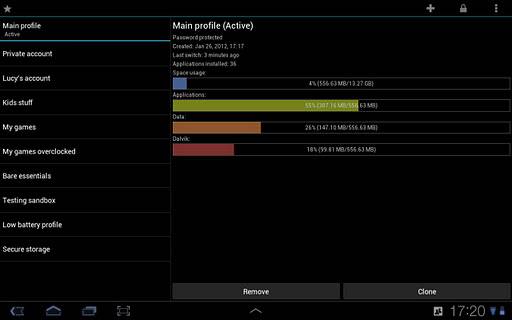
There’s one thing that I’ve heard requested more than anything when it comes to Android tablets: support fur desktop-style user profiles. It’s rare that more than one person uses a smartphone, but tablets were practically made for sharing, especially in the communal area of the family coffee table. While Google graciously allows you to connect more than one Gmail account to a single device, true separation (as in apps, passwords, and settings) is impossible. Enter SwitchMe, the first enabler of a truly multi-user device. The app is free in the Android Market, but requires a $1.98 license key for more than two profiles.

The idea is pretty simple: install SwitchMe on your main profile, then use it to define more profiles and manually reboot into them. The only thing you’ll be missing while in a secondary profile is storage space: the apps and cache from multiple profiles don’t cross over, and are isolated onto different sections of flash storage. This could make things tight, especially if your phone or tablet has less that 8GB of space available and/or you store a lot of games, music or video.

SwitchMe is definitely for advanced users: root access is necessary to set up the different storage areas, and even the developer Fahrbot Mobile  recommends performing a Nandroid backup before using it. Ouch. That said, for the tech-savvy among you who wants to share your device with your kids or significant other, this seems like a pretty in-depth solution that’s much cheaper than buying a second chuck of Android hardware. Just clean off all your gigantic game files before trying it out and you’ll be set.

[via Android Police]

Share
  • Samsung Galaxy Note 3 with Android 4.3 spotted in benchmark results
  • Verizon HTC One "will be announced later"
  • Verizon HTC One tipped for CTIA event unveiling

Tags: Android appAndroid TabletsAndroid-Marketroot

  • Search

  • REVIEWS

    • AT&T LG Optimus G Pro ReviewAT&T LG Optimus G Pro Review
    • Iron Man 3 game Review: what you need to knowIron Man 3 game Review: what you need to know
    • Samsung GALAXY S 4 ReviewSamsung GALAXY S 4 Review
    • Samsung Galaxy Note 8.0 ReviewSamsung Galaxy Note 8.0 Review
    • Pebble review: Two weeks with a smartwatchPebble review: Two weeks with a smartwatch
  • HANDS-ON & QUICK LOOKS

    • Coolpad Quattro II 4G and 8920 hands-onCoolpad Quattro II 4G and 8920 hands-on
    • Kyocera Hydro XTRM and EDGE hands-onKyocera Hydro XTRM and EDGE hands-on
    • Opera for Android exits beta, we go hands onOpera for Android exits beta, we go hands on


  • T-Mobile G1 Accessories
  • RECENT COMMENTS

  • About
  • Contact
  • Terms of Use
  • Privacy Policy
  • Advertise

Copyright 2013 Android Community






