

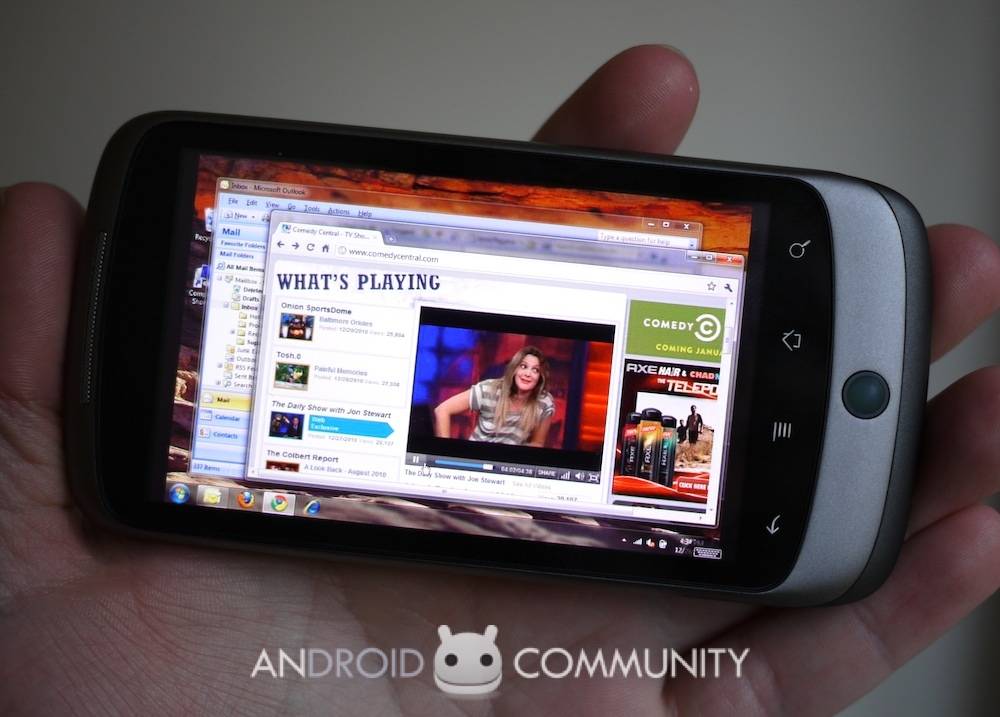
Splashtop has broadened platform support to include Android devices in addition to iOS, meaning that Android smartphone users can now use Splashtop Remote to access their PC apps and digital content, including real-time video and audio streaming.
Splashtop Remote allows for movie and music streaming, together with access to files and applications, remote PC and Flash gameplay, and the ability to wake up a computer remotely via “Wake-on-LAN”. The company recommends using an Android 2.2 phone or tablet for the best results.
Press Release:
Splashtop Remote Seamlessly Connects Any Computing Device – Now Adding Support for Android and Windows
Now anyone with a tablet or a smartphone, regardless of operating system, can access their PC content, media and applications from anywhere
SAN JOSE, Calif.–(BUSINESS WIRE)–Splashtop Inc., the worldwide leader in instant-access computing, today announced that it is making its popular Splashtop Remote Desktop software available for Android and Windows clients, in addition to its current support for iOS clients. This expanded support for client platforms enables anyone with an Android or a Windows smartphone or tablet to access their PC content and applications while on the go, regardless of mobile device operating system.
“Splashtop is building the ‘Bridge to Anywhere,'” said Mark Lee, CEO and co-founder of Splashtop. “Of course, we’re talking software here, not Alaskan politics. Whether you’re a consumer with an Android-based eReader, or a business using iPhones, iPads or Windows tablets, now everything on your PC at home or in the office is at your fingertips no matter where you are. Splashtop Remote seamlessly bridges all of your devices.”
Splashtop Remote allows users to effortlessly access and control their computer remotely through a mobile device, such as an iPad, an iPhone, or an Android-based Dell Streak, Samsung Galaxy Tab or Lenovo LePad, bridging the computing experience across devices. For the first time, users can enjoy a rich and interactive remote PC experience that includes full real-time video and audio. With Splashtop Remote, users can watch movies, listen to music, access all of their files and applications, play PC and Flash games remotely, and even wake up a computer remotely via a “Wake-on-LAN” feature. Splashtop Remote is available localized for English, Chinese, French, German, Italian, Japanese, Korean, and Spanish users.
Splashtop Remote is available now in the Apple App Store and on iTunes, and on the Android Market. To learn more about Splashtop Remote, please visit: http://www.SplashtopRemote.com.








Haven’t been able to locate the Splashtop Remote app to install on my Dell Streak! Whatzup??!?!?!
I’m running Android 1.6 (was told a push to 2.2 should come any day) and I understand the Splashtop Remote should be working with 1.6, but I cannot find the app anywhere to install….
can you not read! It cleary says that android 2.2 needed. Pay attention and read! Gf dammit
can you get splashtop remote app for blackberry torch? if so how?
can you get splashtop remote app for blackberry torch? if so how?
can we use this android os in normal pcs?