

• Home
  • Reviews
  • Featured
  • Archives
  • Videos
  • Devices
  • Send Tips
  • Contact
  • AndroidCommunity on Twitter AndroidCommunity on Facebook AndroidCommunity on Google+ AndroidCommunity RSS Feed

Android Community

    • MUST READ

      STORIES

    • Android 5.0 ‘Key Lime Pie’ Concept Design has us dreaming for the future

      June 18, 2013

    • Huawei Ascend P6 official as world’s thinnest smartphone

      June 18, 2013

    • Kazam created by ex-HTC execs, aimed for European market

      June 17, 2013

  • Trending Topics
  • Jelly Bean
  • NVIDIA
  • Galaxy S 4
  • HTC One
  • Nexus 7
  • Tegra
  • Sell Your Used Phone

SoftMaker Office coming to Android

2
  • By Shane McGlaun
  • on 11 Mar, 2011

SoftMaker Office coming to Android

If you are the sort of user that loves your Android phone, but uses Microsoft Office for document editing frequently in the home or office a new app is heading to the Android Market soon that you might like. The app is coming from SoftMaker and is the firms Office suite. SoftMaker has announced that it is nearly ready to release the beta version of SoftMaker office for Android that will let you edit those Word documents on the go.

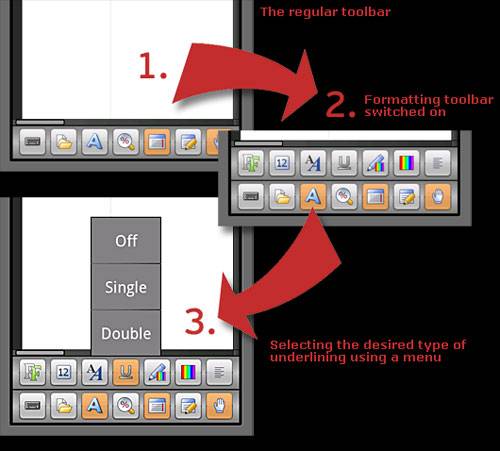
There are already some apps on the Android market that will let you do this, but ZDNet reckons SoftMaker Office has enough features that it will be able to compete well with existing offerings. The screen shot you see here from the app shows lots of formatting options.

Those formatting options might make this as robust as your desktop application. The controls for the app will be optimized for Android’s touch interface and the app will work with Android 3.0 making it viable for tablet users.

[via ZDNet]

Share
  • Google Now wallpapers in full-size available now for all
  • BlackBerry Messenger for Android coming June 27
  • Minuum Keyboard ready for beta testing - aims to change how we type

Tags: AppOffice

  • HoneycombFTW

    I used Softmaker Office for Win desktop and it’s a great little office suite with a couple exceptions. Stick to Softmaker’s *.tmd format or MS *.doc format. I had a great deal of problems working with other formats and using them with OOo. In general Softmaker is focused on compatibility with MS Office more than anything and they do a good job at that.

    The word processor has some nice desktop publishing features, but I stopped using it moving over to gDocs and HTML 100% for comparability reasons. Nonetheless, Quick Office & Softmaker Office are two excellent mobile office suites for anyone looking for that on Android, definitely worth checking out!

  • http://twitter.com/rchowning Richard Chowning

    When I think about what I need for a mobile office, I do not think first about what equipment I need. I think hard about where I will set up my mobile office. My favorite place is Panera Bread. Check it out: http://www.mypaneraoffice.com

  • Search

  • REVIEWS

    • Sony Xperia ZL ReviewSony Xperia ZL Review
    • GALAXY S 4 Tech21 Impact Mesh case reviewGALAXY S 4 Tech21 Impact Mesh case review
    • AT&T LG Optimus G Pro ReviewAT&T LG Optimus G Pro Review
    • Iron Man 3 game Review: what you need to knowIron Man 3 game Review: what you need to know
    • Samsung GALAXY S 4 ReviewSamsung GALAXY S 4 Review
  • HANDS-ON & QUICK LOOKS

    • Huawei Ascend P6 “Beauty Shot” hands-on demo shows smooth-skin oddityHuawei Ascend P6 “Beauty Shot” hands-on demo shows smooth-skin oddity
    • Huawei Ascend P6 hands-onHuawei Ascend P6 hands-on
    • Nyko Dock for NVIDIA SHIELD hands-onNyko Dock for NVIDIA SHIELD hands-on


  • T-Mobile G1 Accessories
  • RECENT COMMENTS

  • About
  • Contact
  • Terms of Use
  • Privacy Policy
  • Advertise

Copyright 2013 Android Community






