

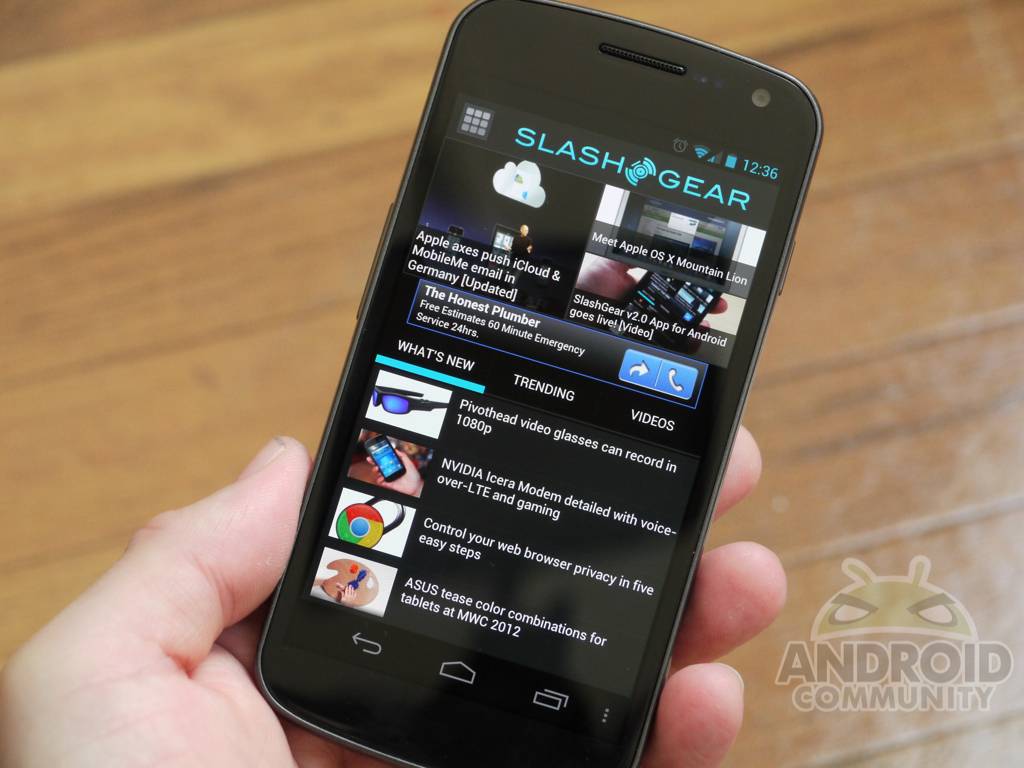
Good news folks, just in time for Mobile World Congress our sister site SlashGear has just launched their all new SlashGear v2.0 app for Android smartphones. If you head over to the Android Market today you’ll find a brand new SlashGear App for Android. They are completely dedicated to all things gadgets, and should be your number one stop to feed that gadget and tech obsession. For the latest gadget news they have you covered, and we’ve taken a first hand look at the all new Android app.
While you’ll want to stay here for all things Android related, they cover everything else you can imagine. Including those other mobile phones, tablets, cameras, laptops, video games — you name it. SlashGear v2.0 is a huge step for their mobile application and brings it up to par with latest OS enhancements in Android 4.0 Ice Cream Sandwich. This is the initial release and more features and improvements (like tablet support) will be coming soon, although it sure is awesome already. Hopefully we’ll have something similar for AC shortly.
The new application is designed to simply and easily display the latest news, headlines, video reviews, and columns all from the SlashGear team. Up top you’ll notice the Android Market style tiles showing the latest Must Read and Featured articles, then neatly below are the rest of the headlines.
They’ve added quick access to stream all the latest reviews and hands-on videos, save, and even share your favorite articles in this latest release. The entire app from overall usage to streaming video has received a huge boost in speed and performance. Helping users read all the news they’d like even faster! SlashGear has added the usual Android share menu, font options, and save for later all conveniently in the menu options.
For all the latest gadget news today, tomorrow, during Mobile World Congress, and beyond make sure you have the SlashGear for Android app. Enjoy my hands-on video, then hit the link or scan the QR code from the gallery below to get get it today.
[vms af057654ef2f38cd77d7]
Download: SlashGear for Android












If it has been updated for ICS, why does it still have a menu button?