

We first heard of a confirmation of GPS issues on the Captivate and Vibrant in August, since then details have been hard to find for the end user. However, now Samsung has posted a set of guides that will walk users through the GPS fix process.
In a quite detailed guide, Samsung guides users through the software fix update as well as installation and use of the GPS Restore application. After you have updated and installed you should no longer have issues with the GPS not giving correct results, or any results at all. You can check out the guides below.
Samsung Captivate (AT&T) Guide
Samsung Vibrant (T-Mobile) Guide








It’s not a fix. It will restore default values for the gps LbsTestMode.
It does not fix the GPS issue, will only reset your gps config in case you made things worst playing around with online lag fix tutorials.
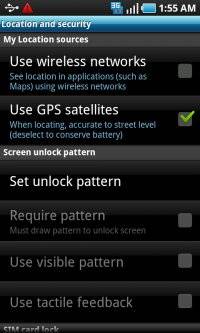
Upon looking through it, the first part is basically how to turn on the option so you’re using satellites as well as the GPS… and the second part is downloading an app to reset the gps’s functions to their original values.
If you never changed them, and are savvy enough to know where the “Settings” menu is, this is not really a fixing guide, but more of a “Learn How to Use Your Phone” guide.
I was hoping for something that would actually fix it… I love the Captivate. Its awesome, and its only lacking point is the gps. Well… that and we still don’t have Froyo yet…
C’mon AT&T!! Give us Froyo already like we were promised!!!!
There is no fix.
This GPS problem is old (6 months?) and no real solution was ever found.
It’s probably a hardware issue.
We just did a video comparing the GPS signal acquiring time and accuracy between the AT&T Captivate, Sprint Epic, and Verizon Continuum pre and post installing/running this app. You can check out the review here to learn more http://bit.ly/gw7SVB .
I’ve never had an issue with my gps on galaxy s (in Australia). havn’t said that, froyo is much more accurate and i’ve noticed that gps reception is much better even if ur inside a building.
when the heck will we get freakin froyo in the states, tired of waiting….stupid at&t give it to the dell phone…but no the captivate, laaame.
Got Froyo for my Bell Canada Samsung Galaxy S Vibrant. GPS is now totally useless. Does not work at all. They changed the service codes so I cannot check the settings.
GPS STILL BROKEN. As noted above this isn’t a fix. Samsung really needs to step up here. Offer a fix that fixes, new devices, refunds- whatever, but been too long with a phone (and ATT replacement) that both shipped with broken GPS.
Fail.
It worked. Before gpsrestore on froyo no lock. After it works within a minute.
gpsrestore did nothing at all for me. I’m going to return this pos before my 30 days are up. Six months to get GPS working? Even the openmoko folks took less time to get their GPS working…and it WAS a hardware fault.