

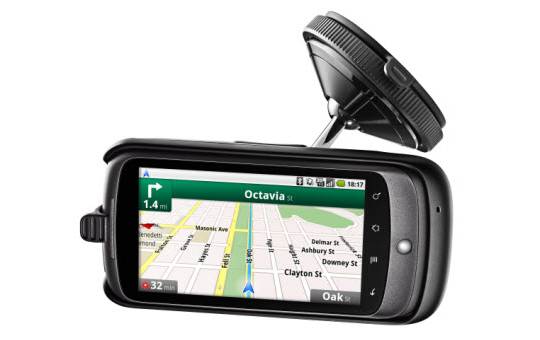
If you’re the proud owner of a Nexus One, then you’ve probably been eagerly anticipating the moment you can finally order your car dock. We’d love to tell you that moment is right now, but unfortunately, that’s not the case. But, we do have a really nice picture! And, that’s got to count for something, right? Right.

Don’t be too dismayed, we’ve also got a few pieces of information that you might like. Along with the suction cup that’s going to make your Nexus One all handy while you’re driving, and the adjustable arm that’ll put it somewhere easy to reach you’ll also get: built-in speakers, the ability to charge your Nexus One while it’s docked, and volume controls for when that lady robot gets too loud for you. (What, she doesn’t yell at you, too, when you go the wrong way?) Unfortunately, there’s no word on a release date yet, so stow your chosen payment method for now. It willcost you $55, though, so maybe you should really think it over.
[Update]: Well, that wasn’t long at all, now was it? If you’re itching to get your hands on the Car Dock, then go right ahead and order yours right now. Just go here.
[via SlashGear]





still looks nice though.
hope the hands free speakers work well for phone calls.
about the dock, i got ahead of myself and ordered it, thankfully google checkout allows you to cancel. Nowhere does google say if the dock can stream music/satnav/calls through a 3.5mm jack to a head unit the same way the desk dock does. they say the BT connection will stream music but if it can only go to the built in speaker then it's a pointless waste of money imo. does anyone know anything more about this unmentioned critical feature?
a pathetic speaker doesn't cut it for calls and navigation. plus, when i'm listening to my own music and a call comes in or i get directions, the music will pause, i'll hear what it has to say, and then the music comes back. as opposed to "oh ****, i have a call coming in, turn down the stereo and roll up the windows so i can hear the crappy little speaker on my phone"
most newer head units have a 3.5mm input for exactly this. half of the reason i was interested in the nexus one was this ability to dock it and not have to plug in the charging cable or headphone cable. Right now when i get in my car i have to plug in both of those things. I was expecting the car dock to be identical to the desk dock in this respect.
it actually seems reversed to me. It's far more convenient to plug in the audio cable at home if you are wishing to play music over your home theater system. In the car you are getting in and out constantly and plugging stuff in is the big hassle, hence the whole bloody point of using a2dp. if the fantastically expensive bluetooth chip built into the dock can't perform this primary function what's the point?
a pathetic speaker doesn't cut it for calls and navigation. plus, when i'm listening to my own music and a call comes in or i get directions, the music will pause, i'll hear what it has to say, and then the music comes back. as opposed to "oh ****, i have a call coming in, turn down the stereo and roll up the windows so i can hear the crappy little speaker on my phone"
most newer head units have a 3.5mm input for exactly this. half of the reason i was interested in the nexus one was this ability to dock it and not have to plug in the charging cable or headphone cable. Right now when i get in my car i have to plug in both of those things. I was expecting the car dock to be identical to the desk dock in this respect.
it actually seems reversed to me. It's far more convenient to plug in the audio cable at home if you are wishing to play music over your home theater system. In the car you are getting in and out constantly and plugging stuff in is the big hassle, hence the whole bloody point of using a2dp. if the fantastically expensive bluetooth chip built into the dock can't perform this primary function what's the point?
If your phone pairs with your car then I think this isn't an issue. There is no other way to connect the dock to the car's sound system. You will need to wire the phone directly - however that might work for your car.
The built in speakers are tiny and not at all suitable for listening to music unless you have absolutely no care about sound quality.
If you use the Drive Safe.ly app it will automatically activate when the BT connects.
Since I wasn't expecting to stream music through it my only other grip is the length of the "stem" that holds the phone, it is VERY short. To keep the phone at arm's length I have to mount it much higher on the windshield than I wanted to. I had been using a $25 generic mount that positioned my phone perfectly but it was of questionable build quality. The official dock definitely is solidly built. I am contemplating using the disk on the dash but I think that would somehow reduce my resell value (though, it is a Ford and I have no resell value anyhow).
I doubt I am the person to answer any BT questions but if I can I will. All in all I think it was a good purchase as the next car I, and most of us, will buy is sure to be BT enabled... But then I might need to buy a new disk for the dash!
My first impressions are good. I love all of the Nexus packaging (for the actual device and accessories) because it makes you feel like you bought a quality product right off the bat.
In the box you will receive the dock, AC adapter, dash-mounting disk, alcohol wipe, and user manuals. I instantly decided to stick the disk onto my dash above my center console so that I can position the Nexus One at arms length (and also close to my AC outlet... preventing me from running wire across the car). Previously, I used my Garmin mounted on my windshield on the far-left side... I prefer this position for window mounting, but like the center for mounting on the dash.
Anyhow, the dock feels like it is durable and will hold the Nexus One nicely in position. I personally like the appearance of the dock and the design seems nice. Mounting the dock is easy and works extremely well with the locking suction cup. The power is plugged into the base of the unit, which runs to the "charging contacts" in the dock.
When you place your Nexus into the unit, it will automatically prompt you whether you want to use the dock for voice calls and music playback. I accepted both of these, because I do not plan to use other means when my device is docked. The N1 is then automatically paired with the dock via BlueTooth (this all happens automagically behind the scenes and is unpaired when you undock).
So far, so good. Now it is time to test things out a bit!! So I used the N1 to drive around town a little bit. The car dock mount is nice and you can position the arm nicely how you like (it rotates at the base and at the mount for the N1). I wish the adhesive on the dash disk was a tad thinker and softer so that you could mount on curved surfaces easier... I can see this being a minor annoyance. The speaker quality of the dock is nice for voice prompts and directions. The volume control is easily accessible and easy to use, but my only complaint is that I wish there was a graphical indication or display of the volume level on-screen when you changed the setting (very disappointed that this does not happen).
At the same time, I was very happy with the volume level and was able to hear directions clearly. I am definitely looking forward to Google improving their Navigation service over time to make it more and more like a "real" GPS unit. Some small things bother me with Google Navigation compared with my Garmin.
I have yet to try playing music through the dock, but I imagine the quality will be subpar and not satisfactory if you are used to your car stereo. I know that I had a million other thoughts on my mind when using the dock, but I cannot think of them off the top of my head right now. Overall, Google/HTC did a good job with the Car Dock integration. Down the road I am sure Google can release software updates to make improvements and add even better functionality.
looks like i just bought myself a $55 bluetooth device that i'll never ever use the bluetooth functionality of. oh well, at least i don't have to keep plugging in a usb cable too -__- thanks google
If your phone pairs with your car then I think this isn't an issue. There is no other way to connect the dock to the car's sound system. You will need to wire the phone directly - however that might work for your car.
The built in speakers are tiny and not at all suitable for listening to music unless you have absolutely no care about sound quality.
If you use the Drive Safe.ly app it will automatically activate when the BT connects.
Since I wasn't expecting to stream music through it my only other grip is the length of the "stem" that holds the phone, it is VERY short. To keep the phone at arm's length I have to mount it much higher on the windshield than I wanted to. I had been using a $25 generic mount that positioned my phone perfectly but it was of questionable build quality. The official dock definitely is solidly built. I am contemplating using the disk on the dash but I think that would somehow reduce my resell value (though, it is a Ford and I have no resell value anyhow).
I doubt I am the person to answer any BT questions but if I can I will. All in all I think it was a good purchase as the next car I, and most of us, will buy is sure to be BT enabled... But then I might need to buy a new disk for the dash!
Also, using the buttons on the phone while driving reinforced the build quality of the dock. The phone feels Very solid sitting in the ****, it doesn't move or bounce at all.
My other concern was, as always with the Nexus One, was heat. I used navigation on it for about an hour and twenty minutes and when I got home the phone wasn't any warmer than if it was just charging.
Also, using the buttons on the phone while driving reinforced the build quality of the dock. The phone feels Very solid sitting in the ****, it doesn't move or bounce at all.
Definitely solid.
I send music from both devices over Bluetooth to car for my rocking sound system. 2 amps, JL subs, Alpine doors. 3.5" screen. All that fun..
So can u guys tell me, the dock itself actually has its own microphone & speaker right?? So when I get a call I can talk n hear hands free through dock, or stereo, and same with music. Cuz Ill send audio to stereo, but handsfree voice my headunits Mic sucks. So the dock might be perfect.
the speaker goes LOUD! thats what i was most worried about so im glad it goes a lot louder than the phone speaker. also, i made one call and my sister said she could hear me well. the only problem i had was getting it to connect. something must be wrong with the dock pins or phone pins.


