

• Home
  • Reviews
  • Featured
  • Archives
  • Videos
  • Devices
  • Send Tips
  • Contact
  • AndroidCommunity on Twitter AndroidCommunity on Facebook AndroidCommunity on Google+ AndroidCommunity RSS Feed

Android Community

    • MUST READ

      STORIES

    • HTC Butterfly S official: UltraPixel Camera, BoomSound, 5-inch display

      June 19, 2013

    • Android 5.0 ‘Key Lime Pie’ Concept Design has us dreaming for the future

      June 18, 2013

    • Huawei Ascend P6 official as world’s thinnest smartphone

      June 18, 2013

  • Trending Topics
  • Jelly Bean
  • NVIDIA
  • Galaxy S 4
  • HTC One
  • Nexus 7
  • Tegra
  • Sell Your Used Phone

My Maps Editor by Google puts your custom maps in your pocket

5
  • By Staff Editor
  • on 15 Dec, 2008

My Maps Editor by Google puts your custom maps in your pocket

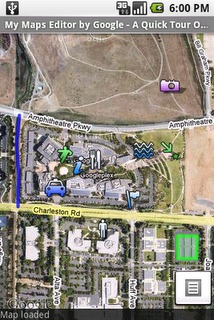
My Maps Editor by Google has just been released into the Android Market and not a moment too soon. With this applications users can create, edit, share, and view personalized maps on your Android-powered handset and synchronize them with the My Maps tab on Google Maps.

You can take your desktop maps with you when your on the go and update them every step of the way. With this app you get the full functionality for markers, lines, and shapes on maps. If you wish you can also post geo-tagged photos directly from your phone. No need to upload any changes you have made to your maps, they are synchronized automatically.

You can make good use of having your maps at your side by planning trips, bike rides or even keep track of your road trips. Head over to the Android Market and download this application, then tell us what you use it for.


Share
  • Android 5.0 'Key Lime Pie' Concept Design has us dreaming for the future
  • Google Now wallpapers in full-size available now for all
  • Minuum Keyboard ready for beta testing - aims to change how we type

Tags: 3rd Party Applicationsandroid osAndroid-AppsAndroid-MarketGoogleGoogle Maps

  • Search

  • REVIEWS

    • Sony Xperia ZL ReviewSony Xperia ZL Review
    • GALAXY S 4 Tech21 Impact Mesh case reviewGALAXY S 4 Tech21 Impact Mesh case review
    • AT&T LG Optimus G Pro ReviewAT&T LG Optimus G Pro Review
    • Iron Man 3 game Review: what you need to knowIron Man 3 game Review: what you need to know
    • Samsung GALAXY S 4 ReviewSamsung GALAXY S 4 Review
  • HANDS-ON & QUICK LOOKS

    • Qualcomm Snapdragon 800 series developer platform first lookQualcomm Snapdragon 800 series developer platform first look
    • Huawei Ascend P6 “Beauty Shot” hands-on demo shows smooth-skin oddityHuawei Ascend P6 “Beauty Shot” hands-on demo shows smooth-skin oddity
    • Huawei Ascend P6 hands-onHuawei Ascend P6 hands-on


  • T-Mobile G1 Accessories
  • RECENT COMMENTS

  • About
  • Contact
  • Terms of Use
  • Privacy Policy
  • Advertise

Copyright 2013 Android Community





