

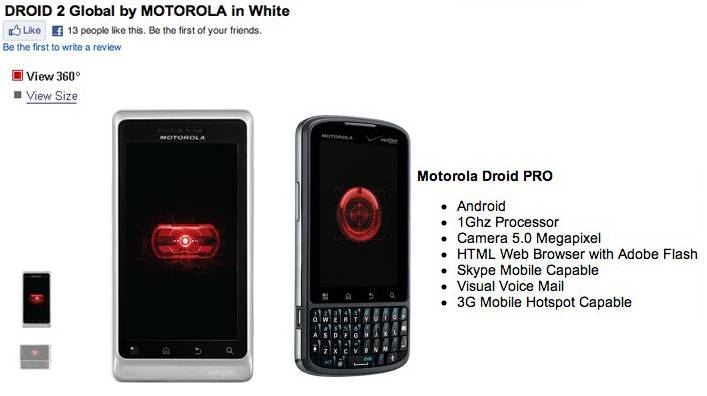
The Motorola DROID 2 Global and the Motorola DROID PRO have both gone on sale at Verizon, with the DROID 2 Global shipping immediately for $199.99 (with a new, two year agreement) and the DROID PRO shipping by November 18 for $179.99. Each phone has both EVDO Rev.A and UMTS/WCDMA connectivity for global use; the DROID 2 Global also gets a 1.2GHz processor.
[via SlashGear]








First Week w Droid 2 Global. Comes with preinstalled apps. You’re not able to unistall them unless root phone. You will use about 8MB data per day if just checking facebook n emails because preinstalled apps are updating in background. Only used 12MB data per month with Blackberry Storm1 when in Africa/Europe. Verizon $15 150MB plan won’t work unless you install free Advanced Task Killer app to kill preinstalled apps auto updating. If high data usage Verizon $30 unlimited plan recommended. Need to sign up for Gmail account to access phone “Market” to search for apps. Get free “No Lock” app to avoid annoying lock feature. Get “Wheres My Droid” app to help you find your lost phone. Get “Advanced Task Killer” app to save your data usage. When submit facebook account, open facebook page, scroll down to bottom of page, click download, now you can upload pics directly to facebook.
To extend droid battery life, search google for tips. They Work!! Qwerty keys top row is too close to top edge of phone for big thumbs. Calls tend to be jarbled when talking to someone and they’re talking at the same time. Overall, I would recommend this phone. Once I did what I stated above, managed preinstalled apps and my installed apps, followed tips for extended battery life, managed data usage the phone works great! I would like to see an update software to get rid of the querks.
The new droid 2 Global will auto sync your facebook contacts to your phone contacts once submit facebook account to phone. Don’t be alarmed when you see all your 500 or more friends in your contacts. Problem solved! Just go to phone contacts, click on top of page where says “All Contacts”, menu comes up, scroll to bottom and click on “Phone Contacts”, now you just see your phone contacts w no facebook contacts. If you need to search facebook contacts, just do the same and click on top of page where now says “Phone Contacts”, menu opens, scroll down to facebook contacts, now you can search just your facebook friends. Nice feature once you get to know how contacts works!