

• Home
  • Reviews
  • Featured
  • Archives
  • Videos
  • Devices
  • Tegra
  • Send Tips
  • Contact
  • AndroidCommunity on Twitter AndroidCommunity on Facebook AndroidCommunity on Google+ AndroidCommunity RSS Feed

Android Community

    • MUST READ

      STORIES

    • Android 4.3 leaks on video with new camera UI

      May 24, 2013

    • HTC One ‘Senseless Edition’ could arrive this summer

      May 23, 2013

    • Verizon HTC One reality returns as DROID DNA offer pops up

      May 20, 2013

  • Trending Topics
  • Jelly Bean
  • NVIDIA
  • Galaxy S 4
  • HTC One
  • Nexus 7
  • Sell Your Used Phone

If you are looking for some trouble, download some apps from “apkdeveloper”

0
  • By Robert Nelson
  • on 28 Dec, 2012

If you are looking for some trouble, download some apps from “apkdeveloper”

The term ‘super’ generally brings happy thoughts. But in the case of one Android developer going by the name of “apkdeveloper” — the term suggests something not so good. Maybe say, super shady. On that note, without getting any further in, we offer this warning. If you have any apps installed by said developer, go ahead and remove them now.

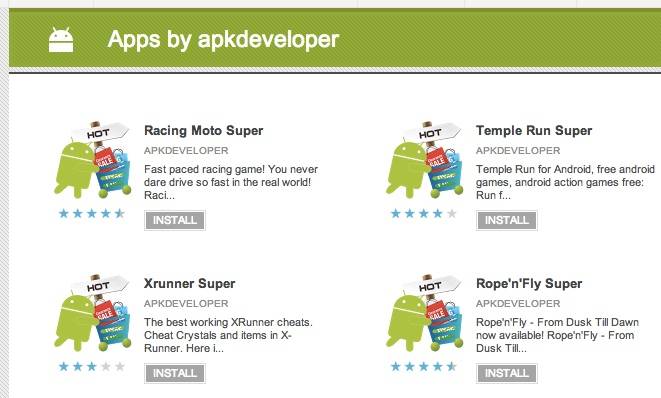
apkdeveloper-apps

The apps are all listed in the Google Play Store showing the same icon which is an Android robot along with a shopping cart and signs that say hot and sale. You can also distinguish the apkdeveloper titles by the ‘super’ in the name. For example, the copy of Temple Run is called Temple Run Super. In this case, we may go as far saying that the real version of Temple Run is super, but Temple Run Super — not so super.

Fun with words aside, lets get into some of the reason for caution here. Take the real and fake versions of World of Goo.You can tell the difference by the name, World of Goo vs. World of Goo Super. Perhaps key here are the permissions. The real World of Goo requires full network access and view network connections — both of which sound logical for a game such as this. The fake World of Goo Super required (as in past tense, this app has since been pulled) full network access along with the approximate location, precise location, read phone calls, mod or delete data on your SD card, find accounts, test access to protected storage, run at startup and more. Simply put — shady.

Of course, the key and problem here — we suspect that many users simply ignore the permissions and choose to install regardless. And in this case, the descriptions and the screen shots were simply lifted from the original apps making it harder to tell the difference. Finally, when you do come across apps such as these, remember, there is a way to report them to Google.

[via Reddit]

Share
  • New Nexus 7 reportedly shipping now, launching next month
  • Verizon HTC One "will be announced later"
  • HTC One with a larger 5-inch display coming soon

Tags: AndroidGoogleGoogle Playmalware

  • Search

  • REVIEWS

    • AT&T LG Optimus G Pro ReviewAT&T LG Optimus G Pro Review
    • Iron Man 3 game Review: what you need to knowIron Man 3 game Review: what you need to know
    • Samsung GALAXY S 4 ReviewSamsung GALAXY S 4 Review
    • Samsung Galaxy Note 8.0 ReviewSamsung Galaxy Note 8.0 Review
    • Pebble review: Two weeks with a smartwatchPebble review: Two weeks with a smartwatch
  • HANDS-ON & QUICK LOOKS

    • Coolpad Quattro II 4G and 8920 hands-onCoolpad Quattro II 4G and 8920 hands-on
    • Kyocera Hydro XTRM and EDGE hands-onKyocera Hydro XTRM and EDGE hands-on
    • Opera for Android exits beta, we go hands onOpera for Android exits beta, we go hands on


  • T-Mobile G1 Accessories
  • RECENT COMMENTS

  • About
  • Contact
  • Terms of Use
  • Privacy Policy
  • Advertise

Copyright 2013 Android Community






