

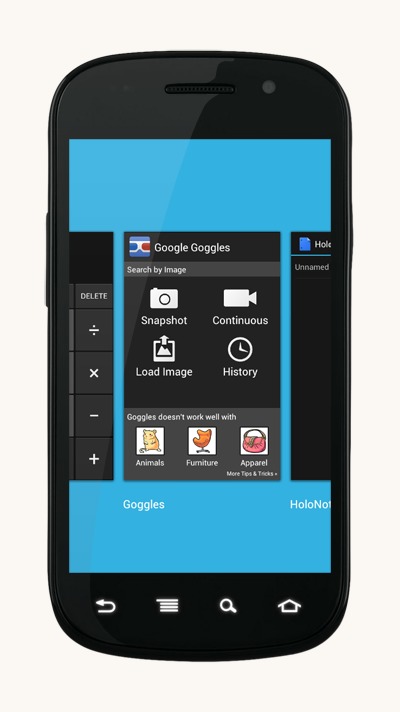
While we at Android Community are understandably loyal to the little green guy, that doesn’t mean we don’t take notice of the competition. And it must be said, some of the phones coming out running Windows Phone 7 (especially those made by Nokia) are real head-turners. While a full WP7 port or popular Android devices is unlikely, various modders have ported elements of the MetroUI to Android. The latest is XDA member “evilisto” (never change, guys) who’s added WP7-style multitasking to stock Ice Cream Sandwich.
When using a Windows Phone 7, uh, phone, users can tap and hold the Back button to bring up a series of thumbnail previews of open tasks in a horizontal layout. Truth be told, it’s a lot like WebOS’ card interface, though not quite as essential to the phone’s operation. (Note also that Android lifted liberally from WebOS for Ice Cream Sandwich’s “open apps” button.) This being the case, evilisto’s mod is basically a skin of Android 4.0’s app switching interface, moving around labels and ratios and adding an ice-blue background. Speaking as someone who’s used WP7, it’s a pretty spot-on imitation. Check it out in action below:
The original mod can be applied to any Nexus S Ice Cream Sandwich ROM, but due to differences in screen size it needs to be adjusted for qHD or larger phones. A conscientious modder has a pre-packaged version for the Galaxy Nexus. If you’ve ever flashed a custom ROM or applied an interface mod, you know what to do: download the ZIP file, reboot into recovery, make a backup, and flash the file. Just press the app switch button like normal to activate it.








Where did he get that wallpaper. its awesome. i must have it.
This one?
http://forum.xda-developers.com/showthread.php?t=1539624
Looks somewhat nice but I’m really not a fan of the Metro design
language. I’d rather have a port of webOS’ cards which is an even better
implementation than the one MS borrowed from Palm.
Actually, since webOS is being open sourced that should be in the cards (hehe), no?
This is pretty sweet! It could be made into an app but it would be a lot of work (especially getting the screen shots without root), but there is a major performance benefit bundling it into SystemUI. If only the mod supported overscrolling horizontally.