• Home
  • Reviews
  • Featured
  • Archives
  • Videos
  • Devices
  • Tegra
  • Send Tips
  • Contact
  • AndroidCommunity on Twitter AndroidCommunity on Facebook AndroidCommunity on Google+ AndroidCommunity RSS Feed

Android Community

    • MUST READ

      STORIES

    • ASUS Padfone Infinity rumors point towards a U.S. release

      May 22, 2013

    • Google invites #ifihadglass applicants to try Google Glass

      May 22, 2013

    • Google Play Magazines updated with card UI to match Google Music

      May 22, 2013

  • Trending Topics
  • Jelly Bean
  • NVIDIA
  • Galaxy S 4
  • HTC One
  • Nexus 7
  • Sell Your Used Phone

HTC ThunderBolt Hands-On and Unboxing by SlashGear

3
  • By Chris Burns
  • on 16 Mar, 2011

HTC ThunderBolt Hands-On and Unboxing by SlashGear

Behold the HTC ThunderBolt as our sister-site SlashGear unboxes it. The oddest thing happens when you first glance at the box – it’s black. There’s nothing on it! That is, until you get a closer look in the light. Just punched-out letters all around, HTC, Verizon, and ThunderBolt around the sides and the bottom, with a bunch of copyright information across the back. When you take off the top, the inside appears red. This is excellent packaging design if I do say so myself. Here at Android Community we’ll have to wait until tomorrow (we hope!) to get our own review model in, but even from the video filmed by our main homie Vince, you can see the power emanating from the box just surrounding one of the most widely anticipated phones of 2011 (and it’s not even spring yet!) Welcome the rain storms, thunderbolts (lightening?) everywhere!

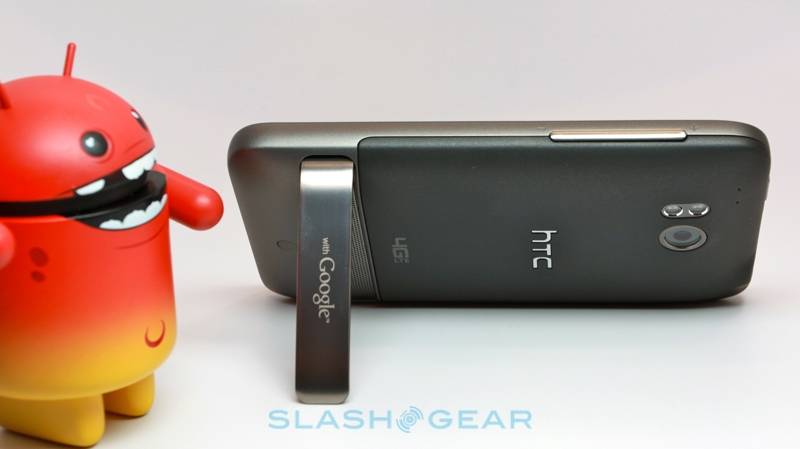
Once the box is opened, there’s just a slip of plastic over the face, and the SIM card is pre-installed. I doubt this will be the case when you purchase the phone from the store, but here it is in this review model. There’s two mics on this device, one on the top and one at the bottom, a 4.3″ WVGA touch screen display, front and back facing cameras, 3.5-inch headphone jack at the top, and 1400 mAh battery inside. The back camera is 8 megapixels and has a dual-LED flash above a kickstand (which has a giant speaker grill underneath,) volume rocker in the upper right, and microUSB port in lower left.

Inside there’s a lovely new Qualcomm 1Ghz processor. On the back there’s a difficult to pop off battery cover and an oddly tight battery over a slot for a Class 4, 32 GB, microSDHC card (this is not just in the review unit, it will come with your purchased unit from the store,) with 8GB onboard memory.

Take a peek of a sampling of images from SlashGear’s unboxing, then prepare yourself for a series of pre-looks at the ThunderBolt today with a closer look at the device tomorrow when we get the unit in for ourselves! Tomorrow, tomorrow, I love ya, tomorrow – it’s only a day a-way.


htc-thunderbolt-verizon-slashgear-15-SlashGear
htc-thunderbolt-verizon-slashgear-14-SlashGear
htc-thunderbolt-verizon-slashgear-13-SlashGear

htc-thunderbolt-verizon-slashgear-12-SlashGear
htc-thunderbolt-verizon-slashgear-11-SlashGear
htc-thunderbolt-verizon-slashgear-10-SlashGear

htc-thunderbolt-verizon-slashgear-09-SlashGear
htc-thunderbolt-verizon-slashgear-08-SlashGear
htc-thunderbolt-verizon-slashgear-07-SlashGear

htc-thunderbolt-verizon-slashgear-06-SlashGear
htc-thunderbolt-verizon-slashgear-05-SlashGear
htc-thunderbolt-verizon-slashgear-04-SlashGear

htc-thunderbolt-verizon-slashgear-03-SlashGear
htc-thunderbolt-verizon-slashgear-02-SlashGear

Share
  • Samsung Galaxy Note 3 with Android 4.3 spotted in benchmark results
  • Verizon HTC One running Android 4.2.2 could be coming soon
  • Verizon HTC One tipped for CTIA event unveiling

Tags: GooglehtcHTC ThunderboltslashgearthunderboltVerizon

  • http://twitter.com/Dravyy Jean-Michel Savard

    A 1400mah battery for a 4.3″ screen with LTE is such a failure… A HDMI port would have also been nice.

  • http://twitter.com/Dravyy Jean-Michel Savard

    A 1400mah battery for a 4.3″ screen with LTE is such a failure… A HDMI port would have also been nice.

  • Anonymous

    You guys need to change your lights or change the shutter speed of the video cam to reduce that flicker!

  • Search

  • REVIEWS

    • AT&T LG Optimus G Pro ReviewAT&T LG Optimus G Pro Review
    • Iron Man 3 game Review: what you need to knowIron Man 3 game Review: what you need to know
    • Samsung GALAXY S 4 ReviewSamsung GALAXY S 4 Review
    • Samsung Galaxy Note 8.0 ReviewSamsung Galaxy Note 8.0 Review
    • Pebble review: Two weeks with a smartwatchPebble review: Two weeks with a smartwatch
  • HANDS-ON & QUICK LOOKS

    • Coolpad Quattro II 4G and 8920 hands-onCoolpad Quattro II 4G and 8920 hands-on
    • Kyocera Hydro XTRM and EDGE hands-onKyocera Hydro XTRM and EDGE hands-on
    • Opera for Android exits beta, we go hands onOpera for Android exits beta, we go hands on


  • T-Mobile G1 Accessories
  • RECENT COMMENTS

  • About
  • Contact
  • Terms of Use
  • Privacy Policy
  • Advertise

Copyright 2013 Android Community