

• Home
  • Reviews
  • Featured
  • Archives
  • Videos
  • Devices
  • Tegra
  • Send Tips
  • Contact
  • AndroidCommunity on Twitter AndroidCommunity on Facebook AndroidCommunity on Google+ AndroidCommunity RSS Feed

Android Community

    • MUST READ

      STORIES

    • Chrome Beta updated with Translation bar and fullscreen tablet support

      May 23, 2013

    • HTC One ‘Senseless Edition’ could arrive this summer

      May 23, 2013

    • HTC One sales are strong as it passes 5 million mark

      May 23, 2013

  • Trending Topics
  • Jelly Bean
  • NVIDIA
  • Galaxy S 4
  • HTC One
  • Nexus 7
  • Sell Your Used Phone

Google’s homepage gets a new design for mobile devices

1
  • By Brittany Hillen
  • on 10 Oct, 2012

Google’s homepage gets a new design for mobile devices

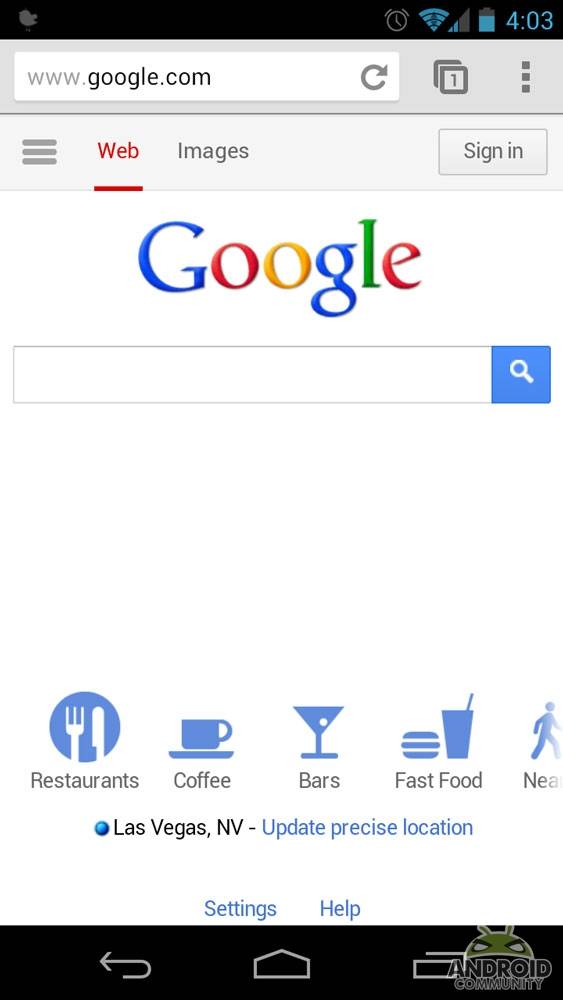
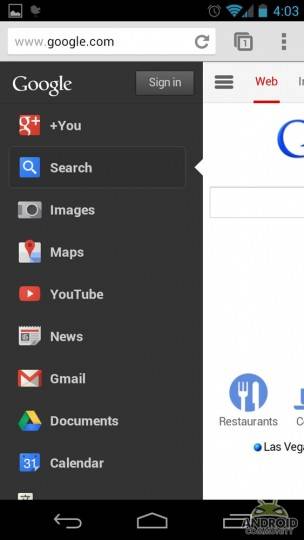
That awesome black menu bar that Google users have enjoyed when using the search engine via their computer browser? It’s just been ported to the mobile version of Google’s homepage, as you can see in the screenshots below. The various links nestled in the normal Google homepage are available in a hidden menu on the left side of the screen called the “Options” tab.

To see a menu with links to the most commonly used Google services (visible in the screenshot below), tap the “Options” tab. If the service you want isn’t listed on the left-side menu, you can find it by selecting “All Products” located on the bottom of the menu. Tapping the Options tab again closes the menu.
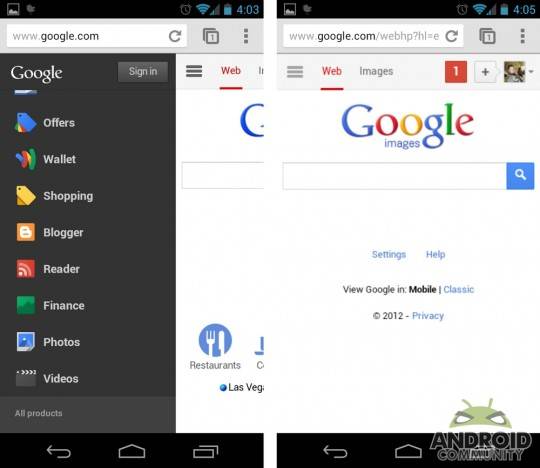
The next tab in the series is the Search tab, which is the default tab that will be opened when you use Google via your mobile. The third and last tab is the image search tab, and it functions the same as the Options tab. Tap the Image tab to open Google Image search, then tap it again to close it.
For those with a Google+ account, your G+ profile picture will appear to the right of the Image Search tab. If you’re not logged into your Google+ account, you’ll see a sign in button instead. New Google+ notifications will be listed over the picture, and, obviously, tapping them will pull up your account. The new homepage seems to show up on all mobile devices, not just mobiles running Android. We’ve found, however, that while Chrome shows the new homepage, the standard WebKit browser currently doesn’t.

[via The Android Soul]

Share
  • Samsung Galaxy Note 3 with Android 4.3 spotted in benchmark results
  • Verizon HTC One "will be announced later"
  • Verizon HTC One tipped for CTIA event unveiling

Tags: browserGooglemobile devices

  • Eman

    I HATE THIS! Plus, “android community” nice mobile website! Not

  • Search

  • REVIEWS

    • AT&T LG Optimus G Pro ReviewAT&T LG Optimus G Pro Review
    • Iron Man 3 game Review: what you need to knowIron Man 3 game Review: what you need to know
    • Samsung GALAXY S 4 ReviewSamsung GALAXY S 4 Review
    • Samsung Galaxy Note 8.0 ReviewSamsung Galaxy Note 8.0 Review
    • Pebble review: Two weeks with a smartwatchPebble review: Two weeks with a smartwatch
  • HANDS-ON & QUICK LOOKS

    • Coolpad Quattro II 4G and 8920 hands-onCoolpad Quattro II 4G and 8920 hands-on
    • Kyocera Hydro XTRM and EDGE hands-onKyocera Hydro XTRM and EDGE hands-on
    • Opera for Android exits beta, we go hands onOpera for Android exits beta, we go hands on


  • T-Mobile G1 Accessories
  • RECENT COMMENTS

  • About
  • Contact
  • Terms of Use
  • Privacy Policy
  • Advertise

Copyright 2013 Android Community






