

• Home
  • Reviews
  • Featured
  • Archives
  • Videos
  • Devices
  • Tegra
  • Send Tips
  • Contact
  • AndroidCommunity on Twitter AndroidCommunity on Facebook AndroidCommunity on Google+ AndroidCommunity RSS Feed

Android Community

    • MUST READ

      STORIES

    • Android 4.3 leaks on video with new camera UI

      May 24, 2013

    • HTC One ‘Senseless Edition’ could arrive this summer

      May 23, 2013

    • Verizon HTC One reality returns as DROID DNA offer pops up

      May 20, 2013

  • Trending Topics
  • Jelly Bean
  • NVIDIA
  • Galaxy S 4
  • HTC One
  • Nexus 7
  • Sell Your Used Phone

Gmail App Inverted with a Black Color Theme

5
  • By Cory Gunther
  • on 11 Aug, 2011

Gmail App Inverted with a Black Color Theme

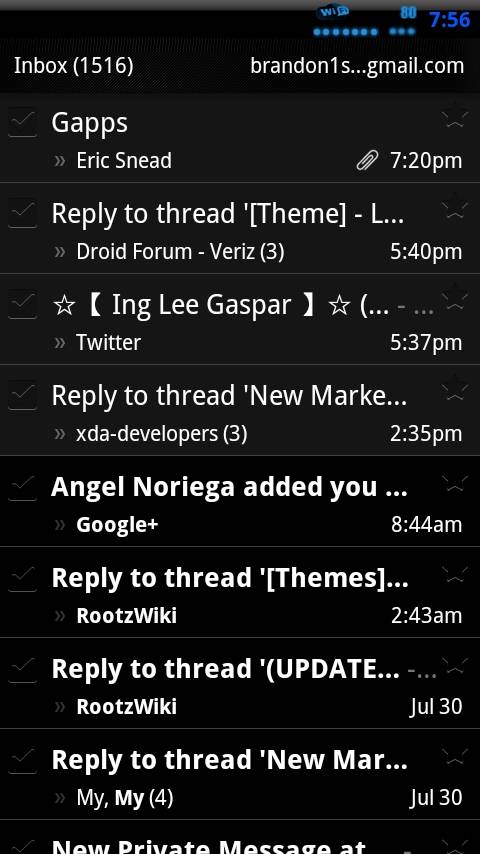
In the world of Android we all love tweaking and hacking our devices so I figured I’d share this quick little theme with our readers. What we have here is another blacked out app theme but this time it’s for Gmail. What we have is the latest version 2.3.5 Gmail that has been inverted to be completely black and fits in nicely with the rest of Android, not to mention could help with battery life.

Last week I posted something very similar with the Google + App being treated with the same black theme and many users really enjoyed that. The developer does mention this should work for both rooted and non-rooted phones but I’d be careful if Gmail is your main email client as things could potentially have problems. Obviously doing a nandroid backup using something like Astro to backup Gmail and settings before continuing would probably be a good idea.

I have not tried this myself so I cannot guarantee how the process will go but from reading a few replies over at XDA most seem to be able to figure it out pretty easily and are enjoying their new Black Gmail client. I’d advise anyone wanting to try this to ask any questions in the forum first and make sure you know what you are doing and have any important settings or emails backed up just to be safe, but then you can always uninstall and just get the stock Gmail from the market if needed. Give it a try and feel free to report how it goes in the comment section below — Enjoy!

[via XDA Forums]

Share
  • Verizon HTC One "will be announced later"
  • New Nexus 7 reportedly shipping now, launching next month
  • HTC One with a larger 5-inch display coming soon

Tags: AppApplicationblackCustom ROMGmailGooglerootTheme

  • Anonymous

    Sweet! Seems snappier..

  • Anonymous

    Sweet! Seems snappier..

  • Anonymous

    cool!!! it began with G+ inverted then twitter and now Gmail, nice work,XDAdevelopers

  • Emiles033

    How do I get the black gmail apk??

  • http://bgoog.com/ Black Google

    nice, inverted theme looks sexy. i found a black google for my phone at bgoog.com too, looks sweet.

  • Search

  • REVIEWS

    • AT&T LG Optimus G Pro ReviewAT&T LG Optimus G Pro Review
    • Iron Man 3 game Review: what you need to knowIron Man 3 game Review: what you need to know
    • Samsung GALAXY S 4 ReviewSamsung GALAXY S 4 Review
    • Samsung Galaxy Note 8.0 ReviewSamsung Galaxy Note 8.0 Review
    • Pebble review: Two weeks with a smartwatchPebble review: Two weeks with a smartwatch
  • HANDS-ON & QUICK LOOKS

    • Coolpad Quattro II 4G and 8920 hands-onCoolpad Quattro II 4G and 8920 hands-on
    • Kyocera Hydro XTRM and EDGE hands-onKyocera Hydro XTRM and EDGE hands-on
    • Opera for Android exits beta, we go hands onOpera for Android exits beta, we go hands on


  • T-Mobile G1 Accessories
  • RECENT COMMENTS

  • About
  • Contact
  • Terms of Use
  • Privacy Policy
  • Advertise

Copyright 2013 Android Community






