

• Home
  • Reviews
  • Featured
  • Archives
  • Videos
  • Devices
  • Tegra
  • Send Tips
  • Contact
  • AndroidCommunity on Twitter AndroidCommunity on Facebook AndroidCommunity on Google+ AndroidCommunity RSS Feed

Android Community

    • MUST READ

      STORIES

    • Google+ Hangouts app update adds tablet support

      May 17, 2013

    • Skobbler for Android update adds turn-by-turn navigation

      May 17, 2013

    • Sony Xperia Tablet Z added to Android Open Source Project

      May 17, 2013

  • Trending Topics
  • Jelly Bean
  • NVIDIA
  • Galaxy S 4
  • HTC One
  • Nexus 7
  • Sell Your Used Phone

Dropbox for Android now lets you move folders in-app

0
  • By Eric Abent
  • on 5 Dec, 2012

Dropbox for Android now lets you move folders in-app

For many, Dropbox is an essential tool that gets used every day. It’s free and easy to use, and the fact that it’s on so many different platforms makes it to go-to choice for cloud syncing and storage for a lot of people. The Dropbox Android app is a handy little tool with a lot of different features, but one feature it’s always been missing is the ability to move folders around within the app.


That all changes today, as Dropbox has been updated to version 2.2.2 on Android. There’s only one new addition in this update, and you’ve probably already guessed what it is: the ability to move files and folders in-app. It isn’t the biggest or even the most essential update ever, but it’s one that we’re sure a lot of Dropbox users will appreciate.

Other than some unnamed bug fixes, there isn’t anything else to this update, so don’t expect it to take a lot of time to download. Dropbox has been pretty good with pushing update for its Android app out the door. With the update before this (2.2.1), Dropbox added support for European Spanish and Italian, while it added the Photos tab back in October.
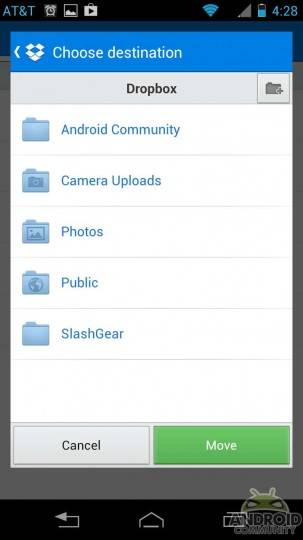
Now the app Android users have is packed with even more features, so in that sense, Dropbox keeps getting better. If you don’t have Dropbox, you can download it from the Google Play Store [download link]. Given the rate at which Dropbox has been pushing updates out the door, it probably won’t be long before we hear of more updates, so keep it tuned here to Android Community for new details!
Screenshot_2012-12-05-16-28-41wtmk
Screenshot_2012-12-05-16-28-48wtmk

Story Timeline

  • Google Drive revealed: Dropbox beware
  • Google Drive vs Dropbox vs Box and more
  • Verizon and AT&T won't honor Dropbox 50GB promo for Galaxy S III
  • Dropbox Pro plans go big with 500GB option
  • Samsung Galaxy Note 10.1 comes with 50GB Dropbox storage free for 2 years
  • Dropbox introduces new photos tab to show off your pictures
Share
  • New Nexus 7 outed in Google Hangouts video
  • Verizon HTC One talk returns as the HTC PN073XX surfaces
  • Easter Eggs and Ponies found in the new Google Hangouts

Tags: AndroidAndroid appdropboxGoogle Play Storeupdates

  • Search

  • REVIEWS

    • AT&T LG Optimus G Pro ReviewAT&T LG Optimus G Pro Review
    • Iron Man 3 game Review: what you need to knowIron Man 3 game Review: what you need to know
    • Samsung GALAXY S 4 ReviewSamsung GALAXY S 4 Review
    • Samsung Galaxy Note 8.0 ReviewSamsung Galaxy Note 8.0 Review
    • Pebble review: Two weeks with a smartwatchPebble review: Two weeks with a smartwatch
  • HANDS-ON & QUICK LOOKS

    • Google+ Hangouts app goes live, we go hands-onGoogle+ Hangouts app goes live, we go hands-on
    • Flipboard magazines arrive with v2.0 update, we go hands-onFlipboard magazines arrive with v2.0 update, we go hands-on
    • Lenovo IdeaCentre Horizon hands-on with BlueStacks for Android gamingLenovo IdeaCentre Horizon hands-on with BlueStacks for Android gaming


  • T-Mobile G1 Accessories
  • RECENT COMMENTS

  • About
  • Contact
  • Terms of Use
  • Privacy Policy
  • Advertise

Copyright 2013 Android Community







