

• Home
  • Reviews
  • Featured
  • Archives
  • Videos
  • Devices
  • Tegra
  • Send Tips
  • Contact
  • AndroidCommunity on Twitter AndroidCommunity on Facebook AndroidCommunity on Google+ AndroidCommunity RSS Feed

Android Community

    • MUST READ

      STORIES

    • Google H840 media streamer hits the FCC to replace the Nexus Q

      May 18, 2013

    • Google+ Hangouts app update adds tablet support

      May 17, 2013

    • Skobbler for Android update adds turn-by-turn navigation

      May 17, 2013

  • Trending Topics
  • Jelly Bean
  • NVIDIA
  • Galaxy S 4
  • HTC One
  • Nexus 7
  • Sell Your Used Phone

Boost Grand Theft Auto 3′s graphics with a few simple tweaks

6
  • By Michael Crider
  • on 19 Dec, 2011

Boost Grand Theft Auto 3′s graphics with a few simple tweaks

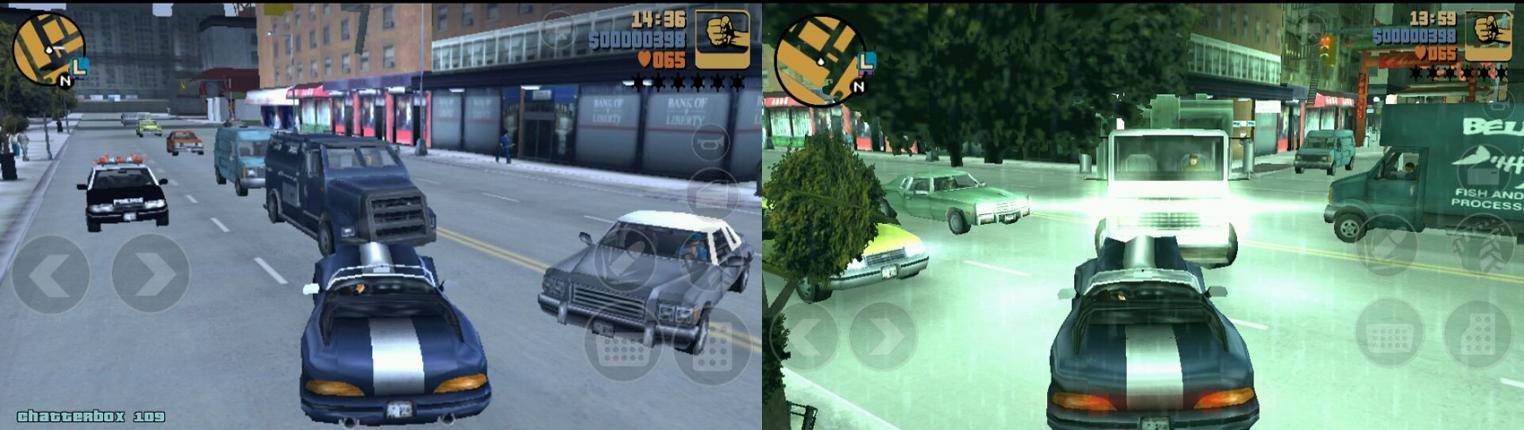
A few of you have probably been reliving your most outrageous Liberty City exploits since Rockstar released a pint-sized port of sandbox classic Grand Theft Auto 3 for Android last week. While the game makes the transition mostly intact, some of the graphical flair of the original is missing, probably to make it run better on a wider variety of Android phones and tablets. If you’re running a high end phone with a fast dual-core processor and a competent GPU, it might not be using them to the best of their abilities. Luckily, German site AndroidNext has found a hidden settings file within the game’s data folder, which will allow you to modify some basic graphics settings.

First, connect your phone or tablet to your PC, in either USB mass storage or MTP mode. Open the SD card or the /sdcard/ folder. Navigate to /Android/data/com.rockstar.gta3eng/files/GTA3. (I’m guessing on the “com.rockstar.gta3eng” file – it may be named slightly different in the US/UK.) Copy the file “gta3.set” to your computer for backup, then open the original in a text editor. Inside you’ll find all the fiddly little settings that you’re probably used to if you play PC games on a regular basis.

Story Timeline

  • Grand Theft Auto III coming to Android this fall
  • ASUS Transformer Prime Official Hands-on
  • Grand Theft Auto III Anniversary Edition crashes into Android December 15th
  • ASUS confirms Transformer Prime will be available on launch day
  • Grand Theft Auto III arrives in Android Market

With the right settings adjusted, effects like light bloom, dynamic shadows, headlights, weather and more high-resolution effects become enabled. Obviously the game is going to take a hit on performance, but if your device is powerful enough, you may not even notice it. If you’re planning on picking up an Asus Eee Pad Transformer Prime, be sure and keep these settings handy. You can go directly to AndroidNext’s site for a pre-configured settings file, but be warned: it might have your menus and subtitles sprechan sie Deustch.

Share
  • New Nexus 7 outed in Google Hangouts video
  • Google H840 media streamer hits the FCC to replace the Nexus Q
  • Samsung says it will look into compacting Galaxy S 4 software bloat

Tags: android gamesAndroid-Marketmods

  • http://twitter.com/peteyagmin Pete Yagmin

    I thought ‘boost’ was a play on words since we’re talking about GTA! Glad to see it means enhance rather than steal!

    • http://www.androidcommunity.com Michael Crider

      ba-dum TISH

  • Anonymous

    Even the default settings run less than 1 frame per second on my Nexus One. Oh well, good to see some people’s newer phones have horsepower to spare anyway. Maybe it’s coming up on upgrade time for me.

  • Pantydoodle

    Help: when I open the gta3.set file in notepad, I only see gibberish :(

  • http://www.facebook.com/people/Joey-Palazzolo/1345033561 Joey Palazzolo

    yeah all i see is gibberish as well… someone help

  • http://www.facebook.com/people/Joey-Palazzolo/1345033561 Joey Palazzolo

    all i see is gibberish as well please help

  • Search

  • REVIEWS

    • AT&T LG Optimus G Pro ReviewAT&T LG Optimus G Pro Review
    • Iron Man 3 game Review: what you need to knowIron Man 3 game Review: what you need to know
    • Samsung GALAXY S 4 ReviewSamsung GALAXY S 4 Review
    • Samsung Galaxy Note 8.0 ReviewSamsung Galaxy Note 8.0 Review
    • Pebble review: Two weeks with a smartwatchPebble review: Two weeks with a smartwatch
  • HANDS-ON & QUICK LOOKS

    • Google+ Hangouts app goes live, we go hands-onGoogle+ Hangouts app goes live, we go hands-on
    • Flipboard magazines arrive with v2.0 update, we go hands-onFlipboard magazines arrive with v2.0 update, we go hands-on
    • Lenovo IdeaCentre Horizon hands-on with BlueStacks for Android gamingLenovo IdeaCentre Horizon hands-on with BlueStacks for Android gaming


  • T-Mobile G1 Accessories
  • RECENT COMMENTS

  • About
  • Contact
  • Terms of Use
  • Privacy Policy
  • Advertise

Copyright 2013 Android Community






