

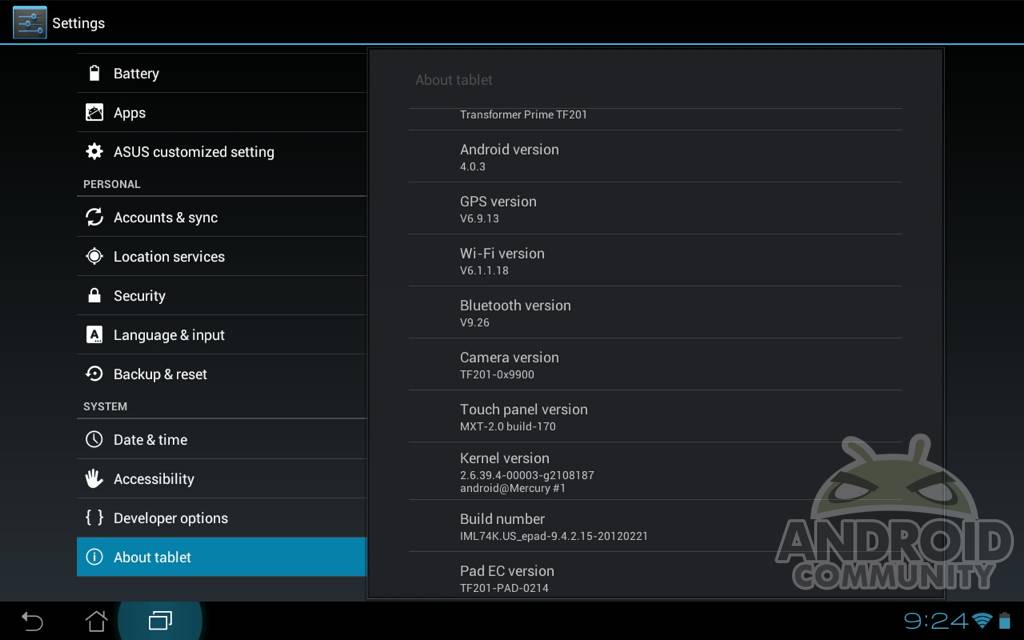
ASUS has been pretty busy it seems, because they have just pushed out another over the air update for the Transformer Prime tablet. This is actually the third OTA update for the Prime this month alone here in the US. I’m starting to wonder if they’ll ever give us a change log. After the last update seemed to cause more problems than it fixed, we are hoping for something different with this latest update to build 9.4.2.15 so we’ll see.
The update is very minor and should only take a few minutes. The only changes were to the build number and none were made to GPS or WiFi for those wondering. After the last update just last week many were complaining they had random reboots return, or those without reboots were now having the issue. My own Prime has only rebooted once the entire time I’ve owned it so while this problem is widespread, it doesn’t affect everyone.
With ASUS pumping out 3 updates a month I’m starting to have mixed feelings. Yes updates in a fast and timely manor are great, especially OS upgrades like Ice Cream Sandwich. With updates as minor as these maybe they should do one big one, or at least give us a change log so we know what is being “improved”. So far the only improvement I’m noticing is smoother scrolling and a weird screen glitch appears to be gone.
Hopefully this 3rd update finally fixes whatever random reboot issue they seem to be having. Or changes now they’ve released the bootloader unlock tool. As usual you can manually pull the update by menu > settings > about tablet > firmware updates. Most likely this will break root as always but you can run OTA Rootkeeper from the Market to save root — works great on the last update.
[device id=1934]








Just updated to latest firmware having had serious reboot issue after upgrading to b14 on 20th Feb (rebooting every 1 – 3 minutes).
New Firmware works!!!! Been using it for past few hours with no problems. Delighted to have my tablet back
Lol, mine’s the reverse. I had no issues but now having reboot issues. What did you do about it? Just wait for next update?
I got my prime yesterday and updated everything but still having the reboot issue.
Mine is so slow now and freezes all the time!!
You mean affect, not effect.
Hi all, updated yesterday saturday 25 Feb. Ever since my wife’s transformer cannot find our router IP address so cannot go on the internet. Machine constantly says “obtaining IP address” and just sits there, It worked perfectly with no issues before the update. I thought we were going forward with technoligy not backwards. Can any one help please
Chad
When my devices cannot connect to my home wireless router, I just restart the router.
Hey Chad,
I got the same update last night and it killed my WiFi connectivity. I can only connect now when I am within 3 feet of the wireless router. It is not usable any where else in the house. The other 5 computers are working fine, so it is very likely this update caused problem. I have opened a ticket with ASUS support. I’ll post again once I hear from them.
was this written by an eighth grader?
So you don’t use Microsoft software at all? They update every Tuesday!