

• Home
  • Reviews
  • Featured
  • Archives
  • Videos
  • Devices
  • Tegra
  • Send Tips
  • Contact
  • AndroidCommunity on Twitter AndroidCommunity on Facebook AndroidCommunity on Google+ AndroidCommunity RSS Feed

Android Community

    • MUST READ

      STORIES

    • Intel-powered Galaxy Tab 3 leaked in benchmarks

      May 21, 2013

    • Samsung Galaxy Note 3 with Android 4.3 spotted in benchmark results

      May 21, 2013

    • Verizon HTC One running Android 4.2.2 could be coming soon

      May 21, 2013

  • Trending Topics
  • Jelly Bean
  • NVIDIA
  • Galaxy S 4
  • HTC One
  • Nexus 7
  • Sell Your Used Phone

Android x86 adds Ethernet and VirtualBox support

2
  • By Michael Crider
  • on 23 Feb, 2012

Android x86 adds Ethernet and VirtualBox support

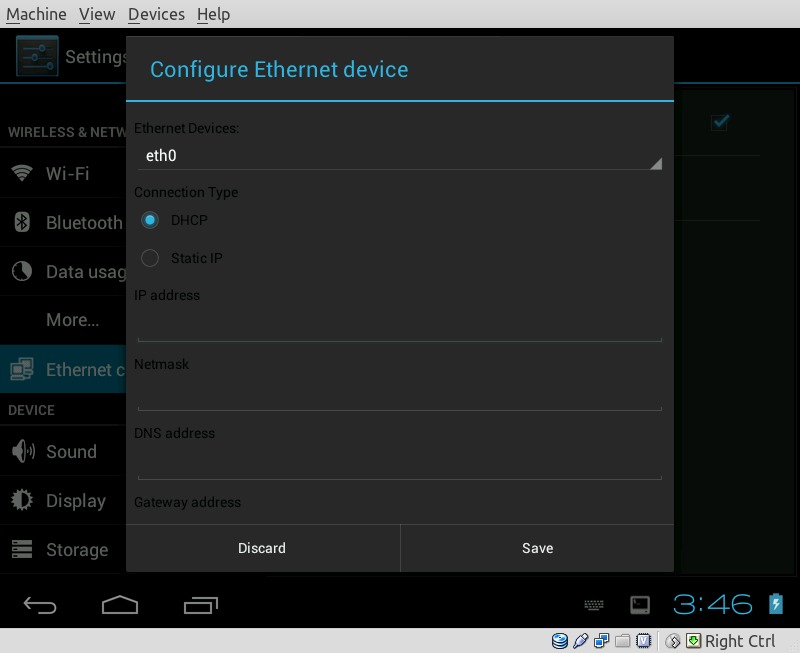
There’s been a lot of talk about desktop modes i Android this week, but many don’t realize that you can install an experimental build of Android on your laptop or desktop computer right now. Android-x86 is a derivative of open-source Android that runs on standard Intel-compliant hardware, i.e. the vast majority of computers out there. The latest modified version from Android-Dev.ro adds two important features: Ethernet networking support (for small computers like the Atom-based “net-tops” that lack WiFi) and virtualization, so that eager users can try out Android in Virtual Box, VMware or similar programs.

As always with virtualized software, the VirtualBox support is a little tricky: hardware acceleration is a no-go, and Ethernet only works in DHCP mode. On the plus side, it’s running a full version of Ice Cream Sandwich, with new features like shared folders that can be accessed from the host machine and Android at the same time (not unlike plugging in a Honeycomb tablet with MTP file access). Otherwise it works just like the tablet interface you’re (probably) familiar with, just with mouse/touchpad and keyboard.

To install Android-x86, you can download the ISO file and use it like an desktop OS disc. Burn it to a DVD, reboot your computer and get cracking, or just point Virtual Box to the volume. Fair warning, this is a pretty advanced way to try out Android, and having some previous Linux experience under your belt will help no end if things get hairy. The rest of us can just wait patiently for Android Jelly Bean or Ubuntu on Android.


Share
  • Student wins science fair with 30-second phone battery charger
  • Verizon HTC One reality returns as DROID DNA offer pops up
  • Hisense Sero 7 Pro with Tegra 3, Android 4.2 takes on Google's Nexus 7

Tags: desktopoperating systemvirtual machinex86

  • Manish A.Shetty

    link bronken! please fix!

  • John Kamakas

    links down please re up

  • Search

  • REVIEWS

    • AT&T LG Optimus G Pro ReviewAT&T LG Optimus G Pro Review
    • Iron Man 3 game Review: what you need to knowIron Man 3 game Review: what you need to know
    • Samsung GALAXY S 4 ReviewSamsung GALAXY S 4 Review
    • Samsung Galaxy Note 8.0 ReviewSamsung Galaxy Note 8.0 Review
    • Pebble review: Two weeks with a smartwatchPebble review: Two weeks with a smartwatch
  • HANDS-ON & QUICK LOOKS

    • Opera for Android exits beta, we go hands onOpera for Android exits beta, we go hands on
    • NVIDIA Tegra 4i demos i500 LTE modem on Cat 4: 150Mbps of speedNVIDIA Tegra 4i demos i500 LTE modem on Cat 4: 150Mbps of speed
    • HP Slatebook x2 Tablet hands-onHP Slatebook x2 Tablet hands-on


  • T-Mobile G1 Accessories
  • RECENT COMMENTS

  • About
  • Contact
  • Terms of Use
  • Privacy Policy
  • Advertise

Copyright 2013 Android Community





