

• Home
  • Reviews
  • Featured
  • Archives
  • Videos
  • Devices
  • Tegra
  • Send Tips
  • Contact
  • AndroidCommunity on Twitter AndroidCommunity on Facebook AndroidCommunity on Google+ AndroidCommunity RSS Feed

Android Community

    • MUST READ

      STORIES

    • ASUS Padfone Infinity rumors point towards a U.S. release

      May 22, 2013

    • Google invites #ifihadglass applicants to try Google Glass

      May 22, 2013

    • Google Play Magazines updated with card UI to match Google Music

      May 22, 2013

  • Trending Topics
  • Jelly Bean
  • NVIDIA
  • Galaxy S 4
  • HTC One
  • Nexus 7
  • Sell Your Used Phone

Add the new Gingerbread keyboard to your Android 2.2 device with these steps

7
  • By Shane McGlaun
  • on 7 Dec, 2010

Add the new Gingerbread keyboard to your Android 2.2 device with these steps

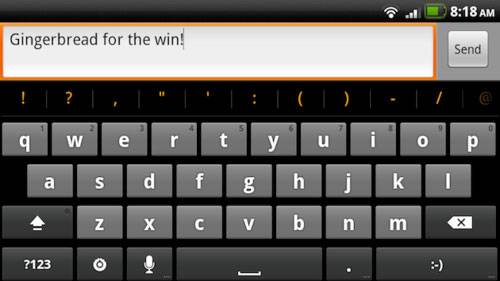
One of the cool new features that was added to Android with the official debut of Gingerbread yesterday was the new keyboard. If you want that new keyboard and have an Android 2.2 device that has been rooted, you can install it right now.

What you have to do is follow a few steps to get the deed done. You have to grab a zip file that is flashed to the smartphone just like any other ROM or software. You will then need to reboot and select the Android keyboard option under input method and you are ready to use the new keyboard.

The directions are on Droid-Life and should work with all rooted 2.2 devices. If you have been looking for a compelling reason to root your device, this may be it.


Share
  • Samsung Galaxy Note 3 with Android 4.3 spotted in benchmark results
  • Verizon HTC One running Android 4.2.2 could be coming soon
  • Verizon HTC One tipped for CTIA event unveiling

Tags: Gingerbreadhackskeyboard

  • http://walkman-mobiles.blogspot.com Latest Mobiles

    So where can I download that zip files..

  • bryce

    idoits, thats just the stock samsung keypad, not the stock android, this is on all galaxy s phones.. -.- hold text box, input options, and take a look for yourself.

  • viking

    Bryce you ignorant slut. That is not the Samsung keyboard. The Samsung keyboard looks just like swype.

  • Baxter

    I was going to try this out but I didn’t want to root my phone just for a keyboard. Ontop of that Samsung still hasn’t updated my freaking phone to Froyo so I’m stuck with Eclair, aka 2.1.

    But, I found some instructions and an actual APK that should work whether you are rooted or not, here it is:

    http://www.groovypost.com/howto/how-to/how-to-install-the-android-gingerbread-keyboard-on-a-froyo-or-eclair-device/

    It was actually developed by XDA, but the xda site didn’t tell you anything about it so it was kinda lame.

  • Ajones7456

    i use Better Keyboard….in all actuality its literally “better” than any physical keyboard on the market. this keyboard is still a massive step behind

  • Ajones7456

    i use Better Keyboard….in all actuality its literally “better” than any physical keyboard on the market. this keyboard is still a massive step behind

  • http://www.facebook.com/EVOlition7 Anthony Jones

    unless of course the keyboard becomes skinnable…then i may switch but i highly doubt it

  • Search

  • REVIEWS

    • AT&T LG Optimus G Pro ReviewAT&T LG Optimus G Pro Review
    • Iron Man 3 game Review: what you need to knowIron Man 3 game Review: what you need to know
    • Samsung GALAXY S 4 ReviewSamsung GALAXY S 4 Review
    • Samsung Galaxy Note 8.0 ReviewSamsung Galaxy Note 8.0 Review
    • Pebble review: Two weeks with a smartwatchPebble review: Two weeks with a smartwatch
  • HANDS-ON & QUICK LOOKS

    • Coolpad Quattro II 4G and 8920 hands-onCoolpad Quattro II 4G and 8920 hands-on
    • Kyocera Hydro XTRM and EDGE hands-onKyocera Hydro XTRM and EDGE hands-on
    • Opera for Android exits beta, we go hands onOpera for Android exits beta, we go hands on


  • T-Mobile G1 Accessories
  • RECENT COMMENTS

  • About
  • Contact
  • Terms of Use
  • Privacy Policy
  • Advertise

Copyright 2013 Android Community





