

If you’ve been using the Results Workout app introduced by Runtastic a couple of years ago, then you’ve probably been intensely trying to achieve your 12-week fitness goal (or so you hope). But for times when you’re either traveling and away from your normal fitness routine, you might want to have an easier workout while still trying to stick as close as possible to your original goal. The app now has a new Workout Creator feature which lets you customize a time-based routine and choose which muscle groups you want to work out.
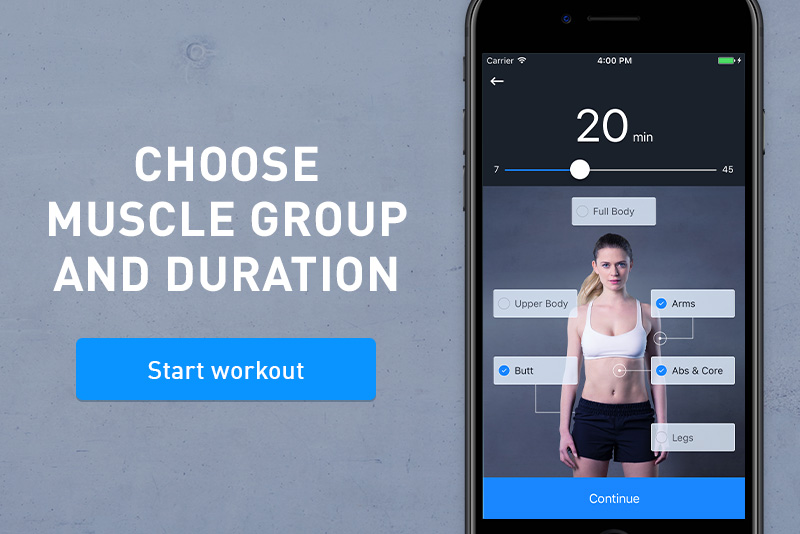
The Workout Creator option can be found on the drawer of your Results Workout app and once you’re there, you can create that workout you will need while you’re away. You can choose from the targeted muscle groups: Upper Body, Arms, Abs & Core, Legs, Butt, or Full Body. You can then select the exact time you want to workout, from 7 minutes to 45 minutes. You can also select more than one category in case you want a tougher workout. Press Continue and then you can start your routine.
You can also use the Workout Creator on your own regularly or in between the set workouts on your 12-week Training Plan. You can also use it as a quick workout after you run, in case you’re really a glutton for punishment. It can serve as a form of cross-training as support for the main activity that you’re doing. Just like all the Results workouts, the routines are bodyweight excercises.
To be able to access the Workout Creator, you need to update your Runtastic Results app. If you don’t have the latter yet, you can download it for free from the Google Play Store.
SOURCE: Runtastic







