

At one point in time, you probably have had that time when you were just about ready to post something on Instagram, and then you realized you don’t want to just yet, but later on, you probably will? But then you’d have to delete the post, and then do it all over again when you feel like finally posting it. Well the photo-sharing app would like to make your life a little bit easier but letting you save that post as a draft.
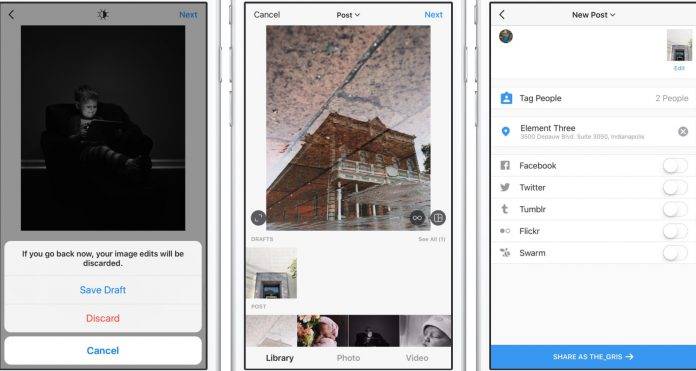
This update has not yet rolled out to everyone but for those who already have the version 9.4 of Instagram, you will be able to save posts as drafts already. The way to do it is of course to create a post first. Do it your usual way, by taking or uploading a photo or video, adding filters (or #nofilter), effects, captions, and even your locations. But after you’ve done all that, instead of proceeding to the post step, you go back to the filtering and editing step, press the back arrow, and then choose “Save Draft” at the bottom of the screen.
Now if you’re ready to post your draft, click on the camera icon and go to the Library part. You’ll see a section at the bottom of the screen called Draft and that is where your saved future posts are. The only condition for you to be able to save the post as draft is that you need to edit the post, tag people, or add a caption and location.
As we said, the update hasn’t rolled out yet to all Instagram users, so just wait for it to get to you. In the meantime, you’d have to settle for uploading and editing and captioning your posts all over again in case you change your mind.







