

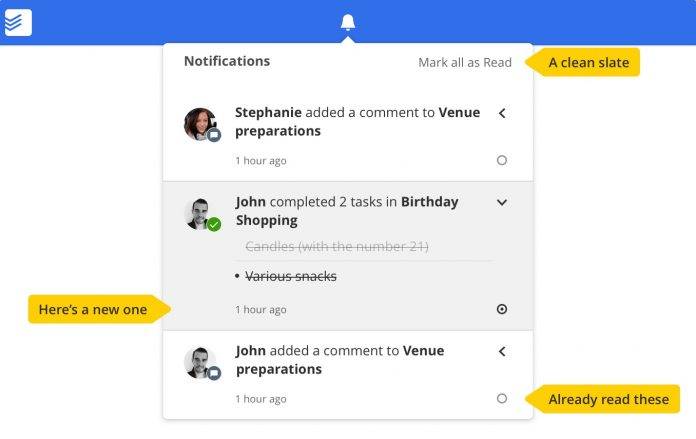
The big announcement last week from some people’s favorite to do list app was that it finally has integration with Google Calendar, which a lot of people have been waiting for. Now the latest update to Todoist is not as major of course, but it also is pretty useful especially if you receive and manage a lot of notifications particularly for shared projects. You will now have a revamped notification tracking system which should make it easier for you to mark things as read as needed.
Previously (or as they referred to it, the “dark ages”), a notification will be mark as read as soon as you opened it from your notifications drawer. That seems okay if you just receive one notification at a time and you can immediately act on it. But if you’re collaborating on several projects with several people, it’s not helpful and useful at all, since you may miss out on an crucial comment or an important update from another member.
Now when you open your notification drawer, you can mark as read individual items only when you’ve actually read through them. You will see a small circle next to each, and if you’ve read it or you’ve dealt with it, you can manually mark it as read. Or if you want to respond or read more about it, just click through it. You can also mark everything as read in one go by clicking the “Mark all as read” option. And if you want to “unread” something, just click on the circle again.
You can update your Todoist app from its Google Play page to enjoy this new way of looking at and marking your notifications. If it’s not there yet, just wait a little bit as they’re still rolling out the update.
SOURCE: Todoist







