

• Home
  • Reviews
  • Featured
  • Archives
  • Videos
  • Devices
  • Tegra
  • Send Tips
  • Contact
  • AndroidCommunity on Twitter AndroidCommunity on Facebook AndroidCommunity on Google+ AndroidCommunity RSS Feed

Android Community

    • MUST READ

      STORIES

    • Chrome Beta updated with Translation bar and fullscreen tablet support

      May 23, 2013

    • HTC One ‘Senseless Edition’ could arrive this summer

      May 23, 2013

    • HTC One sales are strong as it passes 5 million mark

      May 23, 2013

  • Trending Topics
  • Jelly Bean
  • NVIDIA
  • Galaxy S 4
  • HTC One
  • Nexus 7
  • Sell Your Used Phone

Wil Wheaton Recovery tool simplifies the HTC One root process

0
  • By Robert Nelson
  • on 2 May, 2013

Wil Wheaton Recovery tool simplifies the HTC One root process

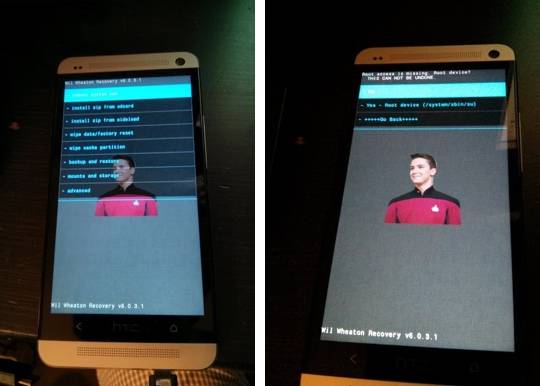
Wil Wheaton recently took to his Google+ page looking for anyone that had successfully rooted the HTC One. As it turns out, Wheaton was able to unlock the bootloader, but he could not get it to mount any partitions when he booted into recovery. As per his words, this process had him “about to scream.” Anyway, it seems that his pain and suffering has actually lead to a new tool that should help others through the HTC One rooting process.

wil-wheaton-recovery

That tool is coming by way of Koush, who has taken to his Google+ page to announce the Wil Wheaton Recovery tool. Koush has said “tough bootloaders call for an even tougher recovery” and as a result, we now have the Wil Wheaton Recovery tool that will “offer to root your device if root access is missing.” This is said to be a limited edition item and will work with AT&T and T-Mobile branded handsets.

The process begins with the user flashing the Wil Wheaton Recovery tool with fastboot. And as always, if this makes little or no sense, you either need to do a bit of research or simply skip the rooting process. That warning out of the way, after flashing you will boot recovery and then reboot back to Android once in the recovery menu.

This is where this tool makes it easy. Before the recovery actually exits, it will prompt you to install root. After this, once you are rooted you fire up your device, launch the Google Play Store and download (install and run) the Superuser app which will then complete the rooting process. Basically, thanks to Wil Wheaton having some issues, the HTC One root process has been simplified for all.

[via Google+ Koushik Dutta]

Story Timeline

  • AT&T HTC One LTE Review
  • HTC One vs GALAXY S 4: launch time in the USA
  • HTC One developer ROM available for download in the US
  • HTC One battery case released by mophie
  • HTC One trade-in program extended through mid-May
Share
  • Samsung Galaxy Note 3 with Android 4.3 spotted in benchmark results
  • Verizon HTC One "will be announced later"
  • Verizon HTC One tipped for CTIA event unveiling

Tags: AndroidGooglehtchtc oneKoushroot

  • Search

  • REVIEWS

    • AT&T LG Optimus G Pro ReviewAT&T LG Optimus G Pro Review
    • Iron Man 3 game Review: what you need to knowIron Man 3 game Review: what you need to know
    • Samsung GALAXY S 4 ReviewSamsung GALAXY S 4 Review
    • Samsung Galaxy Note 8.0 ReviewSamsung Galaxy Note 8.0 Review
    • Pebble review: Two weeks with a smartwatchPebble review: Two weeks with a smartwatch
  • HANDS-ON & QUICK LOOKS

    • Coolpad Quattro II 4G and 8920 hands-onCoolpad Quattro II 4G and 8920 hands-on
    • Kyocera Hydro XTRM and EDGE hands-onKyocera Hydro XTRM and EDGE hands-on
    • Opera for Android exits beta, we go hands onOpera for Android exits beta, we go hands on


  • T-Mobile G1 Accessories
  • RECENT COMMENTS

  • About
  • Contact
  • Terms of Use
  • Privacy Policy
  • Advertise

Copyright 2013 Android Community






