

• Home
  • Reviews
  • Featured
  • Archives
  • Videos
  • Devices
  • Tegra
  • Send Tips
  • Contact
  • AndroidCommunity on Twitter AndroidCommunity on Facebook AndroidCommunity on Google+ AndroidCommunity RSS Feed

Android Community

    • MUST READ

      STORIES

    • Otterbox Defender and Commuter GALAXY S 4 case hands-on

      May 20, 2013

    • Verizon HTC One reality returns as DROID DNA offer pops up

      May 20, 2013

    • Student wins science fair with 30-second phone battery charger

      May 20, 2013

  • Trending Topics
  • Jelly Bean
  • NVIDIA
  • Galaxy S 4
  • HTC One
  • Nexus 7
  • Sell Your Used Phone

Verizon Galaxy Note II bootloader gets unlocked, bring on the CM10.1

0
  • By Cory Gunther
  • on 12 Dec, 2012

Verizon Galaxy Note II bootloader gets unlocked, bring on the CM10.1

Hmm. That certainly didn’t take very long now did it? For all those owners of Verizon’s Samsung Galaxy Note II we have some good news in the form of an unlocked bootloader. In their usual fashion, the folks from XDA Developers have came up with a little solution to our Verizon problems. Read on for more details and the quick video for your viewing pleasure.

Verizon‘s Samsung Galaxy Note II has been cracked open, literally, and now the giant phone can be hacked, tweaked, and more. Hopefully some awesome custom ROM’s in the form of my personal favorites arrive soon. Those being CM10 and AOKP. There’s still plenty of work that needs to be done but this is the first step.

The method isn’t as easy as we’d hoped for, but it’s available now step-by-step for those worried. As usual, this is something you’ll surely want to do with caution and proceed at your own risk. If you’ve been patiently waiting for the bootloader to be unlocked however, we have a feeling you already know your way around ADB and a few other tricks for enjoying custom ROMs.

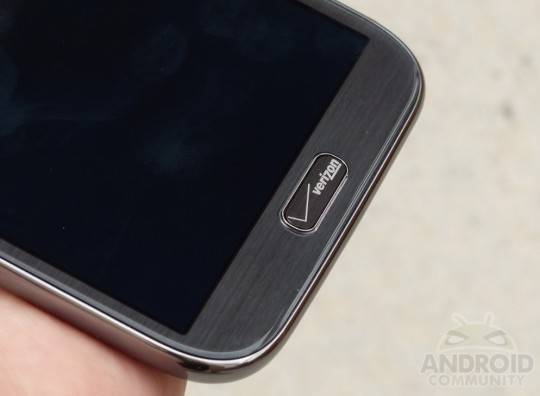
So, if you’re comfortable with the fact that something could potentially go wrong but would love to hack into that shiny new 5.5-inch phablet from Verizon, go right ahead. Download the files from XDA, jump through a few hoops, and you’ll be good in no time. Once you’ve completed all of this and flash a custom ROM that’s bloatware free, your next step will be paint thinner to remove that logo front and center. Have fun folks!

Story Timeline

  • Samsung Galaxy Note II passes five million in global sales
  • Galaxy Note II launches on Verizon Wireless with LTE
  • Verizon Galaxy Note II hands-on and unboxing
  • Verizon Galaxy Note II vs HTC DROID DNA
  • Android 4.1.2 Jelly Bean leaks for Galaxy Note II LTE
[device id=3362] [via XDA]
Share
  • Student wins science fair with 30-second phone battery charger
  • Hisense Sero 7 Pro with Tegra 3, Android 4.2 takes on Google's Nexus 7
  • Verizon HTC One reality returns as DROID DNA offer pops up

Tags: AndroidbootloaderGalaxy Note IIphabletSamsung Galaxy Note IIsmartphoneVerizonxda

  • Search

  • REVIEWS

    • AT&T LG Optimus G Pro ReviewAT&T LG Optimus G Pro Review
    • Iron Man 3 game Review: what you need to knowIron Man 3 game Review: what you need to know
    • Samsung GALAXY S 4 ReviewSamsung GALAXY S 4 Review
    • Samsung Galaxy Note 8.0 ReviewSamsung Galaxy Note 8.0 Review
    • Pebble review: Two weeks with a smartwatchPebble review: Two weeks with a smartwatch
  • HANDS-ON & QUICK LOOKS

    • Google+ Hangouts app goes live, we go hands-onGoogle+ Hangouts app goes live, we go hands-on
    • Flipboard magazines arrive with v2.0 update, we go hands-onFlipboard magazines arrive with v2.0 update, we go hands-on
    • Lenovo IdeaCentre Horizon hands-on with BlueStacks for Android gamingLenovo IdeaCentre Horizon hands-on with BlueStacks for Android gaming


  • T-Mobile G1 Accessories
  • RECENT COMMENTS

  • About
  • Contact
  • Terms of Use
  • Privacy Policy
  • Advertise

Copyright 2013 Android Community







