

• Home
  • Reviews
  • Featured
  • Archives
  • Videos
  • Devices
  • Tegra
  • Send Tips
  • Contact
  • AndroidCommunity on Twitter AndroidCommunity on Facebook AndroidCommunity on Google+ AndroidCommunity RSS Feed

Android Community

    • MUST READ

      STORIES

    • Google+ Android app update adding new Photos experience

      May 20, 2013

    • GALAXY S 4 Active images leak showing a ruggedized red device

      May 20, 2013

    • T-Mobile choosing ISIS over Google Wallet

      May 20, 2013

  • Trending Topics
  • Jelly Bean
  • NVIDIA
  • Galaxy S 4
  • HTC One
  • Nexus 7
  • Sell Your Used Phone

Verizon Galaxy Camera update brings remote view finder and new modes

0
  • By Robert Nelson
  • on 15 Apr, 2013

Verizon Galaxy Camera update brings remote view finder and new modes

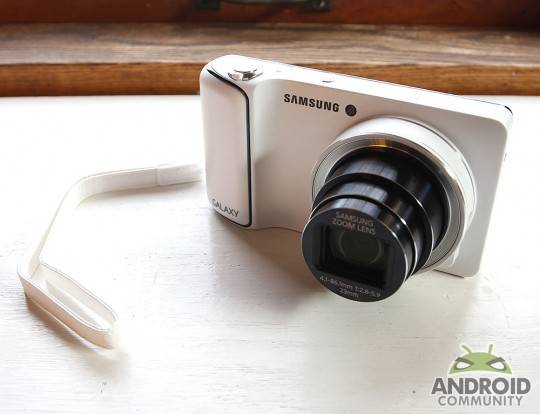
Those carrying a Verizon Wireless branded Galaxy Camera may want to be on the lookout for an update. Basically, Verizon Wireless has announced and will soon begin rolling out the update which contains some new features and modes as well as some smaller improvements. The update will be coming over-the-air and will measure in at a rather large 179.8MB in size.

IMG_7537-540x4141

Beginning first with the new features and modes and we are talking about a Remote View Finder and Smart Modes. The remote view finder app is just as the name would imply, it will allow you to use another device as the view finder for your Galaxy Camera. The compatible devices include those in the Galaxy S and Galaxy Tab series as well as the iPhone. The view finder connects using a Wi-Fi connection.

Shifting over to the modes and we have four new additions. These new additions include Dawn, Party Indoor, Snow and Food. All in all, Galaxy Camera users now have a total of nineteen modes to choose from when shooting. With the new goodies taken care of, lets get into those improvements. In this case they deal with S Memo and the Help app.

The S Memo update notes that users will now be able to create a record with photos that have already been taken. The Help app does just what one would hope — it gives the user the ability to read up on the functions, main apps and features that are available for use. Otherwise, this update is arriving as software version JZO54K.GC120VRAMC4 and those with a camera in hand can navigate to Menu -> Settings -> About device -> System updates to try and get the process started.

[via Verizon Wireless]

Story Timeline

  • Samsung Galaxy Camera heads to Verizon with 4G LTE
  • Verizon confirms Samsung Galaxy Camera with LTE hits December 13
  • Samsung Galaxy Camera available at Verizon now
  • Samsung posts Galaxy Camera ad starring James Franco
  • Samsung Galaxy Camera gets updated to Android 4.1.2 Jelly Bean
  • Samsung announced a Wi-Fi only Galaxy Camera
  • Samsung Galaxy Camera WiFi model hits the streets for $449
[device id=3893]
Share
  • Hisense Sero 7 Pro with Tegra 3, Android 4.2 takes on Google's Nexus 7
  • Google H840 media streamer hits the FCC to replace the Nexus Q
  • New Nexus 7 outed in Google Hangouts video

Tags: AndroidcameraGoogleSamsungSamsung Galaxy CameraVerizonverizon wireless

  • Search

  • REVIEWS

    • AT&T LG Optimus G Pro ReviewAT&T LG Optimus G Pro Review
    • Iron Man 3 game Review: what you need to knowIron Man 3 game Review: what you need to know
    • Samsung GALAXY S 4 ReviewSamsung GALAXY S 4 Review
    • Samsung Galaxy Note 8.0 ReviewSamsung Galaxy Note 8.0 Review
    • Pebble review: Two weeks with a smartwatchPebble review: Two weeks with a smartwatch
  • HANDS-ON & QUICK LOOKS

    • Google+ Hangouts app goes live, we go hands-onGoogle+ Hangouts app goes live, we go hands-on
    • Flipboard magazines arrive with v2.0 update, we go hands-onFlipboard magazines arrive with v2.0 update, we go hands-on
    • Lenovo IdeaCentre Horizon hands-on with BlueStacks for Android gamingLenovo IdeaCentre Horizon hands-on with BlueStacks for Android gaming


  • T-Mobile G1 Accessories
  • RECENT COMMENTS

  • About
  • Contact
  • Terms of Use
  • Privacy Policy
  • Advertise

Copyright 2013 Android Community







