

• Home
  • Reviews
  • Featured
  • Archives
  • Videos
  • Devices
  • Tegra
  • Send Tips
  • Contact
  • AndroidCommunity on Twitter AndroidCommunity on Facebook AndroidCommunity on Google+ AndroidCommunity RSS Feed

Android Community

    • MUST READ

      STORIES

    • Hisense Sero 7 Pro with Tegra 3, Android 4.2 takes on Google’s Nexus 7

      May 19, 2013

    • Google H840 media streamer hits the FCC to replace the Nexus Q

      May 18, 2013

    • Google+ Hangouts app update adds tablet support

      May 17, 2013

  • Trending Topics
  • Jelly Bean
  • NVIDIA
  • Galaxy S 4
  • HTC One
  • Nexus 7
  • Sell Your Used Phone

US Cellular Galaxy Note II software update brings multi-window support

0
  • By Robert Nelson
  • on 31 Dec, 2012

US Cellular Galaxy Note II software update brings multi-window support

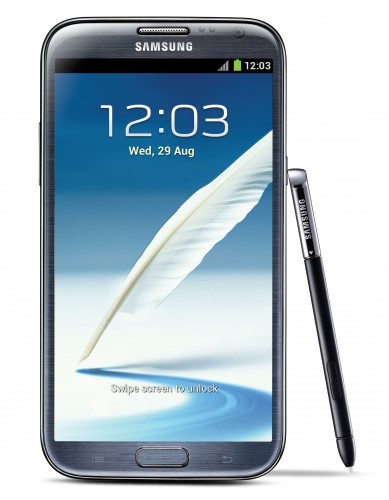
AT&T rolled-out the multi-window update for the Galaxy Note II a short while back, and well, as of today we have word of that update coming available with another carrier. The latest is US Cellular and nicely done on their part, the update includes more than just support for running multiple windows.

us_cellular_galaxy_note_ii-389x500

First things first though, this update arrives as Android 4.1.2 with baseband version R950VXALL1. The update brings the previously mentioned support for multi-window as well as some pre-loaded apps, some UI changes and some fixes. Beginning with the UI changes and US Cellular notes that these will deal with a color change (from gray to green) on the sound icon (4th position) and a change in menu items. The menu saw the term Sync being replaced by Multi-Window.

Some of the fixes included where users could not search for image files using the “Search” option in the My Files app, where the device would sometimes toggle between 3G and 1X and for burst mode. The change dealing with burst mode should take care of those times when you used burst mode only to enter the gallery to see black images.

Finally, those pre-loaded apps include more than a handful from Amazon as well as Wi-Fi Now, Slacker Radio, Let’s Golf 3, Mobi TV and a few others. That all being said, those rocking a Galaxy Note II with US Cellular should look for the update notification or grab your device and navigate to Menu -> About device -> Software Update to get the process started.

Story Timeline

  • Verizon Galaxy Note II hands-on and unboxing
  • Verizon Galaxy Note II vs HTC DROID DNA
  • Samsung Galaxy Note II promo shows how office workers will use multi-window
  • AT&T Galaxy Note II multi-window update now rolling out
  • Samsung reportedly plotting black Galaxy Note II
  • Samsung Galaxy Note II shipments top 1 million in South Korea
[device id=3362] [via AndroidPolice]

Share
  • New Nexus 7 outed in Google Hangouts video
  • Google H840 media streamer hits the FCC to replace the Nexus Q
  • Samsung says it will look into compacting Galaxy S 4 software bloat

Tags: AndroidGalaxy Note IIGoogleSamsungus cellular

  • Search

  • REVIEWS

    • AT&T LG Optimus G Pro ReviewAT&T LG Optimus G Pro Review
    • Iron Man 3 game Review: what you need to knowIron Man 3 game Review: what you need to know
    • Samsung GALAXY S 4 ReviewSamsung GALAXY S 4 Review
    • Samsung Galaxy Note 8.0 ReviewSamsung Galaxy Note 8.0 Review
    • Pebble review: Two weeks with a smartwatchPebble review: Two weeks with a smartwatch
  • HANDS-ON & QUICK LOOKS

    • Google+ Hangouts app goes live, we go hands-onGoogle+ Hangouts app goes live, we go hands-on
    • Flipboard magazines arrive with v2.0 update, we go hands-onFlipboard magazines arrive with v2.0 update, we go hands-on
    • Lenovo IdeaCentre Horizon hands-on with BlueStacks for Android gamingLenovo IdeaCentre Horizon hands-on with BlueStacks for Android gaming


  • T-Mobile G1 Accessories
  • RECENT COMMENTS

  • About
  • Contact
  • Terms of Use
  • Privacy Policy
  • Advertise

Copyright 2013 Android Community






