

• Home
  • Reviews
  • Featured
  • Archives
  • Videos
  • Devices
  • Send Tips
  • Contact
  • AndroidCommunity on Twitter AndroidCommunity on Facebook AndroidCommunity on Google+ AndroidCommunity RSS Feed

Android Community

    • MUST READ

      STORIES

    • Android 5.0 ‘Key Lime Pie’ Concept Design has us dreaming for the future

      June 18, 2013

    • Huawei Ascend P6 official as world’s thinnest smartphone

      June 18, 2013

    • Kazam created by ex-HTC execs, aimed for European market

      June 17, 2013

  • Trending Topics
  • Jelly Bean
  • NVIDIA
  • Galaxy S 4
  • HTC One
  • Nexus 7
  • Tegra
  • Sell Your Used Phone

Undelete Beta restores deleted files from your SD card, desktop style

0
  • By Michael Crider
  • on 23 Nov, 2011

Undelete Beta restores deleted files from your SD card, desktop style

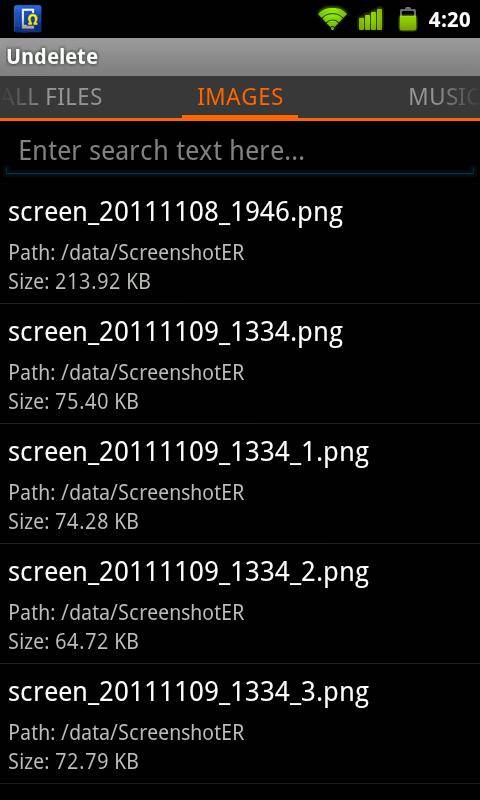
The Trash Can/Recycling Bin is one of the handiest features of desktop computer for those with the know-how to use it. Due to mobile phone’s Flash-based storage, similar functionality has been hard to duplicate – until now. Developer Fahrbot Mobile’s latest app Undelete Beta allows users to restore recently deleted files and folders from Android phones’ MicroSD card. The app requires root access, and is available for free in the Android Market.

File restore works something like this, on basically every platform. Imagine your hard drive/flash drive/storage card as a huge filing drawer. When you delete a file, it isn’t instantly removed – it’s more like the label on the filing folder is erased. While your computer or phone doesn’t have quick access to the file anymore, it remains physically there, usually until the same part of the storage drive is needed to hold something else. Most files can be restored in some fashion, at least until that part of the drive is written over again. (Note: I’m no computer scientist – feel free to offer better, more accurate analogies in the comments section.)

Undelete Beta brings the functionality you’re used to on desktop operating systems to Android. Results will vary – if you’re restoring a small file like a photo that you deleted five minutes ago, odds are pretty good that you can get it back. If you’re trying to restore a 100MB ROM file from last month, you may find that it’s gone for good. Still, it’s a pretty handy app to have in case of file emergencies. Root users should check it out in the Android Market.

[via Android Police]

Share
  • Google Now wallpapers in full-size available now for all
  • BlackBerry Messenger for Android coming June 27
  • Minuum Keyboard ready for beta testing - aims to change how we type

Tags: Android-Marketfree appmicroSDroot

  • Search

  • REVIEWS

    • Sony Xperia ZL ReviewSony Xperia ZL Review
    • GALAXY S 4 Tech21 Impact Mesh case reviewGALAXY S 4 Tech21 Impact Mesh case review
    • AT&T LG Optimus G Pro ReviewAT&T LG Optimus G Pro Review
    • Iron Man 3 game Review: what you need to knowIron Man 3 game Review: what you need to know
    • Samsung GALAXY S 4 ReviewSamsung GALAXY S 4 Review
  • HANDS-ON & QUICK LOOKS

    • Huawei Ascend P6 “Beauty Shot” hands-on demo shows smooth-skin oddityHuawei Ascend P6 “Beauty Shot” hands-on demo shows smooth-skin oddity
    • Huawei Ascend P6 hands-onHuawei Ascend P6 hands-on
    • Nyko Dock for NVIDIA SHIELD hands-onNyko Dock for NVIDIA SHIELD hands-on


  • T-Mobile G1 Accessories
  • RECENT COMMENTS

  • About
  • Contact
  • Terms of Use
  • Privacy Policy
  • Advertise

Copyright 2013 Android Community






