

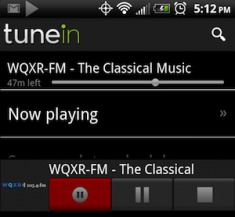
Who knows how long this will last, but RadioTime has released an update to it’s popular TuneIn Radio Pro for Android app which allows for recording of radio streams. Users can simply tap on the red record button and the app saves the stream as an .m4a file. There’s also a DVR function that allows users to pause and backup. Users can then play back the file through the TuneIn Radio app, upload it to DropBox, or even email it to a friend.
The app provides more than 50,000 radio streams of music, news, sports and talk radio. Users can enjoy radio from all over the world and even some satellite stations like Sirius 98. Local radio stations are also available. Audio quality is streamed between 32kbps and 128. And users can also save their favorite stations as presets and create a sleep timer or alarm to record automatically.
When I was kid, you could record broadcast radio and there was nothing anyone could due thanks to the Fair Use doctrine. Then along came the Digital Millennium Copyright Act. So with the music industry going after legal use of music via fair use on every front, how long can this feature really last? So get it while you can. The app is available at both the Amazon App Store and the Android Market for $0.99.
[via Androinica]








I am trying to figure out why, if I save audio stream files from TuneIn Radio Pro to my computer from my phone, that I am unable to play these audio files with any media player?
http://forums.toucharcade.com/showthread.php?t=78761
Gregg, thanks for the link, but as it says in toucharcade.com, there is no way (that anyone has discovered) to play TuneIn Radio Pro recordings using any program except the TuneIn Radio Pro app.
I’ve been banging my head against a wall trying to figure out the encryption the TuneIn Radio Pro 2.5 app is using so I can decrypt the files. Having to re-record using a 3.5mm cable is so dodgy. If anyone figures it out, hook us up!
Download V Radio Record or their lite version. Flawless mp3 recording!
Tunein recording works fine for me on the pc with mp3 format after it.
Required to play in VLC player first but can just reconvert the file with audacity for example.
🙂
I’ve tried this and the tunein recordings are either speeded up or slowed down I suspect randomly. No matter trying renaming as a wav or as mp3 I cannot get it to work!
Something happened some months ago with an update that encrypts or scrambles all new recordings. Are you running the latest version? All my files were playable until about December last year. I am going to try and record with the AAC+ disabled in the advanced options and see if mp3 is forced then.
Hey its playing with VLC player without doing any change
asasas
Agreed , after much research, TuneIn Radio Pro stores the files in a proprietary (probably encrypted) format that cannot be simply converted like other media files… But there is always hope for the determined.
No matter how good technology gets, it will never defeat physics and reality… If hi-tech can’t be done, there’s always lo-tech. I don’t advise anyone to do this and making note that I am discussing this purely as a plausable solution of turning recordings into MP3 regardless of any legal or moral implications, you could always…
Wire your audio jack to a PC/audio recording device with input and simply record it again. Yes, there’s quality loss, it will take time and it can be challenge to find a 3.5mm male to male cable, but if you have a song on one of your recordings that you really want to take, then you could go this way about it…
An alternative is my app zRadio on Google Play. It’s designed for one purpose only: easy scheduled recording and playback. The recordings are not converted to other format, only some lossless changes. So there is no quality lost in the conversion process.
Thanks to Disqus, which is probably the worst commenting software ever invented, I lost the comment I just wrote, so I’ll try again, but more briefly.
About 80 to 90 percent of the mp3 streams I record with Tunein Radio Pro can be played with VLC on my Mac just by adding the mp3 extension to the filename. The ones that can’t show up in VLC as having 00:00 duration and multiple dummy streams, none of which show a Bitrate or Sample rate. I haven’t figured out why some of the recordings come out like this while others recorded from the same source are OK, and I’ve checked a few times to make sure the files on the computer match the ones on the original device.
Any ideas, anybody?