

• Home
  • Reviews
  • Featured
  • Archives
  • Videos
  • Devices
  • Tegra
  • Send Tips
  • Contact
  • AndroidCommunity on Twitter AndroidCommunity on Facebook AndroidCommunity on Google+ AndroidCommunity RSS Feed

Android Community

    • MUST READ

      STORIES

    • ASUS Padfone Infinity rumors point towards a U.S. release

      May 22, 2013

    • Google invites #ifihadglass applicants to try Google Glass

      May 22, 2013

    • Google Play Magazines updated with card UI to match Google Music

      May 22, 2013

  • Trending Topics
  • Jelly Bean
  • NVIDIA
  • Galaxy S 4
  • HTC One
  • Nexus 7
  • Sell Your Used Phone

SwiftKey 3 updated with new themes, bug fixes, and Google Voice dictation

2
  • By Cory Gunther
  • on 15 Aug, 2012

SwiftKey 3 updated with new themes, bug fixes, and Google Voice dictation

SwiftKey is back today to offer their first update since officially launching their new and improved SwiftKey 3 keyboard for Android smartphones and tablets. SwiftKey 3 has just been updated to version 3.0.1 and brings with it tons of bug fixes, as well as two new languages, and two fun themes for summer. We have screenshots and all the details below.

SwiftKey 3 continues to be one of the best 3rd party keyboards for Android, and today they’ve improved it even more. They’ve finally replaced the voice actions with Google’s voice dictation, which should make just about everyone happy. Then for summer they’ve released two new color themes — although summer is almost over. Then they added two new languages. Adding both Malay and Urdu support, which brings the total to 44 languages.
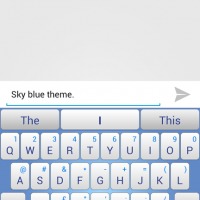
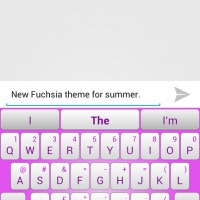
SwiftKey 3.0.1 - Fuchsia Theme
SwiftKey 3.0.1 - Sky Theme

Above you can see both of the new themes from the creators of SwiftKey. They aren’t anything extreme and are rather simple and elegant. I don’t think I’ll be hanging out with the pink option, but I could see many of my lady friends enjoying it. Colors and languages aren’t the only thing here though. SwiftKey has continued to make their keyboard one of the best by updating with bug fixes, here’s what to expect from today:

BUG FIXES
Fixed the following issues:
Font size and indentation inconsistencies in preference menus;
Font size too large on the sharable Heatmap;
GTalk smiley button has gone in JellyBean
Handle the case where languagePacks.json somehow gets set to “readonly”
Punctuation does not always auto correct
Reports of performance lag on some devices for some users;
Swedish localization problems for key height settings;
Theme list wrong after upgrade 2.2 -> 3.0;
Twitter personalization does not handle OAuthException gracefully;
When composing, after an auto-completing punctuation character, selecting the prediction inserts it twice.

As usual they state they’ve improve performance, general usage, and stability, but it’s the other things that are important. Now that SwiftKey 3 will use Google’s own voice dictation you can expect more accurate results too. SwiftKey just keeps getting better and better with each update. Are you a SK fan, or a Swype user? Get the latest update right this minute at the Google Play Store.


Story Timeline

  • SwiftKey X Keyboard updated with a spooky Halloween theme and bug fixes
  • SwiftKey X updates to v2.2 with multi-touch and resizing, we go hands-on
  • SwiftKey passes 5 million downloads, on sale this weekend only
  • SwiftKey 3 hits beta with new UI - We go hands-on
  • SwiftKey 3 beta update improves features based on user feedback
  • SwiftKey CMO and Community Manager speaks at CTIA
  • SwiftKey 3 leaves beta, hits Play Store on sale for $1.99
  • SwiftKey 3 update adds Jelly Bean and Nexus 7 compatibility
Share
  • Samsung Galaxy Note 3 with Android 4.3 spotted in benchmark results
  • Verizon HTC One running Android 4.2.2 could be coming soon
  • Verizon HTC One tipped for CTIA event unveiling

Tags: keyboardsmartphoneSwiftKeySwiftKey 3TabletUpdate

  • Trevor

    The update introduced a new bug that makes the keyboard entirely useless: Autocorrect does not function anymore.

  • Oscar

    More bugs, useless with polaris office

  • Search

  • REVIEWS

    • AT&T LG Optimus G Pro ReviewAT&T LG Optimus G Pro Review
    • Iron Man 3 game Review: what you need to knowIron Man 3 game Review: what you need to know
    • Samsung GALAXY S 4 ReviewSamsung GALAXY S 4 Review
    • Samsung Galaxy Note 8.0 ReviewSamsung Galaxy Note 8.0 Review
    • Pebble review: Two weeks with a smartwatchPebble review: Two weeks with a smartwatch
  • HANDS-ON & QUICK LOOKS

    • Coolpad Quattro II 4G and 8920 hands-onCoolpad Quattro II 4G and 8920 hands-on
    • Kyocera Hydro XTRM and EDGE hands-onKyocera Hydro XTRM and EDGE hands-on
    • Opera for Android exits beta, we go hands onOpera for Android exits beta, we go hands on


  • T-Mobile G1 Accessories
  • RECENT COMMENTS

  • About
  • Contact
  • Terms of Use
  • Privacy Policy
  • Advertise

Copyright 2013 Android Community





