

• Home
  • Reviews
  • Featured
  • Archives
  • Videos
  • Devices
  • Send Tips
  • Contact
  • AndroidCommunity on Twitter AndroidCommunity on Facebook AndroidCommunity on Google+ AndroidCommunity RSS Feed

Android Community

    • MUST READ

      STORIES

    • HTC Butterfly S official: UltraPixel Camera, BoomSound, 5-inch display

      June 19, 2013

    • Android 5.0 ‘Key Lime Pie’ Concept Design has us dreaming for the future

      June 18, 2013

    • Huawei Ascend P6 official as world’s thinnest smartphone

      June 18, 2013

  • Trending Topics
  • Jelly Bean
  • NVIDIA
  • Galaxy S 4
  • HTC One
  • Nexus 7
  • Tegra
  • Sell Your Used Phone

Real Colors generates palettes from your photos

0
  • By Michael Crider
  • on 14 May, 2012

Real Colors generates palettes from your photos

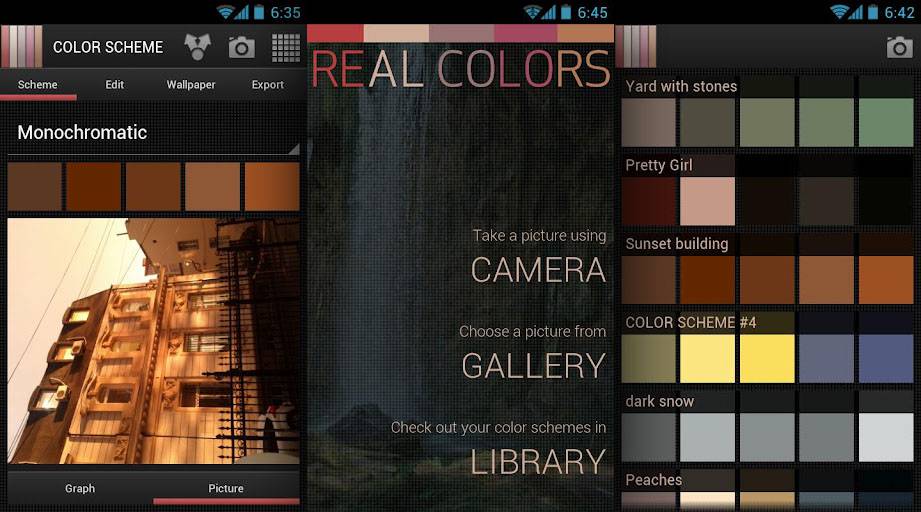
If you’re a graphic designer or a web developer, you know the importance of having a harmonious color scheme on your next project. There are plenty of programs, services and web apps that will generate an eye-pleasing palette for you, but they’re almost all drawing from pre-created sets of colors. Real Colors Pro is an Android app that’s well worth the consideration for any creative professional, not just because it moves this functionality to a stand-alone mobile app, but because it adds a few new bells and whistles as well.

Chief among these is the ability to automatically generate a color palette from a photo that you take with your phone. So if you’re out and about in New Orleans and you see a fetching mural for the Saints, you can snap a photo and get the distinctive gold/black/white color without having to hunt down a branding guide. It’s not just a gimmick, either: you can create palettes along the major divisions of color theory, complementary, monochromatic, analogous, shades, triad, tetrad and split complementary.

Other functions include exporting to RGB, HSB and HEX, not to mention swapping palettes with your friends on Facebook. Those just looking for some UI bling can adapt their palettes into Android wallpapers. The full version is a hefty $4.99 USD, but those who need professional tools probably won’t bat an eye. The Lite version is free, but does without the various theoretical variations and wallpaper.


Share
  • Android 5.0 'Key Lime Pie' Concept Design has us dreaming for the future
  • HTC One Mini headed to AT&T
  • Qualcomm Snapdragon 800 series quad-core benchmarks: This thing is fast

Tags: Android-AppsColorGoogle Play Store

  • Search

  • REVIEWS

    • Sony Xperia ZL ReviewSony Xperia ZL Review
    • GALAXY S 4 Tech21 Impact Mesh case reviewGALAXY S 4 Tech21 Impact Mesh case review
    • AT&T LG Optimus G Pro ReviewAT&T LG Optimus G Pro Review
    • Iron Man 3 game Review: what you need to knowIron Man 3 game Review: what you need to know
    • Samsung GALAXY S 4 ReviewSamsung GALAXY S 4 Review
  • HANDS-ON & QUICK LOOKS

    • Qualcomm Snapdragon 800 series developer platform first lookQualcomm Snapdragon 800 series developer platform first look
    • Huawei Ascend P6 “Beauty Shot” hands-on demo shows smooth-skin oddityHuawei Ascend P6 “Beauty Shot” hands-on demo shows smooth-skin oddity
    • Huawei Ascend P6 hands-onHuawei Ascend P6 hands-on


  • T-Mobile G1 Accessories
  • RECENT COMMENTS

  • About
  • Contact
  • Terms of Use
  • Privacy Policy
  • Advertise

Copyright 2013 Android Community





