• Home
  • Reviews
  • Featured
  • Archives
  • Videos
  • Devices
  • Tegra
  • Send Tips
  • Contact
  • AndroidCommunity on Twitter AndroidCommunity on Facebook AndroidCommunity on Google+ AndroidCommunity RSS Feed

Android Community

    • MUST READ

      STORIES

    • Intel-powered Galaxy Tab 3 leaked in benchmarks

      May 21, 2013

    • Samsung Galaxy Note 3 with Android 4.3 spotted in benchmark results

      May 21, 2013

    • Verizon HTC One running Android 4.2.2 could be coming soon

      May 21, 2013

  • Trending Topics
  • Jelly Bean
  • NVIDIA
  • Galaxy S 4
  • HTC One
  • Nexus 7
  • Sell Your Used Phone

OverSkreen breaks the Android browser out of its full-screen cage

2
  • By Michael Crider
  • on 5 Mar, 2012

OverSkreen breaks the Android browser out of its full-screen cage

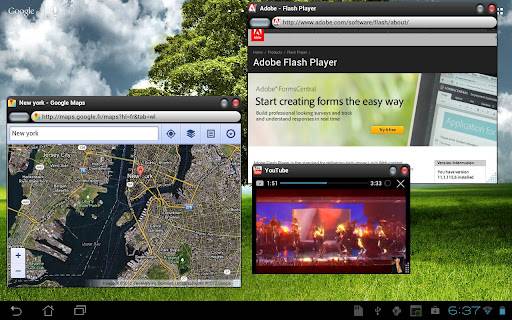
Mobile apps are full screen, because phones have small screens. That little bit of conventional wisdom drive a lot of app design… but since 7 and 10-inch tablets are now available in droves, not to mention some very large phones as well, perhaps it shouldn’t be. That’s the thinking behind the OverSkreen Browser, which breaks out the Android browser from the binds of full-screen oppression to roam all over your tablet screen, making friends with the apps running underneath it.

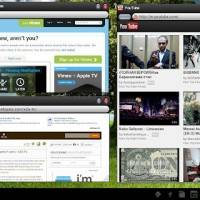
The idea is pretty simple: the app launches multiple browser windows (“instances” in Android speak) that can run independently and concurrently with just about any other app. The experience is not unlike using a standard web browser on a desktop, if not quite so refined. The app works with all versions of Android 2.2 and later, though obviously it’s better suited for Honeycomb and Ice Cream Sandwich tablets than smartphones. You can buy it for an introductory price of just $1.49, half off today only.

As you might have guessed, OverSkreen comes from the same people who made Stick It!, an Android video player along the same lines. Naturally, OverSkreen is a lot more useful: it can handle anything that the stock browser can (though Flash support is only for Honeycomb and Ice Cream Sandwich. This seems like the perfect compliment app if you plan to do some desktop-style docked browsing.
unnamed (1)
unnamed (2)
unnamed (3)


[via Redmond Pie]
Share
  • Student wins science fair with 30-second phone battery charger
  • Samsung Galaxy Note 3 with Android 4.3 spotted in benchmark results
  • Verizon HTC One reality returns as DROID DNA offer pops up

Tags: Android appAndroid BrowserAndroid-Market

  • http://pulse.yahoo.com/_H4SADEZ6GDNQ5INS3B4INQFVHM Trevor

    hmm.. still faster, more convenient, and practical to use windows/page switching with thumbnails of open page displayed – like Opera has… 

  • http://www.facebook.com/sameersingh17 Sameer Singh

    Eh, I prefer tabs. Chrome Beta is the way to go.

    http://www.tech-thoughts.net/ 

  • Search

  • REVIEWS

    • AT&T LG Optimus G Pro ReviewAT&T LG Optimus G Pro Review
    • Iron Man 3 game Review: what you need to knowIron Man 3 game Review: what you need to know
    • Samsung GALAXY S 4 ReviewSamsung GALAXY S 4 Review
    • Samsung Galaxy Note 8.0 ReviewSamsung Galaxy Note 8.0 Review
    • Pebble review: Two weeks with a smartwatchPebble review: Two weeks with a smartwatch
  • HANDS-ON & QUICK LOOKS

    • Opera for Android exits beta, we go hands onOpera for Android exits beta, we go hands on
    • NVIDIA Tegra 4i demos i500 LTE modem on Cat 4: 150Mbps of speedNVIDIA Tegra 4i demos i500 LTE modem on Cat 4: 150Mbps of speed
    • HP Slatebook x2 Tablet hands-onHP Slatebook x2 Tablet hands-on


  • T-Mobile G1 Accessories
  • RECENT COMMENTS

  • About
  • Contact
  • Terms of Use
  • Privacy Policy
  • Advertise

Copyright 2013 Android Community